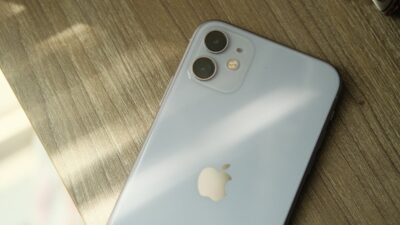
Many people search for the best free iPhone government phone on the internet, but most do not understand how to get it. The US government does not hand out iPhones. The Lifeline program helps eligible users get free and discounted smartphones plus free services from trusted providers. You can qualify through income rules or programs like Medicaid, SNAP, SSI, Section 8, or Tribal benefits.
Keep reading the guide below to compare providers, see available iPhone models, and learn how to apply in simple steps.
1. What is the Best Free iPhone Government Phone in 2025?
Many people search for the best free iPhone government phone, but the answer depends on how the Lifeline program works in your state.
1.1. How Free Government iPhone Programs Work
The Lifeline program is a federal program that lowers the cost of wireless service for low-income households. You receive a discount of up to $9.25 per month, and people on Tribal lands receive up to $34.25 per month.
Lifeline supports your monthly service. Providers use your monthly Lifeline subsidies to help you receive free services. Besides free services, you may get a free iPhone or a discounted newer iPhone.
1.2. Who Qualifies for the Best Free iPhone Government Phone?
You qualify for the best free iPhone government phone when you meet income rules or participate in certain programs.
1. Income Eligibility
Your household income must be 135% or below the Federal Poverty Guidelines.
2. Program Eligibility
You qualify if you or someone in your household uses:
- Medicaid
- SNAP
- SSI
- Federal Public Housing (Section 8)
- Veterans Pension
- Tribal TANF
- BIA General Assistance
- FDPIR
3. Documents You Need
When you start the registration process at the provider website, your documents will automatically be verified. But, in some cases, verification fails, you may need to upload:
- A valid photo ID
- A program approval letter or income document
- A document that shows your address

2. Which is the Best Free Lifeline iPhone Provider?
When they search for the best free iPhone government phone, many people compare Lifeline carriers based on several factors. There include:
- The availability of iPhone models
- Network coverage
- The range of monthly plan benefits
- Approval speed, customer support, and stock reliability.
These factors help you decide which provider fits your needs.
In most providers, Cintex Wireless is one of the approved Lifeline carriers operating in all of the US states. Eligible users may receive unlimited talk, text, calling, and free data plus a free/discounted iPhone through Cintex.
However, Cintex Wireless is merging with AirTalk Wireless, meaning most new applications now redirect to AirTalkWireless.com. The transition gives users access to a stronger 5G+ network, faster approval, and more iPhone options.
Because of the merger, most people complete their full application through AirTalk Wireless. AirTalk offers a broader device inventory and faster processing, making it one of the top choices for users searching for the best free iPhone government phone in the US.
AirTalk Wireless provides several advantages:
- Wider range of free iPhones (iPhone 6 to iPhone SE)
- Newer upgrade iPhone models available (iPhone 11–15) (including Pro/ProMax)
- Free monthly service with unlimited talk/text and data allowances
- Free SIM or eSIM, based on your needs
- Free international calling to more than 200 countries
- Real-time order tracking
- Fast approval, and free shipping after 3-7 days
3. How to Apply for the Best Free iPhone Government Phone
You can follow a simple process when you want to apply for the best free iPhone government phone.
Most Lifeline carriers use the similar steps, and we recommend choosing AirTalk Wireless as one of the largest and most popular benefit providers.
The guide below helps you complete your request quickly.
Step 1: Check Eligibility Through the National Verifier
Start by checking your eligibility on the National Verifier website.
You qualify through income rules or benefit programs such as Medicaid, SNAP, SSI, Section 8, or Tribal support programs. You must pass this step before you continue.
Step 2: Go to AirTalkWireless.com and Enter Your ZIP Code
Go to AirTalkWireless.com after you complete your eligibility check. Enter your ZIP code to see the plans and device options available in your area.
Note: If you apply through Cintex, you will automatically redirect the application process to AirTalk Wireless.
Step 3: Choose a Lifeline Plan
Select a Lifeline plan based on your state.
Note: Plan details change by ZIP code, but all options follow Lifeline rules.
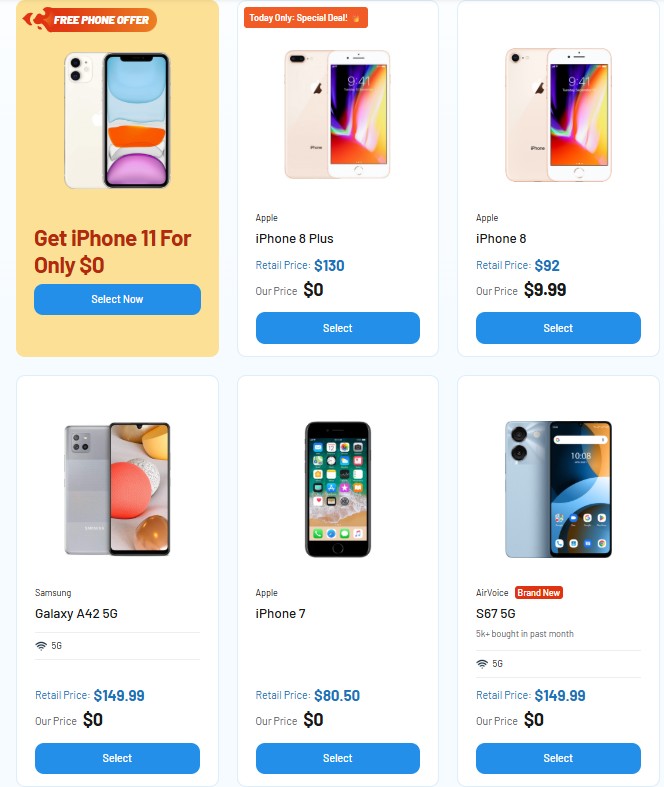
Step 4: View Available iPhone Models in Your Area
You will see a list of free and discounted iPhone plans after you select your plan.
| Free iPhone | Discounted iPhone |
| iPhone 6 iPhone 6s iPhone 6s plus iPhone 7 iPhone SE | iPhone 11 iPhone 12 iPhone 13 iPhone 14 iPhone 15 |
Note: The list and price may change based on each location.
You can check the full list of availability of iPhone models at the AirTalk Wireless Product
Step 5: Upload Documents (If Required)
Your documents will be verified automatically.
If the system cannot verify your details, you must upload documents.
You may need:
- A valid photo ID
- A benefit letter or income document
- A document that shows your address
Note: Use clear photos. Avoid cropped files and expired letters.
Step 6: Submit Your Application
Submit your application once you finish uploading your details.
Most users receive approval within minutes because AirTalk uses fast online verification.
Step 7: Receive Your Device Through Free Shipping
AirTalk ships your SIM card or smartphone for free. Most devices arrive within 3-7 business days, depending on your location and stock.
4. FAQs
Q1. Are free government iPhones really $0?
Yes. Free government iPhones are $0 when you qualify for Lifeline and your ZIP code shows an eligible model in stock. Lifeline covers your monthly service discount, and the provider may offer a promotional iPhone at no cost. You only pay if you choose an optional upgrade. Free models often include refurbished iPhones such as the iPhone SE, iPhone 7, or iPhone 8.
Q2. Why was I redirected to AirTalk Wireless when applying through Cintex?
You are redirected because Cintex Wireless is merging with AirTalk Wireless. Most new applications now move to AirTalk Wireless for faster approval, stronger 5G+ coverage, and more iPhone options. The merge also gives users access to a larger device inventory and a smoother online process.
This is the current application path for anyone applying for the best free government iPhone through Cintex.
Q3. Can seniors or veterans get a free iPhone?
Yes. Seniors and veterans can qualify for a best free government iPhone if they meet Lifeline rules. Many seniors qualify through Medicaid, SSI, or low income. Veterans may qualify through the Veterans Pension program. The application steps are the same for all eligible users: check eligibility, enter your ZIP code, upload documents if needed, and submit your online form.
>>> Seniors and veterans can find more: How To Get Free Cell Phone Service For Veterans
Final Words
You can find the best free iPhone government phone when you qualify for Lifeline and apply through a trusted provider. The process is straightforward, and most users complete the online form within a few minutes. You only need your ID, proof of benefits, and a valid address document. You can check your ZIP code, view current iPhone options, and start your application through the links in the guide.
The right provider gives you a free service plan, reliable coverage, and access to the best available iPhone in your area.