Many people search for how to get a free iPhone from the government, but most offers online can confuse you. You may not know which options are real or how the process works.
In this guide, you’ll find the best free government iPhone program with clear steps, real rules, and the fastest way to apply. Keep reading.
1. Can You Get a Free iPhone From the Government?
Yes. You can get a free government iPhone through Lifeline, which is the national phone assistance program for low-income households.
The Lifeline program gives a monthly discount on your phone service. Providers partner with the program to offer free service and promotional smartphones, including free iPhone deals.
Lifeline gives you:
- Up to $9.25/month toward your phone service
- Up to $34.25/month if you live on Tribal land
These discounts lower your bill and allow approved providers to offer:
- Free monthly talk, text, and data
- Free SIM or eSIM
- Free shipping
- Free smartphones or low-cost iPhone upgrades
Lifeline works in every U.S. state. You only need to meet the eligibility rules and apply through a trusted provider. The process is simple, and many users receive approval in minutes.
If you qualify, you can start your service right away and receive your free iPhone or activate your eSIM with no fees.
2. Eligibility Rules to Get a Free Government Phone Today
You can get a free government phone today if you qualify for the Lifeline program. Lifeline uses two main eligibility paths: income-based and program-based. You only need to meet one of them.
1. Income Eligibility
You qualify based on income if your household income is at or below 135% of the Federal Poverty Guidelines (FPG).
This rule applies nationwide.
2. Program Eligibility
You also qualify if you currently receive benefits from one of these programs:
- Medicaid
- SNAP / EBT
- SSI
- Federal Public Housing (Section 8)
- Veterans Pension or Survivors Pension
- Tribal programs, including: Tribal TANF, BIA General Assistance, FDPIR
If you live on Tribal land, you may receive a higher monthly benefit.
3. Documents for Approval (If Required)
Most users do not need to upload documents because the system automatically verifies eligibility based on government records. However, you should prepare the following documents in case manual verification is needed:
- Government-issued ID (State ID, driver’s license, Tribal ID, passport)
- Benefit approval letter (Medicaid, SNAP, SSI, or other qualifying program)
- Proof of address (Utility bill, lease, or official letter)
4. Tips to Avoid Delays
Use these simple steps to prevent rejections:
- Upload clear, bright, readable photos
- Make sure your name matches exactly across all documents
- Avoid expired benefit letters
- Avoid cropped images or shadowed corners
Following these steps helps you move through approval faster and start your free service sooner.
3. Where Can I Get a Free Government Phone Today?
Many people want to get free iPhone from government, and the easiest way is through approved Lifeline providers. When comparing each provider, most customers focus on a few key points:
- Fast approval
- A stable 5G network
- Reliable service
- iPhone stock or upgrade options
- An easy online application
3.1. Find the Top Lifeline Provider
Cintex Wireless and AirTalk Wireless both participate in the Lifeline program and offer free monthly service, along with promotional smartphones, to eligible users
However, Cintex is merging with AirTalk Wireless.
Applications may redirect to AirTalkWireless.com, where customers can access stronger 5G+ coverage, a wider range of iPhone options, and faster approval.
3.2. What You Actually Receive Through AirTalk Wireless
AirTalk Wireless often provides some of the strongest options for users who want free service or affordable iPhone upgrades.
Here is what you may receive, depending on your state and ZIP code:
- Free monthly mobile service, including talk, text, and data
Note: Data amounts may change based on future federal or state updates. - Free smartphones when stock is available
- Large discount for newer 5G smartphones, including models from iPhone 11 to iPhone 15
- Free eSIM activation for free plans or BYOP users
- Access to many free and newer tablet options
- Simple online application with fast verification
- Free shipping in most areas (typically 3–7 days)
- No activation fees
- Real-time order tracking
- Free calls to 200+ countries and territories
These features help users start their free service quickly and safely.
4. How to Apply and Get a Free iPhone From the Government
You can apply for a free phone through Lifeline in a few simple steps. Follow the guide below to complete your application safely and quickly.
Step 1 – Confirm Your Eligibility Through the National Verifier
Go to the National Verifier website and check your qualification status. The system reviews your income or program information. Some users are approved instantly if the database matches their records.
Step 2 – Visit AirTalkWireless.com and Enter Your ZIP Code
Type your ZIP code into the website. Your ZIP code decides which Lifeline plans and iPhone models are available in your area.
Step 3 – Select Your Lifeline Plan
Choose the Lifeline plan that fits your needs. Plans include free talk, text, and data. Data amounts depend on your state or area.
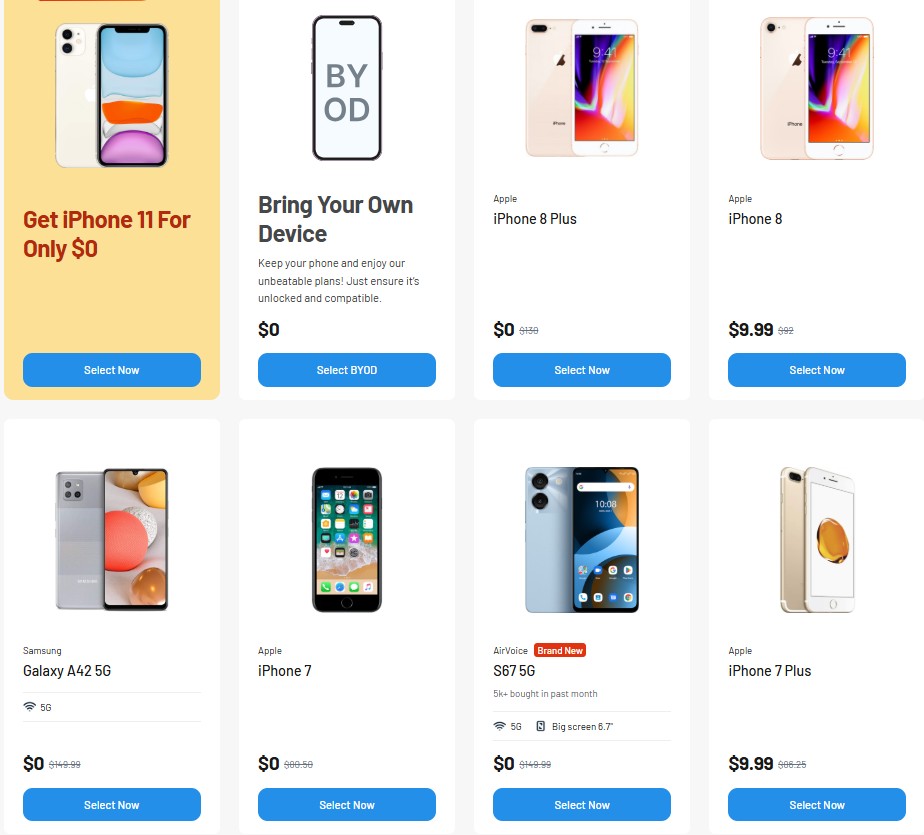
Step 4 – Choose a Free or Discounted iPhone
You may see free or discounted iPhones depending on stock and location.
Common free iPhone options include:
Common discounted upgrade options include:
- iPhone 12 Mini
- iPhone 12 Pro
- iPhone 12 Pro Max
- iPhone 13
- iPhone 13 Mini
- iPhone 13 Pro
- iPhone 13 Pro Max
- iPhone SE 3 (2022)
- iPhone 14 Series
- iPhone 15 Series
You choose the phone during the device selection step.
Step 5 – Upload Your ID and Benefit Documents
If your documents are not automatically verified, you need to upload clear photos of your:
- Government-issued ID
- Program approval letter
- Proof of address
Note: Most documents verify automatically. Upload only if the system cannot confirm your information.
Step 6 – Submit Your Application
Click “submit.” Many applicants receive approval in minutes, especially when the National Verifier confirms their details automatically.
Step 7 – Receive Your Device or Activate Your Free eSIM
You will receive:
- A free eSIM (instant activation), or
- A free physical SIM and phone by mail
- Shipping usually arrives within a few days.
Step 8 – Start Using Your Service
Activate your SIM or eSIM and begin using your free monthly talk, text, and data.
>>> Read more: Get a Free iPhone Today: The Fastest Way to Get One at $0
Final Words
You now see how you can get a free iPhone from the government through a simple and safe process. The key is meeting Lifeline rules, choosing a trusted provider, and submitting clean documents for fast approval.
Once your application goes through, you can start using free service and receive your device or eSIM without fees.
If you are ready to check your eligibility and see which iPhones are available today, continue to the next section and begin your application.