The free iPhone for seniors enables older people to have reliable communication without paying for it. Reliable suppliers like Cintex Wireless are offering eligible seniors free or deeply discounted iPhones through the government’s Lifeline Program.
Every senior can now afford and obtain digital independence thanks to this program’s easy applications and speedy acceptance. Discover how to get a free government iPhone for low-income families now!
What to Consider Regarding Free iPhone for Seniors?
When looking at a free iPhone for seniors, comfort and safety should come first, rather than advanced features.
A phone with a clear display and simple navigation can make calls and messages more comfortable. Moreover, emergency features matter, especially options that allow quick access to help when needed.
Battery life should also be reliable to avoid frequent charging.
For instance, models like the iPhone 8 or iPhone SE are often good options because they are simple to use and not too large.
For seniors who prefer a bigger display and longer battery life, the iPhone iPhone XR or iPhone 11 can also be suitable choices.
Is a Free Government iPhone for Seniors Really Available?

In fact, it is possible to get a free iPhone for seniors through a participating Lifeline provider.
Lifeline was founded by the Federal Communications Commission (FCC). It is the primary government program that offers low-income Americans, especially older adults, affordable phone and Internet service.
In particular, it offers qualified customers a monthly discount of up to $9.25, or up to $34.25 for individuals living in Tribal areas.
Please note that the government does not distribute devices directly. Despite that, seniors can apply for a free iPhone through reliable companies like Cintex Wireless.
These authorized suppliers ensure seniors have a safe, legal way to obtain equipment by confirming eligibility and delivering it directly to applicants.
>>> Read more: 5 Easy Steps to Get a Free Government iPhone 14 Today: Claim Your Benefits Now!
Which Provider Offers a Free iPhone for Seniors?
Cintex Wireless is one of the best Lifeline-certified companies with a free government iPhone for seniors. It provides reliable service and quick approval.
In addition to basic phones for seniors, the company offers a wide range of devices for users of all levels, including students who want more advanced models.
Furthermore, Cintex is currently merging with AirTalk Wireless to give its customers more benefits, such as:
- Wide device selection: Choose from multiple device options, including older and newer iPhone devices, offered for free or discounted when available.
- Substantial data benefits: Eligible plans include generous free data allowances (may vary), along with unlimited talk and text.
- Quick approval: Applications are often reviewed and approved in under 30 minutes.
- Reliable customer support: Assistance is available online and by phone, both during enrollment and after service begins.
- Free delivery: Approved devices are shipped within 7 to 10 business days and include tracking details.
- Broad coverage: Service is available across most regions, including rural and tribal areas.
How to Get a Free Government iPhone for Low-Income Families?
Only eligible Lifeline program participants can apply for a free iPhone 5G through a licensed provider. Then they will need to visit the carrier’s official website and begin the application process.
Verify Your Eligibility
Seniors who meet income requirements or participate in specific assistance programs may be eligible for a free or reduced iPhone as a Lifeline benefit.
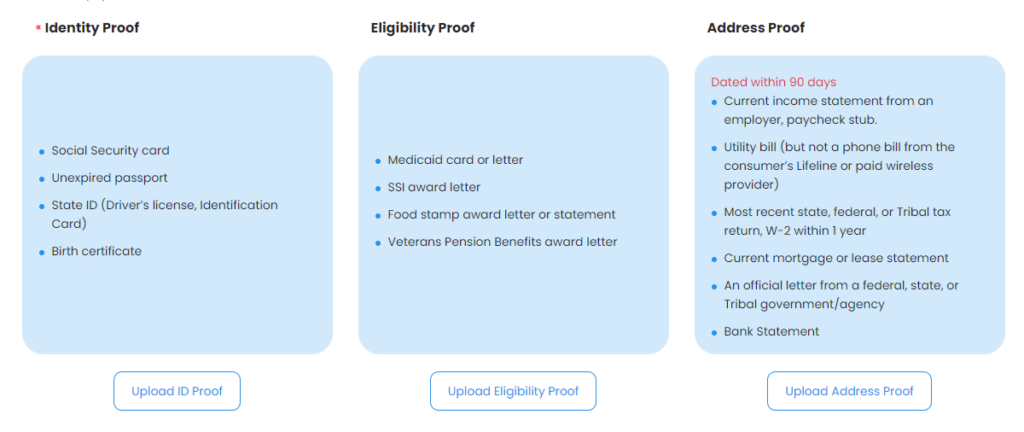
Older adults are eligible if their household income is equal to or less than 135% of the Federal Poverty Guidelines. Tax returns, benefit letters, and recent pay stubs can be some of the necessary proof of income.
Alternatively, they can also qualify if involved in one of the following programs, which automatically verify eligibility and allow them to apply quickly through licensed providers:
- Supplemental Security Income (SSI)
- Medicaid
- Supplemental Nutrition Assistance Program (SNAP or Food Stamps)
- Federal Public Housing Assistance (FPHA)
- Veterans Pension or Survivors Benefit
- Tribal Assistance Programs
Apply Online
The process of obtaining a free iPhone for seniors at AirTalk Wireless is straightforward. Here are 3 simple steps to follow:
- Step 1: Visit AirTalk Wireless and enter your ZIP code on the main page. Click “Apply Now” to see which Lifeline services and iPhone options are available in your area.
- Step 2: Check the Lifeline plans offered in your state and review the free or discounted iPhone options. Device availability and pricing depend on your location and current offers, so some phones may be free, while others may be offered at a lower cost.
- Step 3: Complete the online application by entering your personal information. You may need to upload supporting documents in accordance with state guidelines. Be sure all details are correct and that the documents are current.
What Happens After Approval
After your application is approved, you will get your device within 7 to 10 business days. Also, you will receive tracking information for the delivery.
In addition, the box contains detailed instructions for activating your phone.
Once activated, you can start using your government cell phone as well as free calls, texts, and other applicable services.
Conclusion
A free iPhone for seniors is now possible through reputable providers under the Lifeline government program. With proper documentation and consistent inventory updates, seniors can now stay easily connected and independent. Start your application right now!