Can you really get a free government cell phone and tablet? Yes, when you qualify for Lifeline, authorized providers offer $0 monthly phone service and may include a free phone. In some cases, you can also add a tablet at a low cost or during special promotions (the availability depends on your ZIP code, eligibility, and provider stock).
Keep reading to see how the free government cell phone and tablet option works and how you can apply correctly.
1. Is There Really a Free Government Cell Phone and Tablet Program?
Yes, but there is no single federal program that automatically gives you both a free phone and tablets. The program that helps most people is Lifeline, and devices come from approved providers, not from the government directly. The Lifeline program is a federal program that provides a monthly service discount of about $9.25, or up to $34.25 on Tribal lands.
You can qualify for Lifeline in two ways:
- Program-based eligibility, such as SNAP, Medicaid, SSI, or other assistance programs
- Income-based eligibility, if your household income is at or below 135% of the Federal Poverty Guidelines
With Lifeline, many users can receive a free government phone with $0 monthly service. Tablets are different. A free government tablet is rare and usually only available during limited promotions. Most of the time, tablets are offered at a low, discounted price when you sign up for service.
Here is how a free government cell phone and tablet option usually works:
- Phones are often included at $0.
- Tablets are usually low-cost or subsidized, and only free during rare promotions.
Authorized Lifeline carriers like AirTalk Wireless and Cintex Wireless are commonly chosen because they combine the Lifeline benefit with free phone monthly plans.
2. What Can You Really Get Through Lifeline Providers?
Most Lifeline providers focus on monthly service benefits, not guaranteed devices. The level of service depends on your provider and your ZIP code.
For example, AirTalk Wireless and Cintex Wireless (with a growing user base) operate on strong nationwide networks that support clear calls, stable data, and consistent service across the US states. Coverage works well in both large cities and small towns, so you can rely on your phone for daily use, job searches, school tasks, and healthcare access.
Network quality does not change based on where you live, which helps avoid dropped calls and slow data in rural areas.
With these providers, you can expect practical benefits that cover daily needs:
- Free monthly talk and text on eligible Lifeline plans
- Free 4G LTE/5G data in supported areas
- International calling to 200+ countries, useful for families with contacts abroad
- Free SIM or eSIM, based on your phone type
- Free shipping within 3–7 days to Ohio addresses
- BYOP (Bring Your Own Phone) if your device is unlocked and compatible
Customer support also plays a big role. Both providers also offer customer service through live chat and phone support. You can get help with your application, device setup, SIM or eSIM activation, and service questions at any time.
UPDATE: Cintex Wireless is merging into AirTalk Wireless. Eligible Lifeline users can expect better system integration, faster approvals, improved device availability, and higher customer service standards under one unified platform.
3. Phone + Tablet Device Options You May See
Lifeline providers like AirTalk Wireless and Cintex Wireless offer device options based on current stock, ZIP code, and active promotions. Phone and tablet availability can change often, so what you see during your application depends on timing and location.
3.1. Free & Discounted Phones (Stock-Based)
Most users start with smartphones that support calls, text, apps, and internet access. Phone options usually include:
Note: Phone inventory changes frequently. Applying early gives you more choices.
3.2. Tablet Options
Tablet access usually comes as a separate offer from your phone plan. Options may include:
| Brand | Tablet Model | Typical Lifeline Price | Estimated Retail Price |
| Apple | iPad 3 | From $8.95 | ~$45 |
| iPad Air 2 | From $74.99 | ~$97 | |
| iPad Air 4 | From $149 | ~$230 | |
| Samsung | Galaxy Tab A (2018) | From $29.95 | ~$74 |
| Galaxy Tab A (2020) | From $34 | ~$79 | |
| Galaxy Tab E | From $59.99 | ~$130 | |
| Galaxy Tab S2 (9.7″) | From $69.99 | ~$150 | |
| Galaxy Tab S4 | From $34.99 | ~$135 | |
| Galaxy Tab S5e | From $49.95 | ~$99 | |
| Galaxy Tab A7 Lite | From $24 | ~$70 |
Example ZIP code: 73301 (Texas)
Tablet availability depends on your ZIP code and current promotions. Tablets may be free during limited offers or available at a low subsidized price with service.
3.3. Limited Promotion Plan
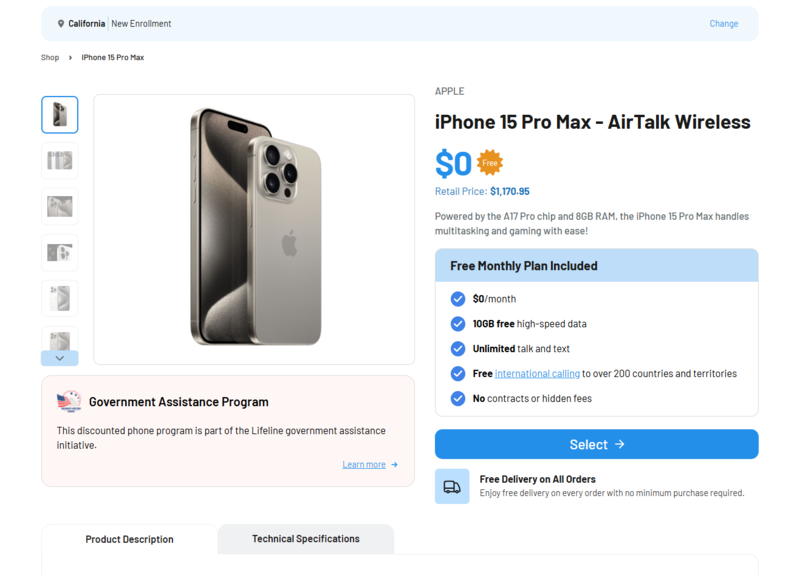
Free government cell phone and tablet are rare, especially the latest devices. However, at certain times, AirTalk Wireless may launch special promotion plans. During these periods, eligible Texas users may receive a newer iPhone or tablet for $0, including high-demand models such as the iPhone 15 Pro Max, based on location and inventory.
These promotions do not run often and are not guaranteed. If no free newer iPhone appears when you apply, continue with your application. AirTalk Wireless often offers deeply discounted free government phone and tablet combos that cost far less than retail prices, making upgrades more affordable even without a $0 promotion.
>>> Read more: Free iPhone 15 Pro Max: How Low-Income Users Can Save the Most in 2026
4. Step-by-Step – How to Apply for Free Phone and Tablet
Getting a free phone and tablet government starts online. Most Lifeline applications follow a simple flow and take only a few minutes to complete.
Step 1: Visit an approved Lifeline provider website
Go to a trusted provider such as AirTalk Wireless or Cintex Wireless. Both providers are FCC-approved and serve users nationwide.
Step 2: Enter your ZIP code
Type in your ZIP code to check Lifeline availability, local plans, and device options in your area.
Step 3: Choose a phone plan
Select a Lifeline plan that fits your needs. Most plans include $0 monthly talk and text, plus data based on your location.
Step 4: Select a phone or tablet
Pick a free phone or tablet if stock allows, or choose a discounted upgrade if you prefer a newer model.
Step 5: Upload proof only if requested
Most users receive automatic approval. Upload documents only if the system asks for verification.
Step 6: Submit and wait for delivery or eSIM activation
After approval, the provider ships your device or activates your eSIM. Shipping usually takes 7-14 business days, depending on location.
This process helps you access affordable phone service and possible tablet options through the Lifeline program without visiting a store.
5. FAQs
Q1. Is there really a free government phone and tablet program?
There is no single program that automatically gives both devices. The Lifeline program provides a monthly service discount, and approved providers may offer a free phone and a discounted or subsidized tablet.
Q2. Can I get both a phone and a tablet at the same time?
Yes, in some cases. Many Lifeline providers offer a free phone first, then allow you to add a tablet at a low cost if inventory and promotions are available.
Q3. Do I have to pay anything for the tablet?
Tablets are usually not completely free. Most are offered at a reduced price for Lifeline users, though free tablet promotions may appear for a limited time.
Q4. Who qualifies for a free government phone and tablet?
You may qualify through program-based eligibility (SNAP, Medicaid, SSI, public housing, Veterans benefits) or income-based eligibility at or below 135% of the Federal Poverty Guidelines.
Final Words
A free government cell phone and tablet can help you stay connected for work, school, health, and daily life. The phone is often $0 with Lifeline service, while tablets depend on provider offers and promotions. You should check eligibility early and apply through a trusted Lifeline provider to avoid delays or stock issues.
Review available plans, compare device options, and submit your application while offers are still available.