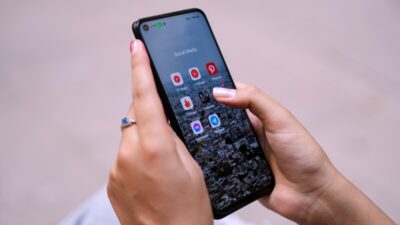
Can you really get phones with tablet deals at low or no cost? Yes. Phones with tablet deals are available through special offers from approved providers of government-supported programs like Lifeline. If you qualify, you can receive a free phone and add a tablet at a discounted price or during limited promotions. These deals help you stay connected for work, school, and daily needs. Keep reading to see how the program works and how to apply.
1. What Is the Lifeline Program Free Phone and Tablet Deals?
The free phones with tablet deals come from the provider of the federal Lifeline program. The Lifeline program helps you lower the cost of phone or internet service. When you qualify, approved Lifeline providers may pair the monthly service discount with device offers, such as a free phone or a low-cost tablet, depending on stock and promotions.
1.1. Lifeline Program Explained
The Lifeline program is a federal benefit supported by the FCC. It helps you reduce the cost of phone service or internet service so you can stay connected for work, school, healthcare, and daily communication.
The benefit applies as a monthly service discount, not as cash, and you can only use it for one account per household. Devices like phones or tablets may be offered by approved providers as added benefits when available, but they are not guaranteed.
Monthly service support through Lifeline includes:
- About $9.25 per month off phone or internet service for most households
- Up to $34.25 per month for eligible users on Tribal lands
- Discount applies directly to your service bill
- Service can cover mobile phone, home phone, or internet plans
1.2. How to Qualify for Lifeline
You can qualify for Lifeline in two main ways.
1. Program-based eligibility
You may qualify automatically if you receive benefits from programs such as:
- SNAP / EBT
- Medicaid
- SSI
- Public Housing or Section 8
- Veterans benefits
2. Income-based eligibility
You may also qualify if your household income is at or less than 135% of the Federal Poverty Guidelines
If you qualify through either method, you can apply with an approved Lifeline provider and see which phone or tablet deals are available in your area.
2. Trusted Providers Offer Phones With Tablet Deals
When you look for phones with tablet deals, the provider you choose matters as much as the device itself. Established Lifeline providers handle every part of the experience, from approval to delivery and long-term support. Users often prefer providers that offer:
- Nationwide coverage that works in cities and rural areas
- Online application without in-store visits
- Clear order tracking after approval
- Multiple device options, including phones and tablets, when available
These factors reduce delays, limit confusion, and help you receive service faster.
2.1. Find Your Reliable Providers
Two well-known providers that many users rely on are AirTalk Wireless or Cintex Wireless. Both serve a large nationwide user base and focus on device access, shipping speed, and customer support.
Applying through these providers can help you stay connected without monthly phone bills. These providers support over 1.3 million users nationwide and operate on strong networks across the United States. Coverage works well in large cities and small towns, so you can rely on your phone or tablet for daily calls, job searches, school tasks, and healthcare access. Network performance stays stable across locations, which helps limit dropped calls and slow data in rural areas.
Customer support also plays a major role. These providers offer 24/7 customer service through live chat and phone support, so you can get help at any time during the application or after activation.
What you benefit from when you apply:
- Strong nationwide networks with clear calls and stable data
- Reliable service in both urban and rural areas
- 24/7 support for applications and account questions
- Help with device setup and SIM or eSIM activation
- Assistance with plan questions, upgrades, and service issues
Currently, Cintex Wireless is merging into Airtalk Wireless. Eligible Lifeline users can expect better system integration, faster approvals, improved device availability, and a smoother experience overall.
2.2. What Phones With Tablet Deals Can You Really Get?
Device availability depends on your ZIP code, provider inventory, and current offers. Most users see a mix of free and discounted options rather than one fixed bundle.
Important notes:
- Inventory changes often
- Tablet offers are usually discounted, not always $0
- Phone + tablet bundles depend on the provider and location
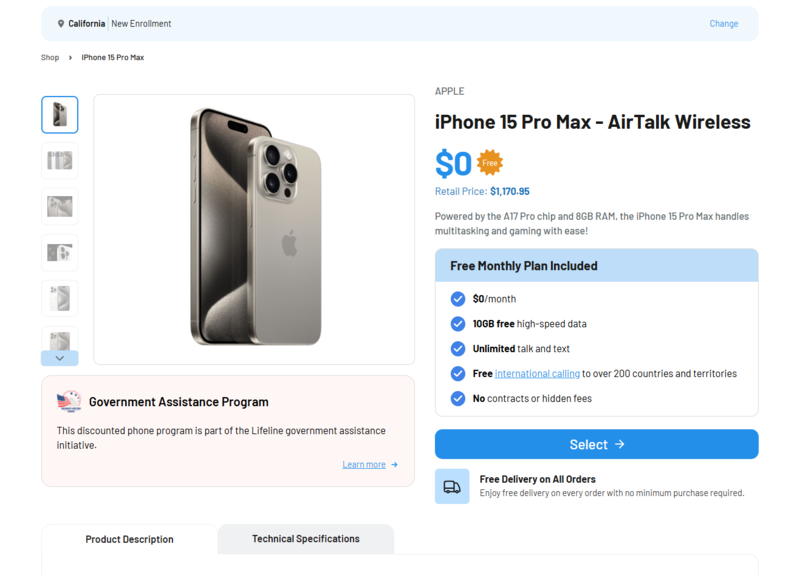
Limited promotion note: Free newer phone or tablet deals are rare, but they do happen. At certain times, providers like AirTalk Wireless or Cintex Wireless may launch limited promotion plans that allow eligible users to receive newer devices (iPhone 11-15 Pro Max) at no cost. These promotions depend on timing, ZIP code, and stock. If a promotion is not available when you apply, you can still receive deeply discounted devices compared to retail prices, so applying early is often the best option.
>>> Read more: Free iPhone 15 Pro Max: How Low-Income Users Can Save the Most in 2026
3. Step-by-Step – How to Apply for Phones With Tablet Deals
Applying for phones with tablet deals is a simple online process. Most users complete everything at home in a short time.
Step 1: Visit an Approved Lifeline Provider and Enter Your ZIP Code
Go to an approved Lifeline provider’s website and enter your ZIP code. The system shows whether Lifeline service is available in your area and which phone or tablet options apply to your location.
Step 2: Choose a Lifeline Phone Plan
Review the Lifeline plans offered for your ZIP code. Most plans include $0 monthly talk and text, with data levels based on your provider and location. Select the plan that fits your needs.
Step 3: Select a Phone or Tablet
Choose a free phone if available, or select a discounted phone or tablet option. Device availability depends on stock, ZIP code, and current promotions. Some users may add a tablet at a reduced cost during checkout.
Step 4: Enter Your Personal Information
Provide basic personal details, including:
- Full legal name
- Date of birth
- Home and shipping address
- Last 4 digits of your SSN (used for verification)
This information is required to process your Lifeline application.
Step 5: Upload Proof Only If Requested
Most applicants are verified automatically. If verification fails, you may need to upload:
- A government-issued photo ID
- Proof of eligibility (benefit letter or income document)
Step 6: Submit and Wait for Shipping or eSIM
Review your application and submit it. After approval, your phone or tablet ships to your address, or your eSIM activates if supported. Delivery usually takes a few business days.
>>> Read more: Free iPhone Deals For New Customers: Quick Steps To Apply
4. FAQs
Q1. Is there really a free phone and tablet deal from the government?
The government does not hand out phones or tablets. Most phones with tablet deals come from approved providers’ offers of the federal Lifeline program. Phones are often $0, while tablets are usually free only during limited promotions or offered at a low cost.
Q2. Can I get both a free phone and a tablet at the same time?
Yes, in some cases. Many Lifeline providers offer a free phone first, then allow you to add a tablet if stock or promotions are available. Availability depends on your ZIP code and provider.
Q3. Are tablets always 100% free?
No. Tablets are usually discounted, not always free. Some providers run limited promotions where tablets are $0, but most of the time, you pay a small one-time fee.
Final Words
Phones with tablet deals give eligible users a practical way to access mobile service without high costs. You can get a free phone, monthly service discounts, and tablet options based on your ZIP code and provider offers. Availability may change, so applying early gives you the best chance to secure a device. Check your eligibility, compare providers, and start your application today.