Nowadays, communication plays a crucial part, so you’ll need a smart device to contact your family, doctors, and others. However, monthly costs are pricey. This leads many individuals to wonder, “Can you get a free phone or tablet with Food Stamps?”
Luckily, the answer is yes. Government assistance programs work with licensed providers to help low-income families stay connected. If you currently get food assistance, you are likely eligible for these benefits. This blog post describes how the procedure works and what you should do.
1. Can You Receive a Free Phone or Tablet with Food Stamps?
The government does not directly give out phones or tablets. Instead, it funds the Lifeline program, a federal program that helps low-income Americans afford basic phone service and internet services.
Furthermore, this initiative enables partnering service providers to offer subsidized plans to qualified customers.
Companies such as Cintex Wireless participate by utilizing these funds to cover the majority, if not all, of your monthly costs.
Please note that being a SNAP recipient may automatically qualify you for Lifeline benefits.
In many cases, these perks can include both a free smartphone or tablet and an ongoing monthly subscription through the providers of the program, making it easier for low-income individuals to stay connected without incurring additional costs.
You can get a free government cell phone for necessary mobile communication. Meanwhile, a tablet may bring a bigger screen for advanced tasks such as filling out applications or taking video calls.
>>>>Read more: Claim a Free iPhone Government Phone With Food Stamps at $0
2. How to Apply for a Free Phone or Tablet with Food Stamps?
The federal government establishes the criteria for getting a free phone or tablet using Food Stamps.
Follow these steps to claim a device from the authorized providers for your daily online requirements.
2.1 Check Your Eligibility
Your involvement in federal aid programs or total family income typically determines eligibility.
Qualify through SNAP participation
If you currently receive Food Stamps, you may be immediately eligible for Lifeline. This is because the SNAP criteria generally align with the requirements for telecommunications assistance.
Importantly, although your EBT card certifies that you receive SNAP, it is no longer accepted as evidence of participation.
Hence, you must submit a valid benefits letter or verification document that includes your name, the SNAP program name, and a recent date.
Qualify through other programs
Aside from SNAP (Food Stamps), numerous other programs might qualify you for a free phone or tablet. This includes:
- Supplemental Security Income (SSI)
- Federal Public Housing Assistance (FPHA)
- Medicaid
- Veterans Pension and Survivors Benefit
- Tribal-specific programs like the Bureau of Indian Affairs General Assistance
Qualify through income
To qualify, your total household income must be at or below 135% of the Federal Poverty Guidelines. This assures that the Lifeline Program is available to those struggling to make ends meet.
2.2 Prepare All Required Documentation
While the system frequently automatically validates you, you should have digital images or copies of your documents on hand.
To obtain a free phone or tablet with Food Stamps, you may need to submit:
- Proof of identity: A valid government-issued photo ID.
- Proof of address: A utility bill or lease agreement.
- Proof of SNAP participation: Your official SNAP/EBT award letter or a recent statement showing your name and active status.
- Proof of income: Tax returns, three consecutive months of pay stubs, or a Social Security statement of benefits.
2.3 Submit an Online Application Via a Lifeline Provider
The process to apply for a free phone EBT is supposed to be completed on an approved provider’s website. This reduces the need to visit several government websites.
- Confirm availability: Start your application by visiting a Lifeline provider’s website and entering your ZIP code to check whether Lifeline service is available in your area.
- Choose a plan and device: Select a Lifeline plan, then choose an eligible free phone or tablet with Food Stamps. You may also opt to use your own compatible device.
- Complete the application: Enter your personal information carefully, making sure it matches your official documents.
- Upload documents if needed: In case automatic verification is not successful, submit clear proof of income or participation in a qualifying assistance program.
2.4 Send Your Application for Approval
After you provide your personal information and documentation, the Lifeline provider will process your application.
If successful, your free device and SIM card will be sent to your address within 7-14 business days.
3. Tips to Maximize Your Lifeline and Food Stamps Benefits
Are you looking for a free iPhone for SNAP recipients or a free Galaxy tablet?
No matter which device you want, the two tips below will help you maximize your Lifeline and Food Stamps benefits.
3.1 Choose a Reputable Provider
First, it is crucial to choose a reputable provider to reduce the risk of scams and service issues.
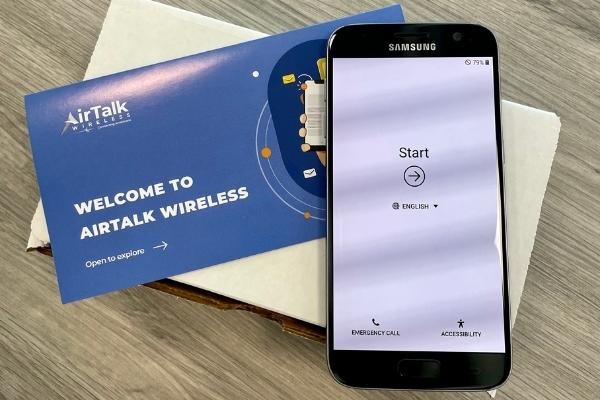
Providers like Cintex Wireless, which is currently merging with AirTalk Wireless, offer reliable service, clear application steps, and customer support.
This merger also means access to more device options and better coverage for eligible users. Some popular models available at AirTalk include:
3.2 Check Device Availability Frequently
It is also vital to check device availability often, as it increases your chances of finding a suitable device when it becomes available in your area.
Lifeline devices can change based on location, inventory, and the time you apply. Some popular devices, like iPads or iPhones, may be available one week and out of stock the next.
Conclusion
Using your existing SNAP benefit is the most straightforward method to get a free device and a monthly subscription. By applying directly through an authorized carrier such as Cintex or AirTalk Wireless, you can immediately get a free phone or tablet with Food Stamps to stay connected without paying costly expenses.