Can I get a free eSIM service government iPhone? Yes, you can receive free eSIM service through an approved provider under the Lifeline program in two ways: BYOP option or free/discounted smartphone plan.
Continue reading to learn how the free eSIM service works and how to get a new device with free service or BYOP activation with larger data.
1. What Is Free eSIM Service Government iPhone?
Free eSIM service government iPhone is a no-cost mobile service plan that eligible users receive through providers of the federal Lifeline program.
The plan uses eSIM technology, which allows you to activate cellular service directly on a compatible iPhone without inserting a physical SIM card. With this setup, you can receive free monthly talk, text, and data once your service becomes active.
The Lifeline program supports this service through a federal subsidy. The government reduces the cost of mobile service for eligible households, and wireless providers apply the subsidy to your plan.
Lifeline subsidy levels include:
- $9.25 monthly subsidy for standard households
- Up to $34.25 monthly subsidy for households on Tribal lands
With this subsidy, Lifeline providers like AirTalk Wireless and Cintex Wireless can offer several options:
- Free service plans with talk, text, and data
- Free eSIM or SIM card activation with BYOD (Bring Your Own Phone)
- New free smartphone plans with eSIM/SIM Card
Many people choose the BYOD option because it allows them to keep their current iPhone. Other applicants prefer a free or discounted smartphone plan, which may include an iPhone or Android device, depending on provider inventory and promotions.
Notably, Cintex is currently merging with AirTalk Wireless. With this transition, customers can look forward to a smoother, more supportive experience, including faster applications, more phone options to choose from, and an easier way to stay reliably connected.
2. Two Ways to Receive Free eSIM Service Government iPhone
Eligible Lifeline users can receive free eSIM service government iPhone through two main options.
You can choose a plan with a free or discounted smartphone, or you can activate service on your own iPhone using the BYOD option.
Each option offers different benefits depending on your situation.
2.1. Free / Discounted Smartphone Plan with eSIM
A free iPhone or discounted upgrade plan works well for people who do not own a compatible phone yet. Lifeline providers offer these plans to eligible low-income individuals across the United States.
With this option, the provider sends a phone and activates the service using eSIM or a physical SIM card. During enrollment, you may see a larger selection of free phone models compared with BYOD plans.
Typical features of this option include:
- free or discounted smartphone
- eSIM or SIM card activation
- $0 monthly service plan
- talk, text, and mobile data allowance
In many cases, newer phones such as iPhone 11 through iPhone 15 (including Pro or Pro Max models) appear during promotion periods. These models usually appear at lower prices compared with BYOD upgrade pricing.
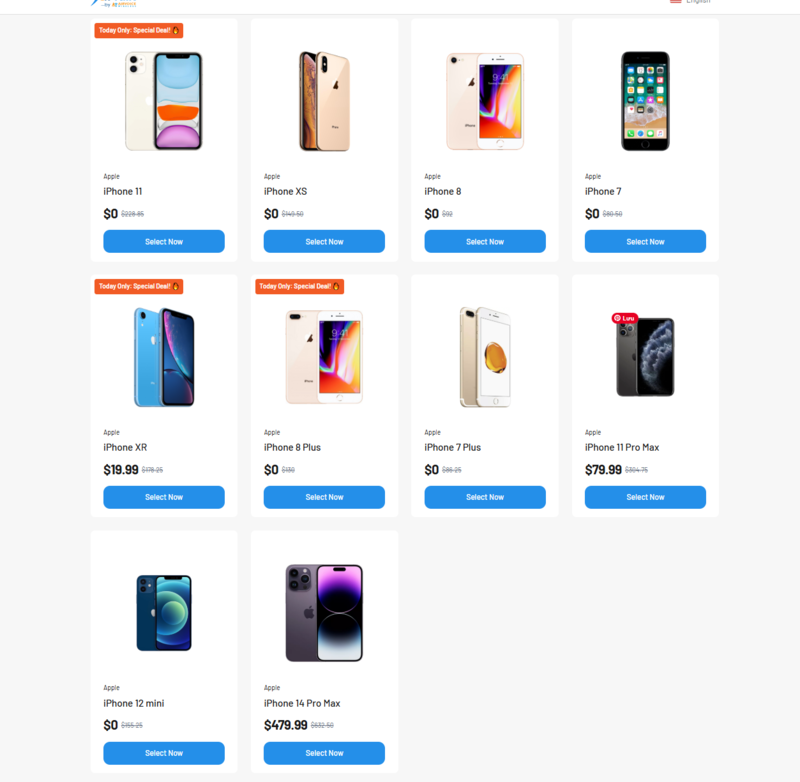
However, service plans with free devices often include smaller data allowances compared with BYOD plans.
>>> Read more: Best Free Government eSIM for iPhone: Fastest Way to Activate Your Service Today
2.2. Use Your Own iPhone With eSIM
The BYOD (Bring Your Own Device) plan works oppositely. Instead of receiving a phone, you activate service on your existing iPhone.
This option focuses on higher data allowances and instant activation.
Typical features include:
- Free eSIM activation on your current iPhone
- No phone shipment required
- Larger mobile data plans
- $0 monthly service cost for eligible users
You only need an unlocked and compatible iPhone. After approval, the provider sends an eSIM activation profile. Your phone downloads the profile and activates the service.
Many users prefer the BYOD plan because they keep their current device and receive more mobile data.
2.3. Example Lifeline Benefits You Can Get
Benefits vary depending on the provider and ZIP code. For example, applicants in Oahu ZIP code 96814 may see plans similar to the following:
1. Lifeline Data Boost Plan [Tribal] – 30GB
- BYOD plan
- Free eSIM activation
- Larger data allowance
- No free phone is included by default
2. Lifeline Standard Plan [Tribal] – 16GB
- free or discounted smartphone option
- eSIM or SIM card activation
- smaller data allowance compared with the Boost plan

These examples show how free eSIM service government iPhone plans can differ depending on your location, provider inventory, and eligibility status.
>>> Read more: Free Government Phone Oahu: How to Apply $0 Service Plan Today
3. How to Get Free eSIM Service on Your iPhone (Step-by-Step)
If you want a free eSIM service government iPhone, you can apply online through a Lifeline provider. The process is simple and usually takes only a few minutes to start. Follow the steps below to activate free service on your iPhone.
Step 1 – Check Lifeline Eligibility
First, confirm that you qualify for the Lifeline program. You may qualify in two ways:
- Program-based eligibility – You participate in a government assistance program like SNAP, Medicaid, Supplemental Security Income (SSI), Section 8 / Federal Public Housing Assistance, and Veterans Pension
- Income-based eligibility – Your household income is at or below 135% of the Federal Poverty Guidelines.
Many applications pass verification automatically through the provider system.
Step 2 – Visit a Lifeline Provider Website
Next, go to the website of a Lifeline provider and enter your ZIP code. The system will show the service plans available in your area.
You can review:
- available service plans
- eSIM or SIM activation options
- compatible devices and BYOD plans
Many applicants choose providers such as AirTalk Wireless and Cintex Wireless. These providers offer large data plans, responsive customer support, and multiple Lifeline service options.
During this step, you can:
- Enter your ZIP code
- view available plans
- Check eSIM compatibility for your iPhone
Step 3 – Choose the Free / Discounted Phone Plan or BYOD Option
After you enter your ZIP code, the provider will show available plan options.
You can select one of the following:
- Free or discounted smartphone plan with eSIM
- BYOD plan to activate service on your own iPhone
Step 4 – Submit Application
Complete the application form and submit your information.
The provider will verify your eligibility through the provider system. In many cases, the system confirms eligibility automatically.
If verification fails, you may need to upload documents such as:
- proof of participation in a qualifying program
- proof of income
- identification documents
In AirTalk Wireless, many applicants receive approval after 30 mins or 2-3 business days.
Step 5 – Activate eSIM on Your iPhone
After approval, the provider sends instructions for activation.
Typical eSIM activation steps include:
- Scan the QR code provided by the carrier
- Download the eSIM profile to your phone
- Activate the plan in iPhone cellular settings
Once activation finishes, your free eSIM service government iPhone plan becomes active, and you can start using talk, text, and mobile data.
>>> Read more: Claim a Free Government Cell Phone and Tablet: Lifeline Program Guide
4. FAQs
Q1. Do all Lifeline providers support eSIM?
No. Not every Lifeline provider supports eSIM activation. Some providers still rely on traditional SIM cards.
Providers like AirTalk Wireless and Cintex Wireless that support eSIM usually allow two options:
- BYOD activation on your own iPhone
- eSIM activation with a new smartphone plan
Before applying, you should check the provider’s website to confirm:
- eSIM compatibility
- supported devices
- available service plans in your ZIP code
Q2. Is the service really free?
Yes, many Lifeline plans offer $0 monthly service for eligible users.
The Lifeline provides a subsidy that lowers the cost of mobile service:
- $9.25 monthly subsidy for standard households
- Up to $34.25 monthly subsidy for Tribal lands
Lifeline providers like AirTalk Wireless and Cintex Wireless apply this subsidy to mobile plans. As a result, eligible users can receive free talk, text, and mobile data through participating providers. Phone models and plan features may vary depending on provider inventory, location, and promotion periods.
Q3. eSIM vs SIM Card – Which Should You Choose?
Both options provide the same Lifeline service, but they work differently.
eSIM
- digital SIM built into the phone
- faster activation
- no shipping required
SIM Card
- physical card inserted into the phone
- works with most phones
- may require shipping time
Many people choose eSIM because activation happens faster. Others choose SIM cards if their device does not support eSIM.
Final Words
Free eSIM service government iPhone is possible for eligible Lifeline users. The program allows two main options. You can activate service on your own iPhone through a BYOD eSIM plan, or you can choose a free or discounted smartphone plan that includes eSIM service. The government provides the subsidy, while wireless providers handle the phones and activation.
If you qualify for Lifeline, you can check provider websites, compare plans, and start an online application. Many applicants receive approval quickly and activate service on their iPhones within a few days.