
Does Stop and Shop take WIC? It’s a question that often comes up after something doesn’t go as expected at checkout.
Since WIC rules can vary by store and state, even familiar places don’t always work the same way. A quick look at how it works at Stop & Shop can help you avoid that uncertainty and shop with more confidence.
1. Does Stop and Shop Take WIC?
Yes, Stop & Shop accepts WIC at most of its store locations, especially across states like Connecticut, Massachusetts, New Jersey, New York, and Rhode Island. However, since WIC is managed at the state level, participation can vary, and not every store is guaranteed to accept it.
When using WIC at Stop & Shop, purchases must be made in-store with an eWIC card. Online orders and delivery services are not supported for WIC transactions.
You can verify your specific store using these simple methods:
- Look for the “WIC Accepted Here” logo on the store entrance doors.
- Use the WICShopper app to find an authorized WIC vendor near you.
- Ask the customer service desk at your local supermarket.

2. How to Find WIC-Approved Items at Stop & Shop
Driving to a store only to find they do not accept your benefits is frustrating. Stop & Shop aims to make your trip easier. You can find WIC-approved foods quickly if you know what to look for. Use the following tools to save time and avoid stress at the register.
Use the Official State’s WIC App
Your state WIC app is the most reliable way to find authorized stores. Most states in the Northeast provide an official app for benefit holders.
You can enter your ZIP code to see a map of every participating Stop & Shop near you.
These apps also show your current food balance in real-time. Checking your balance before you leave home prevents surprises during checkout.
Using the WICShopper App In-Store
WIC rules are very strict about brands and container sizes. For example, the program may cover a specific 16-ounce jar of peanut butter but not the 18-ounce version.
The WICShopper app helps you avoid these mistakes. You can use the app to scan the barcode of any item while you walk through the aisles. The app tells you immediately if the item is WIC-approved.
Identifying Pink WIC Shelf Tags
Stop & Shop uses visual cues to help you shop. Look for small pink tags on the product shelves. These tags usually sit right next to the price label. They clearly state “WIC Approved” or “WIC Eligible.” If a product has a pink tag, it usually meets state nutrition guidelines. Always double-check the item size against your benefit list to be sure.
3. Can You Use WIC at Stop & Shop Self-Checkout Registers?
Yes, many updated Stop & Shop locations now accept the eWIC card at self-checkout registers. This upgrade helps you skip long lines and manage your shopping at your own pace.
A mixed basket transaction allows you to buy WIC-approved foods and regular groceries (like soda or household supplies) at the same time. The store’s computer system is smart enough to separate the items for you.
Follow these steps to ensure your benefits apply correctly:
- Scan all items: Pass every item in your cart across the scanner, including both WIC-approved and non-WIC items.
- Select Payment: When you finish scanning, choose the “Pay” or “Finish and Pay” option on the screen.
- Swipe your eWIC card first: This is the most important step. Always swipe your eWIC card before any other payment method.
- Enter your PIN: Use the keypad to enter your secret 4-digit PIN. The system will automatically identify and deduct only the WIC-eligible items from your total.
- Review and confirm: The screen will show you which items the WIC card covers. If you agree, confirm the purchase.
- Pay the remaining balance: If you have non-WIC items left, the screen will show a remaining balance. You can pay this amount using SNAP (EBT), a debit card, or cash.
>>> Read more: How Soon Can You Get WIC When Pregnant? 2026 Application Guide
4. What Other Payment Methods Work With WIC Cards?
WIC EBT cards work alongside other payment methods in a “split-tender” transaction. This setup allows you to pay for WIC-approved items first. You can then use SNAP EBT, cash, credit cards, debit cards, or gift cards for any remaining items in your cart.
Common payment methods with WIC:
- SNAP EBT: Often used together with WIC to pay for non-WIC-eligible food items.
- Cash/Debit/Credit Cards: These are typically used for household essentials that WIC does not cover, such as cleaning supplies or pet food.
- Manufacturer/Store Coupons: You can still use store rewards cards and coupons to save even more money in addition to your WIC benefits.
To ensure your benefits are applied correctly, you must swipe your eWIC card first at the checkout register. The store’s system will automatically deduct all eligible WIC items from your total before you pay the remaining balance with your other chosen payment method.
5. Extra Telecommunication Benefits Through Lifeline Program
Managing your family’s nutrition requires a constant digital connection. To check your WIC balance or find a WIC-authorized grocery store, you need a working smartphone and data.
However, monthly phone bills can be a heavy burden for low-income households. The Lifeline program offers a solution by providing government assistance discounts to keep you connected with a $0 phone bill per month.
Lifeline Program Eligibility Guidelines
Eligibility for Lifeline is closely tied to other assistance programs.
If you live in California, participating in WIC may help you qualify for California LifeLine.
In most other states, WIC is not an automatic qualifying program for federal Lifeline, but you likely qualify through your household income or other active benefits.
You may qualify for Lifeline if your situation meets one of these standards:
- Income-Based: Your household income is at or below 135% of the Federal Poverty Guidelines.
- Program-Based: You participate in Medicaid, SNAP (Food Stamps), SSI, Section 8, or the Veterans Pension.
- Tribal Support: Residents on federally recognized Tribal lands qualify through TANF, FDPIR, or BIA General Assistance.
Lifeline provides subsidies of $9.25 per month for standard households and up to $34.25 per month for those on Tribal lands.
Eligible Telecommunications Carriers (ETCs) like Cintex Wireless partner with Lifeline to offer free smartphone services.
Many people choose Cintex Wireless because of its ongoing effort to improve the customer experience for Lifeline participants.
Recently, the company has been in the process of merging with AirTalk Wireless, another carrier with a strong presence across the United States and a large subscriber base.
This transition is expected to bring a more consistent and reliable experience for customers, especially throughout the Lifeline application and service process.
IMPORTANT NOTE: The government does not subsidize devices. Lifeline programs cover service costs only. Free or discounted devices are promotional offers from providers. Availability varies by state, ZIP code, stock, and eligibility. Terms apply. Refurbished devices may show minor cosmetic wear, and substitutions occur if out of stock.
How to Apply
- Check Your Eligibility: Confirm you meet the income limits or participate in a qualifying program.
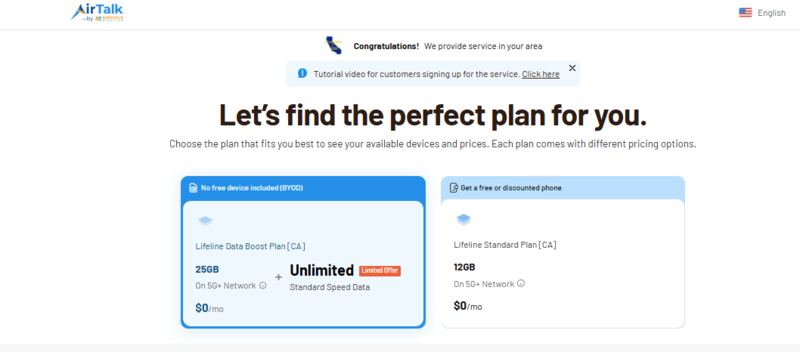
- Apply to a Trusted Provider: Visit the provider website that has large benefits. Enter the ZIP code to confirm the service availability. You can see the specific plans and promotional device offers available in your ZIP code. Choose the one that fits your needs.
- Submit Your Application and Wait for approval: Fill out the online form and upload proof of your participation (such as a benefit award letter) to start your free service. Your application will be reviewed. Once approval is obtained, you can start using your plan or wait for delivery of the chosen device.
>>> Read more: What Are the Free Government Phones? Get One at Zero Cost NOW!
6. FAQs
Q1. Does Stop & Shop take WIC online for pickup or delivery?
No, Stop & Shop does not accept WIC for online orders, pickup, or delivery. You must use your eWIC card for in-person shopping at an authorized store location. State regulations currently require a physical card swipe and PIN entry at the store register. If you use the Stop & Shop app for grocery pickup, you will need to use a different payment method, like a debit card or SNAP EBT.
Q2. What should I do if my eWIC card PIN is locked?
You must contact your local state WIC office or call the customer service number on the back of your card to reset a locked PIN. Stop & Shop employees and customer service desks cannot reset your PIN or unlock your card for you. Your card usually locks after four incorrect attempts to protect your benefits. In some states, the card may unlock automatically after midnight, but calling the official WIC helpline is the fastest way to regain access.
Final Words
Does Stop and Shop take WIC? At many locations, the answer is yes, and once you understand how the system works, the entire shopping experience becomes much more efficient.
A grocery trip often comes down to preparation. Knowing which items are eligible, checking your balance ahead of time, and having a stable connection to use tools like the WICShopper app can help you move through the store with fewer interruptions.
With the right information and a reliable way to stay connected, even routine shopping can feel more predictable and easier to manage.