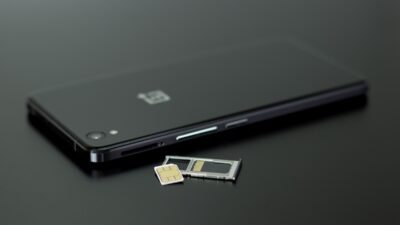
A phone without a SIM card is far from useless. As long as Wi-Fi is available, many everyday features continue to work normally, from web browsing and messaging apps to streaming, navigation, and games.
So, can you use a phone without a SIM card? Yes, but the experience is closer to that of using a small Wi-Fi device than to that of a fully connected mobile phone. Cellular calls, standard text messages, and mobile data will usually be unavailable until you add an active SIM or eSIM.
1. Can You Use a Phone Without a SIM Card?
While a SIM card is crucial for cellular services, there are still several features and functions that your phone can perform without one.
Access Emergency Services
A phone may still be able to place an emergency call even without normal cellular service, depending on the device, country, and available network.
In the U.S., compatible phones can often reach 911 through another available network, but SIM-free emergency calling should not be treated as guaranteed everywhere.
On supported iPhones in certain regions, the device can use another available cellular network for emergency calls when it shows SOS or SOS Only.
However, this should not be treated as a guarantee of SIM-free calling everywhere. Apple warns that some networks may reject an emergency call if the iPhone is not activated or does not have a SIM card.
Connect to Wi-Fi
Wi-Fi allows the phone to browse websites, download apps, check email, use cloud services, and connect to online platforms without a mobile plan.
An iPhone, for example, can join available Wi-Fi networks independently of cellular service.
Once connected, the phone can function much like a small tablet for most internet-based activities.
Use GPS Navigation
Can you use a phone without a SIM card? The GPS hardware inside a smartphone does not rely on the SIM card itself.
Navigation apps can still determine your location, though live traffic and route updates may require Wi-Fi unless the maps were downloaded beforehand.
Offline maps are especially useful when the phone is used without cellular service while traveling.
Take Photos and Videos
The camera works normally without a SIM. Your photos and videos remain stored on the phone, and you can edit them or transfer them to another device without mobile service.
Cloud backup and social sharing still require Wi-Fi or another internet connection.
Use Social Media App
Apps such as Instagram, Facebook, X, and other social platforms can work over Wi-Fi without a SIM card. The same is true for many communication and productivity apps.
Notifications will continue to arrive while the phone remains connected to the internet.
Watch Content
Streaming services can play movies, shows, music, and online videos through Wi-Fi. Previously downloaded content can also be watched offline.
A SIM card is therefore unnecessary if the phone mainly serves as a media device around the home.
Play Games
Many mobile games work perfectly without a SIM. Online games need Wi-Fi, while offline games may not require an internet connection at all.
This makes an older SIM-free phone useful as a dedicated gaming device for children or as a spare entertainment device.

2. What Can’t You Do on a Phone Without a SIM Card?
A phone without an active SIM or eSIM loses the services that depend directly on the carrier network. Wi-Fi can replace some of them, but not all.
Make Regular Calls or Send Text Messages
Can you use a phone without a SIM card? The answer is no if you mean standard carrier calls or SMS. Those usually require an active mobile line, while internet-based calls and messages can still work over Wi-Fi.
Standard carrier calls and SMS usually require an active mobile line. Without one, the phone cannot use your regular cellular number for calls or texts.
Internet-based calling and messaging apps can still provide alternatives, but they operate differently from standard carrier service.
No Mobile Data Connection
Once the phone leaves Wi-Fi coverage, it loses internet access unless another device provides a hotspot. Cellular data requires an active mobile subscription.
This limitation affects navigation updates, messaging apps, streaming, and other services when you are away from home or public Wi-Fi.
No Active Cellular Number on the Device
Without an active SIM or eSIM, the phone cannot use a carrier-assigned number for normal cellular calls or SMS.
The phone number itself may still exist on your mobile account, but that device cannot use the line until the service is activated on it.
Apps Requiring a Phone Number or SMS Verification
Some apps depend on SMS verification, phone calls, or an active mobile number during account setup. Banking, authentication, delivery, and messaging services can sometimes fall into this category.
After initial verification, some of those apps may continue working over Wi-Fi, but access depends on the individual service.
3. How to Make Calls or Send Texts Without a SIM Card?
Regular cellular service is unavailable without an active line, but an internet connection opens several other communication options.
Use VoIP Services
Voice over Internet Protocol services send calls through the Internet rather than the carrier’s voice network.
Once connected to Wi-Fi, a compatible VoIP app can make and receive voice calls through its own account or number.
Call quality depends heavily on the Wi-Fi connection.
Messaging Apps
Apps such as WhatsApp, Messenger, Telegram, FaceTime, and similar services can send messages or make voice and video calls over Wi-Fi.
These apps can provide calls, group chats, and file sharing without a SIM once internet access is available.
Some services still require a phone number during the original account registration.
Use Wi-Fi Calling
Carrier Wi-Fi Calling works differently from a normal messaging app. It routes your carrier calls through Wi-Fi when cellular reception is poor or unavailable.
Apple notes that this feature requires carrier support and must be enabled on the device.
In practice, Wi-Fi Calling still depends on an active carrier line and carrier support, so it is not a true replacement for a SIM or eSIM-based mobile subscription.
Temporary eSIMs
An eSIM can restore full mobile service without inserting a physical card.
Compatible phones can download a digital mobile plan and use it for calls, texts, or data, depending on the provider.
This option can be useful while traveling or when the physical SIM is lost or damaged. eSIM still counts as cellular service, so the phone is no longer truly operating without a SIM profile once it is activated.
4. When Using a Phone Without Cellular Service Makes Sense
Can you use a phone without a SIM card? A phone without cellular service can still be useful if you mainly stay connected through Wi-Fi.
An older device, for example, can serve as a dedicated media player for music, videos, podcasts, or downloaded content without needing an active mobile plan.
Parents may also keep a spare phone as a Wi-Fi-only device for a child. It can handle games, educational apps, video calls, and family messaging while avoiding the cost of adding another cellular line.
A SIM-free phone also works well as a backup device. You can keep important apps, offline maps, photos, or documents on it in case your main phone is lost, damaged, or temporarily unavailable.
Just remember that without active cellular service, it is only a true communication backup when Wi-Fi or another internet connection is available.
Gaming and travel are two other practical uses. Many games work offline or only need Wi-Fi, while travelers can rely on hotel networks, downloaded maps, and saved content.
The main limitation comes when Wi-Fi is unavailable, since regular calls, texts, and mobile data will not work without active cellular service.
5. When Wi-Fi-Only Use Isn’t Enough, You Can Explore Lifeline Benefits
Wi-Fi-only use works well at home, but it can become restrictive when you need calls, texts, or mobile data throughout the day.
Eligible households trying to keep those costs manageable may consider the federal Lifeline program.
Lifeline helps qualifying consumers lower the monthly cost of phone service or internet service.
The standard benefit can provide up to $9.25 per month, while qualifying applicants on Tribal lands may receive up to $34.25. Only one Lifeline benefit is allowed per household.
The program delivers its benefit through participating Eligible Telecommunications Carriers, or ETCs.
Eligibility can be based on household income at or below 135% of the Federal Poverty Guidelines or participation in approved assistance programs.
Cintex Wireless is one Lifeline provider, and the company is merging with AirTalk Wireless to provide a more unified service and enrollment experience without interrupting existing Lifeline benefits.
Depending on eligibility, location, and current offers, applicants may have access to:
- A free or discounted smartphone
- A free SIM card
- Unlimited talk and text
- Generous monthly data
- International calling to supported destinations
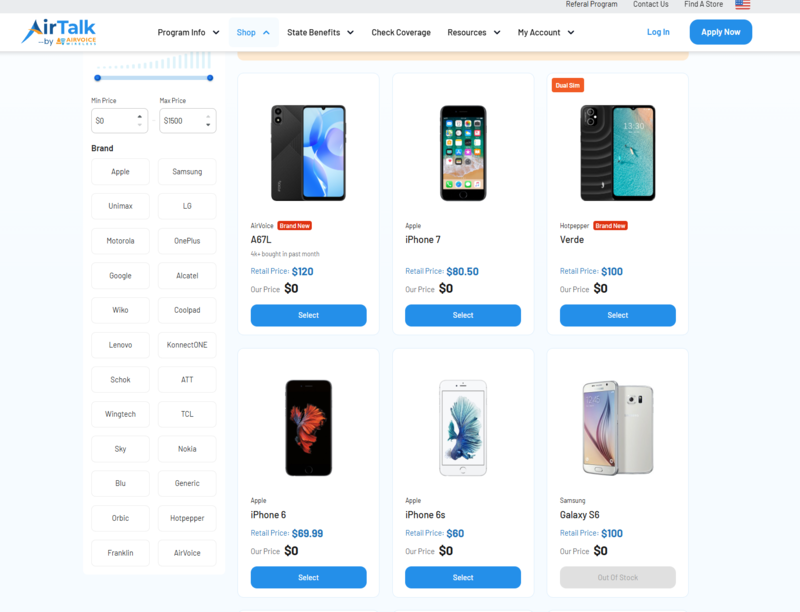
Please note that device availability changes with location and inventory, and some higher-end phones may be discounted rather than free.
Applicants can review the current phone selection and plan details before completing enrollment.
IMPORTANT: The government does not subsidize devices. Lifeline programs cover basic service costs. Free or discounted devices, upgrade plans, or top-ups are exclusive benefits provided by Cintex and AirTalk Wireless as part of the promotional offers. Terms and conditions apply. Limited-time promotion—offers vary by state, stock availability, and eligibility.
Conclusion
Can you use a phone without a SIM card? Absolutely, especially when Wi-Fi covers most of your needs. Apps, media, GPS, photos, games, and internet-based communication can all remain useful.
The limitation is mobility. Once you need dependable calls, texts, or internet away from Wi-Fi, an active SIM, eSIM, or affordable mobile plan becomes much more important.