If you’re wondering whether the iPhone X eSIM is supported, you’re not alone. As more carriers adopt eSIM technology, many iPhone users want to know if older Apple devices can take advantage of digital SIM activation.
In this guide, you’ll learn whether the iPhone X is eSIM-compatible, a list of iPhones supporting this technology, and the alternatives available if your device doesn’t support eSIM.
1. Does iPhone X have eSIM?
No, the iPhone X does not support eSIM technology.
Although this phone model introduced major features such as Face ID and wireless charging, Apple did not integrate eSIM support.
eSIM functionality was initially included in the iPhone XS, iPhone XS Max, and iPhone XR in 2018.
In most regions, these models introduced Dual SIM on iPhone through one SIM card and one eSIM, though SIM support can vary by country or region.
If you own an iPhone X and want to use eSIM, you need a newer eSIM-compatible iPhone and a carrier or eSIM provider that supports eSIM.
In fact, you can easily check whether your iPhone X supports eSIM right from the device in two ways: from Settings or by looking for an EID.
- Navigate to Settings > Cellular or Mobile Data. If you don’t see “Add eSIM”, “Set Up Cellular” or “Add Cellular Plan,” your iPhone does not support eSIM.
- Alternatively, you may launch the Phone app and enter *#06#. If an EID appears, the device has eSIM hardware; if no EID appears, it likely does not support eSIM.

2. What Kind of SIM Card Does iPhone X Use?
iPhone X eSIM feature is not available. Instead, it uses a nano SIM card, the smallest physical SIM format commonly used in modern smartphones.
You will need to insert a physical nano SIM from your carrier to access cellular service. This brings a few pros and cons as follows:
| Pros | Cons |
| – Easy to transfer between compatible unlocked devices. – Widely supported by carriers around the world. – Doesn’t require digital activation or an internet connection to get started. | – Must be physically inserted or replaced when switching carriers. – Can be lost or damaged during removal or installation. – Doesn’t support the flexibility to manage multiple digital plans, unlike an eSIM-enabled device. |
3. Which iPhone Models Support eSIM Technology?
If iPhone X eSIM is not eSIM-compatible, which iPhone models should you use?
Apple may not always be the first to adopt new technology, but when it is, it goes all in. They’ve now officially entered eSIM-only land, with certain models no longer including a physical SIM slot globally.
Here’s a list of eSIM-compatible iPhones:
- iPhone 17 series (US models eSIM-only; international models keep nano-SIM slot)
- iPhone Air (eSIM-only worldwide)
- iPhone 16e/ 16 / 16 Plus / 16 Pro / 16 Pro Max
- iPhone 15 / 15 Plus / 15 Pro / 15 Pro Max
- iPhone 14 / 14 Plus / 14 Pro / 14 Pro Max
- iPhone 13 / 13 mini / 13 Pro / 13 Pro Max
- iPhone 12 / 12 mini / 12 Pro / 12 Pro Max
- iPhone SE (3rd gen, 2022)
- iPhone SE (2nd gen, 2020)
- iPhone 11 / 11 Pro / 11 Pro Max
- iPhone XS / XS Max / XR
However, note that Apple sells region-specific models of the same iPhone.
In the majority of the world, XR and later versions support eSIM technology. But in certain markets, eSIM compatibility is disabled or limited, and dual traditional SIMs are used instead.
As a result, if you purchased your phone overseas or are considering a grey market import, you should double-check the version you have before relying only on digital connectivity.
>>> Read more: Does iPhone 11 Have SIM Card? Which iPhones Still Do
4. What if You Already Purchased an eSIM?
If you’ve already purchased an eSIM but discovered that your iPhone X eSIM is not available, don’t worry!
Depending on your eSIM provider’s policy, you can gift the eSIM to a family member or friend who has an unlocked, eSIM-compatible smartphone.
Before doing so, check whether the eSIM has already been activated, as many eSIM profiles and QR codes are intended for one-time use and may not be transferable after installation.
Another option is to use the eSIM on a different compatible device. If you don’t currently own an eSIM-enabled phone, upgrading may be worthwhile.
Eligible low-income households can explore the Lifeline program.
Rather than offering benefits directly, Lifeline works through approved Eligible Telecommunications Carriers (ETCs), which manage enrollment and deliver the supported services.
You may qualify for Lifeline if:
- Your household income is at or below 135% of the Federal Poverty Guidelines, or
- You or any member of your family participates in government assistance programs such as SNAP, Medicaid, SSI, Federal Public Housing Assistance, or certain Tribal assistance programs.
Depending on your state, eligibility, and available inventory, providers like Cintex Wireless may offer discounted or free eSIM-compatible smartphones, making it easier to use the digital plan you’ve already purchased.
As Cintex Wireless continues to merge its services with AirTalk Wireless, eligible customers can apply at airtalkwireless.com to receive Lifeline-supported wireless service and device offers.
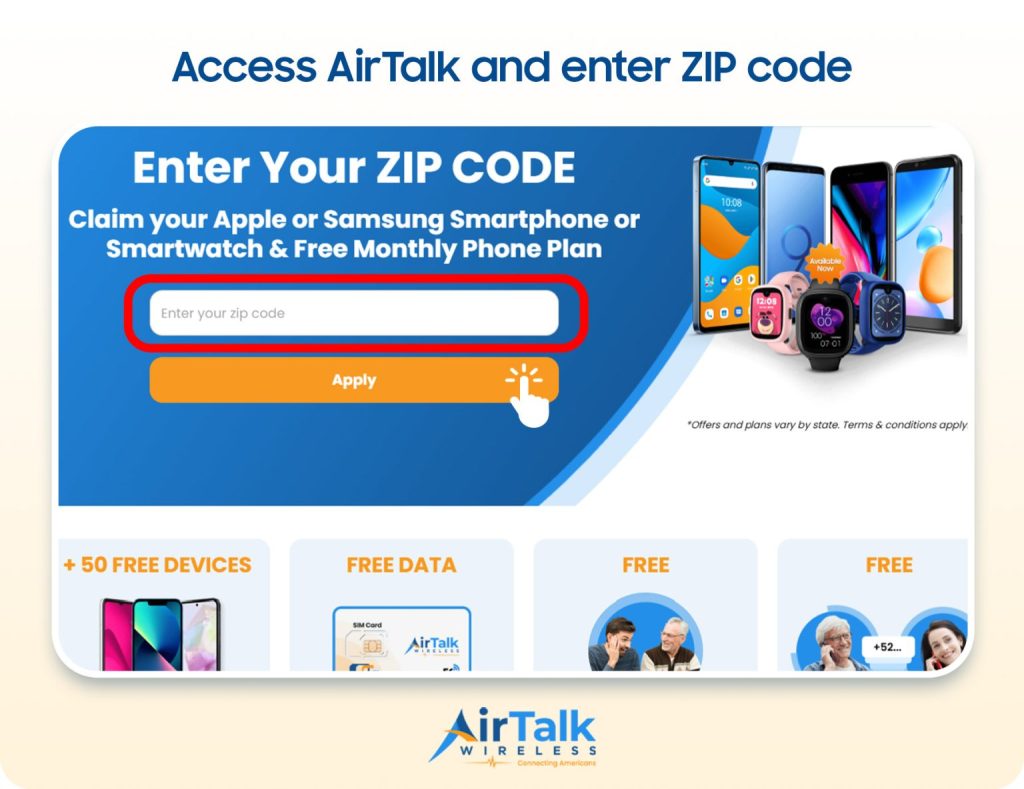
If you’re looking to upgrade to an eSIM-compatible phone, here’s how to apply:
- Visit the AirTalk Wireless website and enter your ZIP code to confirm service availability in your area.
- Choose an available Lifeline plan and device based on your location, eligibility, and current inventory.
- Complete the online application by providing your personal information. Upload any required documents to verify your identity and Lifeline eligibility, if requested.
- Wait for approval through the Lifeline verification process. Receive and activate your new device or SIM, then install your eSIM if your selected phone supports it.
DISCLAIMER: The government does not cover device costs, only basic service through Lifeline. Any free or discounted devices, upgrades, or top-ups are limited-time Cintex and AirTalk Wireless offers and may vary by state, eligibility, and availability. Terms and conditions apply.
Conclusion
To sum up, the iPhone X eSIM feature is not available because it only supports a physical nano SIM card.
If you want the flexibility of eSIM, such as digital activation or Dual SIM functionality, you’ll need to upgrade to a newer iPhone model that supports eSIM.
Before switching carriers or purchasing a new device, be sure to confirm eSIM compatibility with both your iPhone model and your mobile provider.