A SIM that keeps disconnecting can interrupt calls, texts, and mobile data without warning. Sometimes the phone stops detecting the card, while other times the SIM stays visible but the network drops.
So, why does my SIM card keep disconnecting? The problem may come from the SIM, phone, settings, compatibility, or local network conditions.
1. Why Does My SIM Card Keep Disconnecting?
SIM detection problems and ordinary signal loss are not always the same.
Messages such as No SIM often point to the card or tray, while No Service can be related to coverage or the carrier network.
Below are some common reasons making you wonder why does my SIM card keep disconnecting:
Physical Damage or Poor Contact
A scratched SIM, bent tray, dust, or poor contact with the reader can cause the card to disconnect intermittently.
This can become more likely if the SIM or tray has been handled roughly, inserted incorrectly, or damaged after a drop.
Network or Carrier Issues
A temporary outage, suspended account, or incomplete activation can interrupt service even when the SIM itself is working normally.
If nearby users on the same carrier also lose signal, the network is more likely to be responsible.

Software or Network Settings Issues
Outdated software, incorrect network settings, or a temporary system glitch may interfere with the cellular connection.
A restart, available carrier or network updates, or a mobile-network reset can help resolve software-related connection problems.
SIM Card or Device Compatibility Issues
The SIM may fit the phone physically but still fail to provide reliable service if the device is locked to another carrier or does not support the required network bands and technologies.
Imported or older phones deserve extra compatibility checks because regional hardware can differ.
If the issue began after moving the SIM to another phone, run the phone’s IMEI through the carrier’s compatibility checker. A card can fit correctly even when the device is not fully supported.
Weak or Unstable Signal
Poor coverage can cause the phone to switch between Service, SOS, and No Service.
If the problem only happens in certain buildings or locations, a weak signal is more likely than a faulty SIM.
2. How to Fix SIM Card Disconnection?
Now you know why does my SIM card keep disconnecting. So, how to solve this issue?
The best approach is to start with the simplest checks and move to hardware or carrier support only if the problem persists.
If you use an eSIM, skip the physical cleaning and reseating steps. Instead, confirm the line is enabled in cellular settings and contact the carrier if the eSIM repeatedly loses activation or service.
Restart Your Phone
A restart can clear temporary software errors and force the device to reconnect to the carrier. It is one of the first steps to take when a SIM is not working correctly.
You can also turn on Airplane Mode, then switch it off to refresh the cellular connection.
Remove and Reinsert the SIM Card
Power off the phone, open the tray, and carefully remove the card. Also, check that the SIM matches the tray shape and sits flat before inserting it again.
A loose or slightly shifted SIM can repeatedly lose contact with the reader.
Clean the SIM Card and Device Tray
Why does my SIM card keep disconnecting? Dust or residue can interfere with the contact points.
To properly clean a SIM card, gently wipe it with a dry, lint-free cloth and inspect the tray for visible dirt. Moreover, avoid pouring liquid directly onto the card or tray.
Test the SIM Card with Another Device
Place the card in another unlocked and compatible phone. If the same problem follows the SIM into another compatible phone, the SIM itself or the carrier line/account is more likely to be involved.
If the card works normally on the second phone, the original device may have a damaged reader or tray, a software issue, or a compatibility problem.
Reset Network Settings
A network reset can help when the phone detects the SIM but keeps losing carrier service. This removes saved network preferences and returns cellular settings to their defaults.
Keep in mind that saved Wi-Fi networks and some VPN settings may also be removed, depending on the phone.
3. Is the Problem the SIM, the Phone, or the Network?
Knowing the underlying cause can help you select the best troubleshooting. A few simple comparisons can quickly narrow the problem down.
| What happens | Most Likely Cause |
| The same SIM fails in several compatible phones | SIM or carrier account issue |
| Different working SIMs fail in one phone | Phone, tray, or SIM reader problem |
| Several nearby users on the same carrier lose service | Carrier outage or network issue |
| The problem only appears in one location | Weak local coverage |
| “No SIM” appears and disappears | SIM, tray, or contact issue |
Testing both the card and device separately is usually more useful than repeatedly restarting the same phone.
If the behavior follows the SIM, focus on the card or carrier account. If the problem persists with one phone, the device is more likely to be the cause.
4. Additional Tips to Avoid SIM Card Disconnection
To keep using your SIM card effectively, keep it clean and avoid removing it unless necessary.
Avoid unnecessary handling because repeated removal increases the chance of bending the tray, misaligning the SIM, or contaminating the contacts with dust or oils.
It also helps to keep the phone software and carrier settings up to date because software and carrier updates can resolve network-registration and SIM-related problems.
Besides, a protective case can reduce overall impact damage if the phone is dropped, which may also help protect internal components indirectly.
When switching devices, make sure the new phone is unlocked and compatible with the carrier before moving the SIM.
If the phone supports eSIM, digital activation can also eliminate several physical failure points, since there is no removable card or tray involved.
5. When Should You Replace Your SIM Card?
It is so troublesome when the SIM is cracked, deeply scratched, repeatedly loses detection, or fails in several compatible phones.
If cleaning, reseating, and basic troubleshooting do not help, the SIM may be damaged, failing, or no longer provisioning correctly, so asking the carrier for a replacement is reasonable.
Eligible low-income households can consider Lifeline to save on service costs.
The federal program helps reduce the cost of qualifying phone service or internet service, with eligibility generally based on household income or participation in approved assistance programs.
Lifeline benefits are non-transferable and are delivered through Eligible Telecommunications Carriers, or ETCs.
For example, Cintex Wireless, which is merging with AirTalk Wireless, can offer applicants the following benefits:
- A free or discounted phone with a SIM card (varies by state and inventory)
- Unlimited talk and text
- Generous monthly data
- International calling to supported destinations
- No long-term service contract
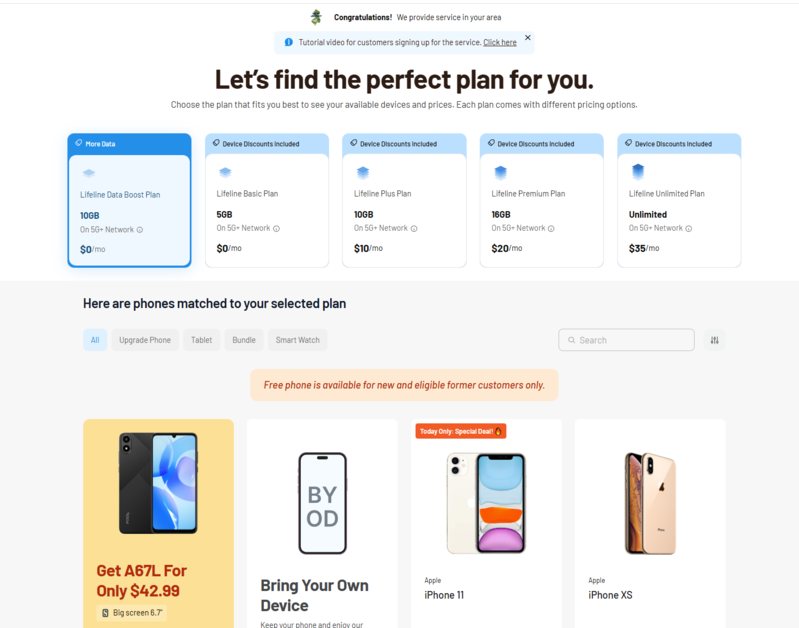
IMPORTANT: The government does not subsidize devices. Lifeline programs cover basic service costs only. Free or discounted devices, upgrade plans, or top-ups are exclusive benefits provided by Cintex and AirTalk Wireless as part of the promotional offers. Terms and conditions apply. Limited-time promotion—offers vary by state, stock availability, and eligibility.
Conclusion
Why does my SIM card keep disconnecting? The answer usually comes down to one of three areas: the SIM, the phone, or the network.
To solve this issue, start by restarting, reseating the card, cleaning the contacts, and testing the SIM in another compatible phone. If the same problem follows the card, replacement or carrier support is the next practical step.