When changing phones, switching carriers, or traveling abroad, it is easy to assume that moving a SIM card from one device to another will be straightforward. But are SIM cards universal?
In fact, several factors can affect whether a SIM works properly, from its physical size and network compatibility to carrier restrictions and device support. This guide explains what you need to check to ensure your SIM card works in a different phone.
1. Are SIM Cards Universal?
SIM cards are not universally compatible with every phone or mobile network, even though they follow standardized formats and sizes.
A SIM may physically fit into another device yet still fail to work because of factors such as carrier locks, network frequency support, SIM format, device compatibility, or differences between regional phone models.
Therefore, it is important to check both the phone’s and the carrier’s requirements before moving a SIM card to a different device.
2. Why One SIM Card May Not Work in Every Phone
Several factors can prevent a SIM card from working in another device. Here are the details:
SIM Card Size
Are SIM cards universal? They come in different physical sizes, including standard, micro, and nano.
Most modern smartphones use nano-SIM cards, but an older device may require a different size, so the card must physically fit the phone’s SIM tray.
Please note that SIM adapters can sometimes help a smaller card fit a larger slot, but a loose or poorly fitted adapter can become stuck, prevent proper contact, or damage the tray or reader.
Unlocked vs Locked Phone
A carrier-locked phone may only accept SIM cards from its network.
If you insert a SIM from another provider, the phone may show an error or fail to connect until the device is officially unlocked.
For this reason, if you plan to use a SIM from another carrier, confirm that the phone is unlocked and compatible with the new network.
Network Compatibility
Even if the SIM fits and the phone is unlocked, the device still needs to support the network technologies and frequency bands used by the carrier.
A mismatch can lead to limited coverage, slower service, or no connection at all.
The SIM itself does not determine the phone’s maximum network capability. Features such as 4G or 5G also depend on the device, plan, carrier provisioning, and local coverage.
Regional Differences
Phones and mobile networks can have different specifications depending on the country or region where they are sold.
Phones sold in different countries can support different network bands, SIM configurations, or carrier features. Your SIM may remain valid, but the phone still needs to support the networks used at your destination, and your carrier must allow roaming or the use of that line there.
Physical SIM vs eSIM Support
An eSIM, or Embedded Subscriber Identity Module, is a digital SIM card that is integrated into your device’s circuit board.
The use of an eSIM allows compatible devices to activate a mobile plan digitally without inserting a removable SIM card, as long as the carrier supports eSIM for that device and service.
Although this technology was initially developed for mobile phones, it has since been incorporated into other devices, including smartwatches, tablets, and certain laptops.
Nowadays, some phones support only physical SIM cards, while others support eSIM or both.
If a device is eSIM-only, you cannot insert a physical SIM and will need to activate a compatible digital SIM profile through your carrier.
>>>Read more: eSIM Vs Nano SIM: Which One Is Better In 2026
3. Check Compatibility Before Moving or Buying a SIM
Are SIM cards universal? The answer is no.
Thus, before moving your current SIM to another phone or purchasing a new one, you should check that the device and carrier are compatible to prevent activation, signal, or network problems later.
- SIM format: Confirm whether the phone uses nano-SIM, another physical SIM size, eSIM, or supports both.
- Unlock status: Confirm that the phone is carrier-unlocked if you want to use a SIM from a different network.
- IMEI check: Use the carrier’s IMEI compatibility checker, when available, to confirm that your specific device can work on its network.
- Network bands: Check that the phone supports the frequency bands and network technologies used by your chosen carrier, especially for 4G and 5G service.
- eSIM support: If you plan to use an eSIM, verify that your phone model supports eSIM and that the carrier offers eSIM service for that device.
- Carrier requirements: Some providers have additional activation, device, or account requirements, so review their official compatibility guidelines before switching.
- Active service: Make sure the mobile line is activated, and the account is in good standing. An expired, suspended, or unactivated line may not work even when the SIM and phone are technically compatible.
4. Before Switching SIMs, Make Sure Your Phone Works With the New Service
As mentioned earlier, it is crucial to confirm that your phone is unlocked and compatible with the provider’s network before moving to a new SIM or carrier.
If your current device is not compatible, you may need a different phone or service setup.
Luckily, eligible low-income households can use the federal Lifeline program to reduce the cost of qualifying phone service. The program’s eligibility is based on income or participation in other qualifying programs.
Notably, the program does not handle everything. It works with Eligible Telecommunications Carriers (ETCs) to provide the benefit.
ETCs, such as Cintex Wireless, currently offer Lifeline plans that may include a promotional smartphone and a free SIM card.
Importantly, it is merging with AirTalk Wireless to offer applicants additional benefits, such as free talk and text, free international calling to various regions, generous monthly data, etc.
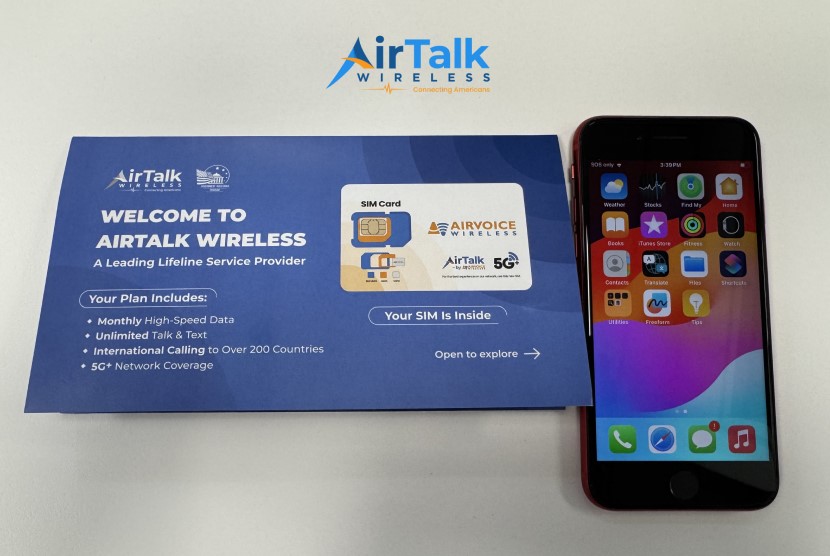
Moreover, if your existing phone is unlocked and compatible, AirTalk’s BYOD option may let you keep your device and activate Lifeline service with a supported physical SIM or eSIM, rather than replacing the phone.
Just note that Lifeline service is nontransferable.
Your discounted phone or internet service cannot be provided, sold, or assigned to any other individual, regardless of whether they are also eligible for the program.
Note: Eligibility varies by state and program. Offers depend on availability and qualifications. Cintex and AirTalk Wireless operate under the federal Lifeline Program as Eligible Telecommunications Carriers (ETCs). Service is non-transferable and limited to one service per household.
FAQs
Can I put my SIM card into any unlocked phone?
You cannot always put your SIM card in any unlocked phone. Your device must support the SIM type, network bands, and carrier technology required by your mobile provider.
Will a nano-SIM work in every phone with a nano-SIM slot?
A matching nano-SIM slot only confirms the physical fit. The phone must also support the carrier’s network, and if the SIM comes from a different carrier, the phone generally needs to be unlocked.
Can a 4G SIM work in a 5G phone?
A 4G SIM can generally work in a 5G phone. However, access to certain 5G services may depend on your carrier, plan, SIM provisioning, and device compatibility.
Can I use a SIM from one carrier in another carrier’s phone?
Generally, you can use a SIM card from one carrier in another carrier’s phone if the phone is unlocked and compatible with the new carrier’s network.
Does eSIM work with every carrier?
eSIM does not work with every mobile carrier. Your phone needs to support eSIM and the carrier must offer eSIM service for your device and plan.
Conclusion
So, are SIM cards universal? Not exactly.
While many modern phones use the same physical SIM size, compatibility still depends on factors such as carrier lock status, network bands, device support, and whether the phone uses a physical SIM or eSIM.
Before switching SIM cards or providers, always check that both your device and SIM are compatible with the new network.