
Have you ever been talking to someone when an important call suddenly comes through? You may feel torn between answering the new call and staying on the line with the person you’re already speaking to.
Missing that second call can be frustrating, especially when you’re expecting news from work, family, or a healthcare provider.
That’s where what is Call Waiting iPhone becomes a useful topic to explore, particularly if you want more control over incoming calls.
1. What Is Call Waiting on iPhone?
Call Waiting is a phone service that alerts you when someone tries to call while you’re already on another call. Instead of sending the new caller straight to voicemail immediately, your iPhone can notify you with a tone and display the incoming call on your screen.
However, there’s an important detail: Call Waiting is a carrier-supported service, not simply an alert built into every iPhone.
Your wireless provider and cellular network must support it for the feature to work. Some carriers also manage the setting on their end, so you may not always be able to change it directly from your device.
2. What Happens When a Second Call Comes In?
When Call Waiting is enabled, your iPhone can alert you to another incoming call while you’re already talking.
Depending on your carrier and network, you may see these options:
- Hold & Accept: Put your current call on hold and answer the new one.
- End & Accept: End your current call and answer the second caller.
- Send to Voicemail: Decline the incoming call without ending your current conversation.
Other options may let you respond with a message or set a reminder to call back.
After accepting the second call, you can tap Swap to switch between conversations or Merge Calls to create a conference call, if supported by your carrier.
Note: The available buttons may vary by network, and conference calling isn’t supported in every configuration.
>>> Also read: Why Is My iPhone Not Ringing When I Get A Call Or Text? Easy Fixes
3. How to Turn Call Waiting On or Off on iPhone
You can usually manage Call Waiting directly through your iPhone settings.
- Open Settings.
- Tap Apps > Phone.
- Select Call Waiting.
- Turn the switch on to receive second-call notifications or off to disable them.
On older iOS versions, you may find Phone directly in Settings.
When Call Waiting is turned off, incoming calls received while you’re already on another call generally go directly to voicemail, if available through your carrier.
Important: Call Waiting requires carrier support. If the setting is missing, unavailable, or won’t save, contact your wireless provider to confirm whether it can be activated on your line.

>>> Also read: How To Call No Caller ID: Can You Choose The Label?
4. Should Call Waiting Be On or Off?
The best setting depends on how you use your phone. When considering what is Call Waiting iPhone and whether you should enable it, think about how often you receive calls that cannot wait.
Keep Call Waiting on if you:
- Regularly receive time-sensitive calls.
- Want to switch between conversations without hanging up.
- Prefer deciding whether to answer each incoming call.
Consider turning it off if you:
- Prefer uninterrupted conversations.
- Find second-call notifications distracting.
- Would rather let callers leave voicemail.
Even with Call Waiting enabled, you don’t have to answer every incoming call. The feature simply gives you more flexibility.
5. Why Isn’t Call Waiting Working on Your iPhone?
A few carrier or device issues can prevent Call Waiting from working as expected. Try these checks before contacting your provider.
- The Call Waiting option is missing or grayed out
Your carrier or cellular network may not support changing the feature directly through iPhone settings. Contact your provider to confirm availability and ask whether they can activate it for you.
- The setting won’t save
Check that your iPhone has cellular service, then restart the device and try again. You should also install any available iOS updates and carrier settings updates. If the change still won’t stick, ask your carrier to check your account.
- The second call goes to voicemail
If you use Dual SIM, remember that Call Waiting normally works for incoming calls on the same line.
Receiving calls on your other line while one is busy may require Wi-Fi Calling and an available data connection. You may also need to enable Allow Cellular Data Switching under your cellular settings.
Without the necessary setup, calls to your other number may go straight to voicemail, sometimes without a missed-call notification.
If the issue continues, contact your carrier to check your line’s configuration.

6. Keep Important Calls Coming Without a Bigger Phone Bill
Call Waiting helps you stay available when another person tries to reach you, but reliable phone service also needs to fit your budget. You shouldn’t have to choose between keeping important calls coming through and managing your monthly expenses.
Fortunately, eligible households can save through the federal Lifeline program.
Lifeline provides a monthly discount on phone service or internet service through participating providers. You may qualify through:
- Participation in Medicaid, SNAP, SSI, or Federal Public Housing Assistance.
- Household income at or below 135% of the Federal Poverty Guidelines.
To get more than just a discount, households can apply to Eligible Telecommunications Carriers (ETCs). These carriers tend to offer a free or heavily discounted device to make the Lifeline support more long-lasting.
Cintex Wireless has served eligible customers as an ETC and has merged into AirTalk Wireless. Through the merger, eligible customers can explore affordable plans with features designed to make everyday communication easier:
- Unlimited talk and text with monthly data.
- Call Waiting, voicemail, and three-way calling to help you manage everyday conversations.
- Phone offers, including free or heavily discounted devices that may give you an opportunity to upgrade an older phone.
Found you qualify and want to enjoy these benefits while keeping Call Waiting available? Here’s how to apply:
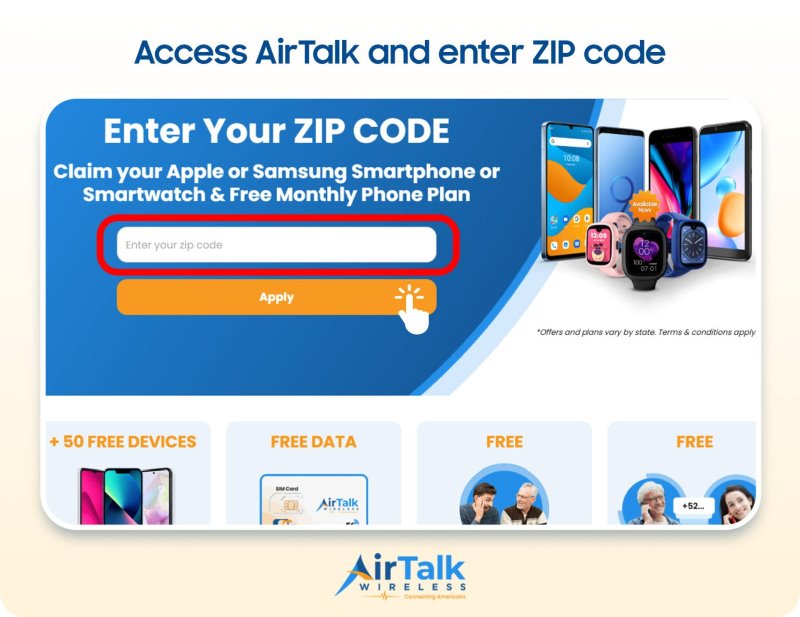
- Visit the AirTalk Wireless application page. Enter your ZIP code to check available plans and device offers in your area.
- Select an available plan and phone option, if offered.
- Complete the application and provide any requested eligibility documents.
- Submit your application and wait for the eligibility decision.
With the right Lifeline plan, you can keep in touch with the people who matter without taking on an unnecessarily high monthly phone bill. Check your eligibility and apply with AirTalk Wireless today!
DISCLAIMER: The government does not subsidize devices. Lifeline programs cover basic service costs only. Free or discounted devices, upgrade plans, or top-ups are exclusive benefits provided by AirTalk Wireless and Cintex Wireless as part of the promotional offers. Terms and conditions apply. Limited-time promotion—offers vary by state, stock availability, and eligibility.
7. FAQs
What Does Call Is Waiting Mean?
“Call is waiting” generally means the person you’re calling is already on another call, and their network has indicated that your call is waiting. It doesn’t mean they’ve answered or rejected you.
How Can You Tell If Someone Is Call Waiting?
You generally can’t tell for certain whether someone has Call Waiting enabled. They may receive a second-call alert while talking, but your phone doesn’t necessarily show you that information.
What Happens When You Call Someone and It Says Call Waiting?
The person you’re calling may already be on another call. If Call Waiting is active, they may be able to answer your call, decline it, or let it go to voicemail.
What Is the Difference Between Call Waiting and Call Forwarding?
Call Waiting alerts you to another incoming call while you’re already talking. Call Forwarding redirects incoming calls to another number based on your settings and carrier support.
How to Fix the “Could Not Save Call Waiting Setting” Error on iPhone?
Check your cellular connection, restart your iPhone, and try again under Settings > Apps > Phone > Call Waiting. If the setting still won’t save, contact your carrier to confirm support and activation.
Conclusion
When you know what is Call Waiting iPhone can give you a simple way to stay available without having to end every conversation when another call comes through. Whether you keep it enabled depends on how often you need to handle overlapping calls.
For most people, leaving it on provides more flexibility, especially when an important call could arrive unexpectedly. And if the feature isn’t working as expected, confirming your carrier’s support is often the best place to start.