Are you searching for free government phone locations near you but feel confused about where to go? Keep reading to know the safe way to apply, and keep reading to find the best option for your situation.
1. Where to Get a Free Government Phone?
Many people search for free government phone locations and wonder where to apply. A free government phone is not handed out by the government directly. You receive the device through an approved Lifeline provider after you qualify for the federal Lifeline program.
The program is funded through an FCC Lifeline subsidy. The subsidy lowers your monthly phone bill so providers can offer $0 plans and free or discounted devices.
Here is how the subsidy works:
- Standard Lifeline discount: about $9.25 per month
- Tribal lands support: up to $34.25 per month
- One benefit per household
You can qualify for Lifeline in two ways:
- Program-Based: If you receive SNAP, Medicaid, SSI, Section 8, or Veterans benefits.
- Income-Based: If your household income is at or below 135% of the Federal Poverty Guidelines.
If you qualify, you can get a free device in two main ways:
- Retail stores
- Online application through approved Lifeline providers
Inventory depends on your ZIP code and current stock. Some locations may offer limited models, while online applications often show a wider catalog, including free 5G government phones when available.
Before you visit any location, confirm that the provider is Lifeline-approved. Check eligibility rules and available devices in advance. This step helps you avoid misinformation and wasted time.
If no nearby store appears in your area, applying online through trusted Lifeline phone service providers may give you faster approval and more device options.

>>> Read more: Which is the Trusted Free Government Phone Providers Near Me?
2. Types of Free Government Phone Locations
Free government phone locations can be either physical retail stores or online provider websites. Both options are operated by approved Lifeline providers and follow FCC rules.
The right option depends on your comfort level and how quickly you want to receive your phone.
2.1. Retail Store Locations (In-Person Help)
Some Lifeline providers operate physical retail stores or authorized partner outlets. These free government phone locations are helpful for people who prefer face-to-face assistance.
This option works well for:
- Seniors
- First-time applicants
- People who need help uploading documents
In-store staff can assist with:
- Checking your Lifeline eligibility
- Uploading required documents
- Explaining available phone models
- Activating your device before you leave
Retail locations can make the process feel simpler and more personal.
However, there are a few limitations:
- Device inventory is usually smaller than online
- Premium models may not be available in-store
- Store hours vary by location
- Wait times may depend on demand
If you prefer direct help and live near a store, this can be a good choice.
2.2. Online Free Government Phone Portals
Most applicants now choose to apply free gov phone online after knowing there are alternatives other than going directly to free government phone locations. Online Lifeline applications have become the most popular option because they are faster and more convenient.
Applying online allows you to:
- View a larger device inventory of free iPhone and Samsung options (stock-based)
- Compare phone models clearly
- Get faster approval in many cases
- Receive shipping within a few business days
- Activate instantly using eSIM (when available)
- Track your order online
- Access customer support 24/7
Online systems often verify eligibility automatically. If documents are needed, you can upload them securely from your phone or computer.
For many users, this method offers more flexibility and better device options.
Tip: Even if you apply in-store or online, the most important step is to compare the benefits between different Lifeline providers. Look at device options, data plans, customer support, and approval speed before applying. So, choosing a trusted provider helps ensure a smoother experience from application to activation.
3. Trusted Free Lifeline Phone Service Providers
Choosing a trusted Lifeline provider is important when applying for a free government phone. Approved providers operate under FCC rules and follow strict eligibility and enrollment standards.
Two well-known providers are AirTalk Wireless and Cintex Wireless, both serving low-income households across the United States.
Together, these providers serve over millions users nationwide. They offer nationwide coverage, free phone options (stock-based), and discounted upgrades for newer 5G smartphones. Plan features and device availability may vary by state and ZIP code.
While plans vary by ZIP code, many users can receive:
- Free iPhone and Samsung options (based on stock availability)
- Discounted newer 5G upgrade options
- Unlimited talk and text
- Monthly data (amount varies by state and eligibility)
- Enhanced Tribal benefits where applicable
Additional features may include:
- eSIM activation for compatible devices
- BYOD (Bring Your Own Device) support
- Free shipping after approval
- Fast application processing, often same day
- Online order tracking
- 24/7 customer support
Device availability depends on location, eligibility, and inventory at the time of application.
>>> Read more: Which Are the Best Free Gov Phone Companies in the US?
4. How to Find a Free Government Phone Store Near You
If you prefer to apply in person, you can visit a retail location operated by AirTalk Wireless. Store availability depends on your state and ZIP code. Not every area has a physical location.
Below is a simple step-by-step guide to help you find free government phone locations near you.
4.1. Step-by-Step Guide: Finding an AirTalk Wireless Store
Follow these steps to find free government phone locations near you:
- Visit the official AirTalk Wireless website.
Always use the official website to avoid scams.
- Click on “Store Locator.”
This tool shows available retail locations. - Enter your city, state, or ZIP code.
The system will display nearby stores. - Review the store details.
Check the address, phone number, and hours before visiting.
4.2. Example AirTalk Retail Store Locations
Here is an example location:
Location 1:
AirVoice Retail Store – Fountain Valley
16055 Brookhurst St, Suite #F
Fountain Valley, CA 92708
Tel: (279) 888-9282
Hours: 10:00 am – 6:00 pm (Mon–Sat)
Note: Retail availability varies by state. Some areas may only offer online enrollment. If no store appears near you, you can apply online and have your device shipped directly to your home.
Or stay updated with your favorite provider for any new store openings that might be close to your location.
5. Step-by-Step: Apply for a Free Government Phone Online
Applying for a free government phone online is simple and secure when you use an approved Lifeline provider such as AirTalk Wireless and Cintex Wireless. Most users prefer online enrollment because it is faster and offers a larger device selection.
Follow the steps below to complete your application.
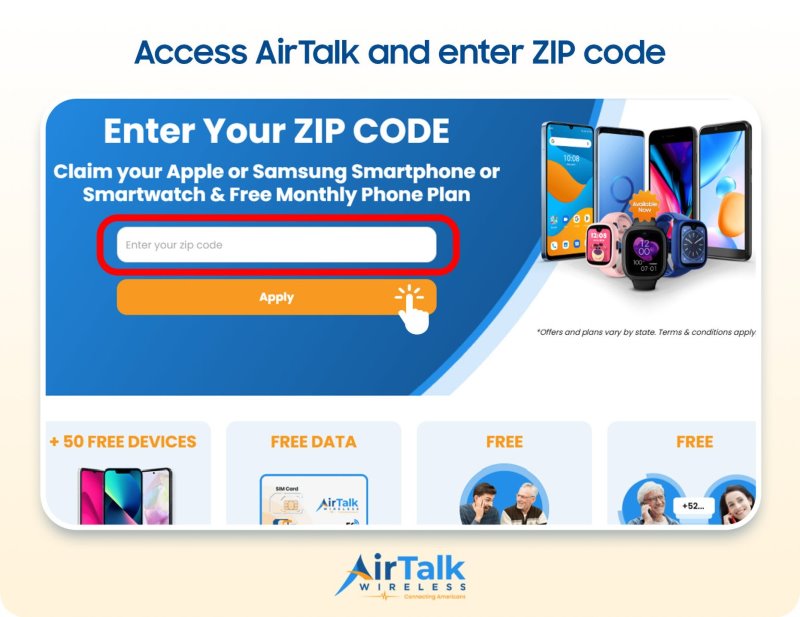
Step 1: Visit an Approved Provider Website and Enter Your ZIP Code
Go to the official website of AirTalk Wireless or Cintex Wireless.
Enter your ZIP code to see available plans and devices in your area. Lifeline benefits may vary by state, so this step is important.
Step 2: View Local Plans and Available Devices
After entering your ZIP code, you can review:
- Monthly talk, text, and data benefits
- Standard or Tribal Lifeline plans (if eligible)
- Free phone options (stock-based)
- Discounted 5G upgrade models
Device availability depends on location and current inventory.
Step 3: Enter Your Basic Information
Fill out the secure application form. You will typically provide:
- Full legal name
- Date of birth
- Home address
- Last four digits of your Social Security Number or Tribal ID
Make sure all information matches your official records.
Step 4: Upload Documents (If Required)
In many cases, the system may verify eligibility automatically.
If automatic verification fails, you may need to upload:
- A government-issued photo ID
- Proof of program participation (SNAP, Medicaid, SSI, etc.)
- Proof of income (if applying under income rules)
Upload clear and readable documents to avoid delays.
Step 5: Submit Your Application
Review your information carefully and submit the application.
Many applicants receive approval the same day. If manual review is required, it may take 1–3 business days.
Step 6: Receive Your Phone or Activate eSIM After Approval
Once approved, you will either:
- Receive your phone by mail within 7-14 business days, or
- Activate your service instantly using eSIM (if your device supports it)
Most providers also offer order tracking so you can monitor delivery.
Applying online gives you more device options, faster approval, and full tracking support. Before submitting, compare plan details and device choices to select the provider that best fits your needs.
>>> Read more: Can I Get Free iPhone 16 Pro Max in the US?
Final Words
Finding reliable free government phone locations does not have to be complicated. You can check approved Lifeline providers, compare device options, and choose whether to apply online or visit a retail store.
Many users now apply online because it offers a wider phone selection and faster approval. Review your eligibility, pick a trusted provider, and start your application today to stay connected without monthly cost stress.