A free iPhone hotspot can make it much easier to stay connected wherever you go, whether you need the internet for work, study, or everyday browsing.
The good news is that some programs and wireless providers offer ways to get a smartphone with hotspot capabilities at little to no cost. Let’s discover more in this post!
The Importance of Free iPhone Hotspot
When a solid WiFi connection is unavailable, a hotspot lets users stay connected via mobile data.
This is especially critical during emergencies, when individuals may want internet connectivity to communicate with family members, check important updates, or locate nearby resources.
Furthermore, it is especially beneficial for visitors who may not have reliable WiFi when traveling between destinations.
For students, remote workers, or anyone who needs internet on the go, having hotspot access on an iPhone is a quick and reliable way to stay connected whenever needed.
How to Use Your Phone as a WiFi Hotspot?
The type of phone you own will determine how you use it as a tethering device. The following is a guide for Apple users.
- Go to Settings > Personal Hotspot. Tap the Allow Others to Join slider. If there is no personal hotspot option, contact your carrier to see if your plan includes one.
- When the personal hotspot activates, be prepared to validate the WiFi password and phone model.
- On the device you want to connect, navigate to settings or internet access options (typically in the top-right corner of the taskbar) and identify your phone’s name among the Wi-Fi options.
- Choose your phone’s connection choice and be ready to give a password if necessary.
If you use Family Sharing, you can configure your hotspot so family members can join automatically without a password.
Go to Settings > Personal Hotspot > Family Sharing and enable the feature. Then, tap the names of your family members to see whether they need approval or can join automatically.
When you no longer need the Wi-Fi hotspot, go to Settings > Personal Hotspot and turn it off.
Tips to Maximize Your Free iPhone Hotspot
If you are struggling with a slow iPhone hotspot, try applying these methods to make it faster:
- Turn off low data mode: Disabling Low Data Mode allows your hotspot to use mobile data normally, which can improve connection speed and performance.
- Turn off low power mode: This feature may limit background activity, so turning it off can help maintain a more stable hotspot connection.
- Shorten the distance between devices: Keeping your devices close to the iPhone helps ensure a stronger and more reliable hotspot signal.
- Avoid physical and electronic interference: Place your free iPhone hotspot in an open area, away from walls or other electronic devices that may disrupt the signal.
- Restart your devices: Restarting both the iPhone and connected devices can quickly fix temporary connection or hotspot issues.
- Close excess open apps: Closing unnecessary apps frees up system resources and can help your hotspot run more smoothly.
Get Your Free Government iPhone with Lifeline Program
While a free iPhone hotspot can be extremely helpful, many people simply cannot afford a device.
With the high cost of smartphones, buying a new device can be difficult for low-income individuals or families.
Fortunately, the Lifeline program and its providers can offer you a solution.
Lifeline is a government subsidy that helps qualified individuals afford phone service. It prioritizes service cost, while approved providers handle enrollment and eligibility verification, plan features, and device availability.
Because Lifeline covers the service rather than a specific phone model, companies such as Cintex Wireless may offer a free government iPhone as part of enrollment or a promotional deal.
| UPDATES: Cintex Wireless is combining with AirTalk Wireless. As a result of this transition, several applications have redirected to airtalkwireless.com, where customers may enjoy speedier activation, greater 5G coverage, and improved iPhone availability. |
Lifeline Qualifications
If you meet the income or program requirements, you may be eligible for a free or reduced-cost iPhone through Lifeline.
Your household income is at or below 135% of the Federal Poverty Guidelines. This applies to both single- and multi-person households. However, income restrictions vary according to family size.
Alternatively, you also qualify if you or someone in your home participates in any of the following programs:
- SNAP / EBT
- Medicaid
- SSI (Supplemental Security Income)
- Veterans Pension or Survivors Pension
- Section 8 / Public Housing
- Tribal Programs, including: BIA General Assistance, Tribal TANF, and FDPIR
If you get benefits from a qualifying program, you may be approved more quickly since your information is easier to match.
>>>Read more: Who Has Free Phones? Top Providers With The Best Phone Offers
How to Apply
Follow these steps to claim a device and activate your free iPhone hotspot:
Step 1: Check Service Availability
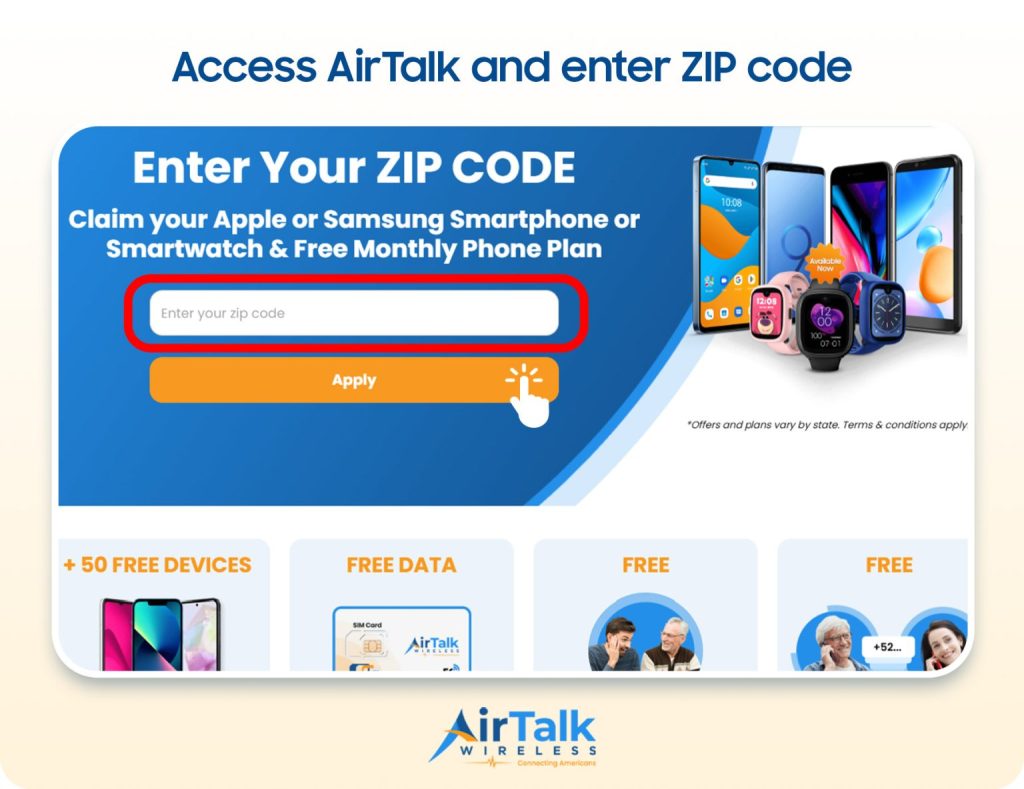
Go to airtalkwireless.com and enter your ZIP code to confirm whether the service is available in your area. This step also shows the Lifeline plans and device options currently offered in your state.
Step 2: Choose a Lifeline Plan and an iPhone
Next, select a Lifeline plan that includes monthly data. After that, you can view the free iPhone models available in your area. The available devices may vary depending on your state and current inventory.
Step 3: Provide Eligibility Documents (If Needed)
Some applicants may need to upload documents to verify eligibility. This may include proof of participation in qualifying government programs or proof of income.
Ensure the documents are clear and accurate to speed up the verification process.
Step 4: Submit Your Application and Wait for Approval
Carefully review all the information you entered before submitting your application. AirTalk Wireless will then verify your eligibility in accordance with the Lifeline program guidelines.
Once approved, your iPhone will be processed and shipped to the address you provided, and tracking information is typically sent when the device is dispatched.
Conclusion
Ultimately, having access to a free iPhone hotspot can make a big difference for people who need reliable internet on the go. Fortunately, through programs like Lifeline, eligible individuals may even have the opportunity to receive a free iPhone with mobile data, making hotspot connectivity more accessible and affordable.


