A smaller SIM does not always mean that you need a new mobile line. When an older phone, tablet, or hotspot uses a larger SIM slot, a SIM card adapter can fill the extra space and keep the smaller card seated properly inside the device.
The accessory looks simple, but a poor fit can bend the SIM, jam the tray, or damage the reader. This guide covers what an adapter actually does, which size you need, how to install one safely, and what to consider when an adapter cannot solve the underlying problem.
1. What Is a SIM Card Adapter?
A SIM card adapter is a thin frame, usually made of plastic, that holds a smaller physical SIM so it can fit into a larger SIM slot.
The adapter itself contains no electronics and does not change anything about the mobile account or network connection.
For example, a nano-SIM can fit into a nano-to-micro adapter and then be inserted into a device designed for a micro-SIM. A micro-SIM can similarly be fitted into a larger standard-SIM frame.
The adapter simply keeps the contacts aligned with the phone’s SIM reader.
However, it cannot unlock a carrier-locked phone, turn a physical SIM into an eSIM, improve signal strength, activate service, or make an incompatible network work.

2. Why Use a SIM Card Adapter?
The most outstanding benefit of a SIM card adapter is device compatibility.
A newer nano-SIM may work perfectly with your mobile plan, while an older phone, tablet, router, or portable hotspot still expects a micro or standard-size card.
When physical size is the only issue, an adapter can let the smaller SIM remain in use instead of requesting a larger replacement card.
This can be convenient when you occasionally move one line between a newer smartphone and an older backup device.
Additionally, a SIM card adapter is helpful when traveling. A traveler may have a nano-SIM from a local carrier but need to place it temporarily in an older hotspot or secondary phone with a larger tray.
The adapter handles the physical size difference without modifying the SIM itself.
3. Match the Adapter to the Right SIM
A SIM adapter only works when the smaller card and larger slot match the correct combination.
Before inserting anything, identify both the SIM currently in your hand and the size required by the device.
A nano-SIM is currently the smallest common removable format, while micro and standard SIM cards are larger.
An adapter can therefore build a smaller SIM up to a larger size, but it cannot safely shrink a larger card.
If you have a micro-SIM and the new phone only accepts nano-SIM, do not try to solve the problem with an adapter.
You need a correctly sized replacement from the carrier instead. Cutting or filing the card can damage the contacts and leave it stuck inside the tray.
Quality also matters. A good adapter should hold the card firmly, remain flat, and have no gaps around the edges.
Avoid loose adapters or products that require tape to hold the SIM in place, because poor alignment can cause the card or adapter to catch inside the tray or reader.
>>>Read more: What Is A SIM Card Reader For iPhone? Common Issues & Fixing Tips
4. How to Use a SIM Card Adapter?
Start with the correct adapter size, and power off the device first if the manufacturer recommends it or if you prefer the extra precaution.
- First, remove the smaller SIM from its current phone and place the adapter on a flat surface.
Fit the SIM into the adapter so that its shape and angled corner line up with the opening. The card should sit level with the frame rather than sticking above it.
- Next, check the adapter from both sides. The SIM should remain firmly in place when you lift it, and the frame should not be bent or cracked.
If the card moves around freely, use a better-fitting adapter rather than adding tape or glue.
- Now, insert the adapter slowly into the SIM slot or tray.
The frame should move in without resistance. If it catches, stops halfway, or feels too thick, remove it and check the alignment instead of pushing harder.
- Once everything is seated correctly, turn the device back on and wait for the network signal to appear. If the phone recognizes the SIM, test making a call, sending a message, and using mobile data.
An adapter does not require activation on its own. The carrier only sees the original SIM inside it.
5. What If Your SIM Card Adapter Cannot Solve Your Issue?
A SIM card adapter only helps with a size mismatch.
If the phone still shows No SIM, Invalid SIM, or No Service, the real problem may be the SIM itself, a damaged SIM tray, carrier restrictions, or device compatibility issues.
When the SIM reader is worn or damaged, moving to an eSIM-compatible phone can be a more practical option.
It avoids many physical SIM problems because it does not rely on a removable card or tray, although eSIM activation and compatibility issues can still occur.
Luckily, eligible low-income households may also consider the federal Lifeline program.
This is a government assistance program providing a monthly discount on qualifying phone service or internet service through approved Eligible Telecommunications Carriers, like Cintex Wireless.
And these carriers may take it another step by offering a free device to make the discount more sustainable.
Eligibility is based on income or participation in other qualifying programs like SNAP, SSI, Medicaid, etc.
As mentioned before, Cintex Wireless is one of those carriers and is currently merging with AirTalk Wireless, where new applicants can review updated Lifeline plans and available devices.
Depending on eligibility, state, and current inventory, eSIM-compatible options may include:
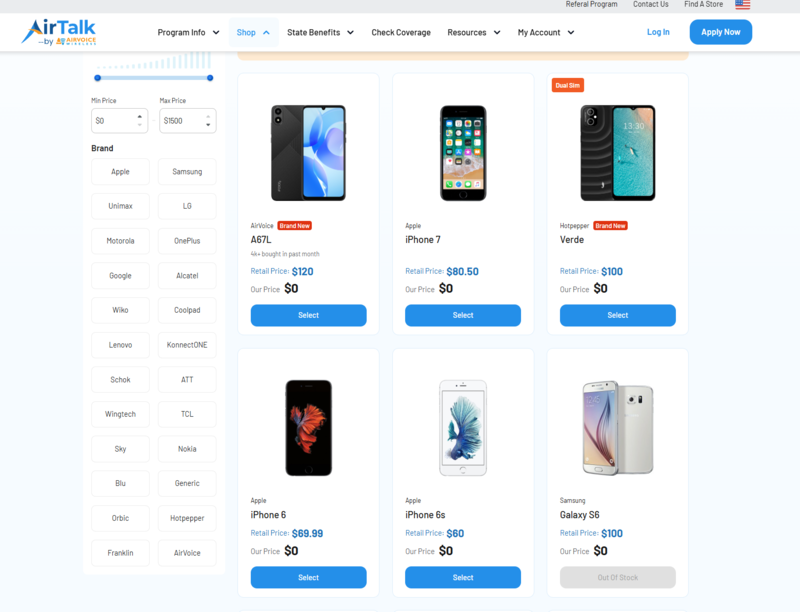
Some premium devices may be discounted rather than free, and stock can change quickly.
Therefore, before selecting a phone, confirm that the exact model supports eSIM and works with the service available in your area.
Note: Eligibility varies by state and program. Offers depend on availability and qualifications. Cintex and AirTalk Wireless operate under the federal Lifeline Program as Eligible Telecommunications Carriers (ETCs). Service is non-transferable and limited to one service per household.
FAQs
Can a SIM card adapter damage a phone?
A loose, bent, or incorrectly sized adapter can become stuck in the tray or damage the SIM reader. The adapter should hold the card securely and slide into the phone without force.
Can I put a nano-SIM in a micro-SIM slot?
Yes. If the adapter is flat and fits the tray properly, a nano-to-micro adapter allows a nano-SIM to fit in the larger micro-SIM slot.
Is it safe to leave a SIM adapter in a phone permanently?
A well-fitting adapter can remain in the phone long term, but repeated removal and reinsertion increases the chance of the card shifting or the frame catching in the tray. Repeated removal can cause the card to shift or the adapter frame to catch inside the tray.
What should I do if a SIM adapter gets stuck?
If your SIM adapter is stuck, steer clear of sharp objects and avoid pushing hard around the adapter. If the tray does not release with gentle pressure, stop and take the device to an authorized repair center or qualified technician to reduce the risk of damaging the SIM reader.
Can an adapter make an incompatible SIM work?
A SIM adapter only changes the physical size of the card. It cannot unlock a phone, add missing network bands, activate service, or make an unsupported carrier work.
Conclusion
A SIM card adapter is useful when a smaller physical SIM needs to fit an older or larger slot. The key is choosing the correct size, keeping the card flat, and never forcing the adapter into the device.
If the problem stems from network compatibility issues, a damaged tray, or an outdated phone, an adapter will not solve it. In those cases, a replacement SIM or newer eSIM-compatible device is the better direction.