Google Pixel 7 eSIM support is built in alongside a physical nano-SIM slot. The Pixel 7 and Pixel 7 Pro can run one eSIM and one nano-SIM simultaneously, although newer Pixel models provide broader support for running two active eSIMs simultaneously.
This guide walks through how to activate it, gives you an honest look at the drawbacks before you switch, and explains what your options are for a more affordable plan.
1. Can You Set Up Google Pixel 7 eSIM?
The Google Pixel 7 and Pixel 7 Pro both support eSIM alongside one physical nano-SIM slot. You can run one eSIM and one nano-SIM at the same time.
Later software updates enabled dual active eSIM on supported Pixel 7 devices, although availability still depends on Android version and carrier support.
2. How Do I Activate eSIM on My Google Pixel?
Activating an eSIM works the same way across Pixel 6, 7, and 8 generations, and only takes a few minutes.
- Connect your Pixel phone to Wi-Fi
- Open Settings
- Tap Network & Internet
- Tap SIMs
- Tap Add SIM, then tap Download a new eSIM
- Choose your carrier, or select Use a different network
- Scan the QR code provided by your carrier, or enter the activation details manually
- Follow the on-screen prompts to finish activation
If you are migrating an eSIM from another phone, turn off the old device first before activating it on your Pixel 7. This single step prevents most activation issues.
>>> Read more: Does Pixel 8 Have eSIM? Full Setup Guide for 2026
3. What Are the Drawbacks of Using an eSIM?
eSIM offers real convenience, but it is worth knowing the tradeoffs before you switch.
- Compatibility is not universal. Many pre-2020 phones and some budget devices do not support eSIM, and not every carrier or smaller provider offers it either
- Switching phones takes more steps. With a physical SIM, you move the card to a new device. With eSIM, you’ll usually need to transfer or reactivate your eSIM through your carrier
- Setup requires internet access. Activating an eSIM needs Wi-Fi or data, which is not true of inserting a physical card
- Some activation issues require carrier assistance. If something goes wrong during setup, you cannot simply re-insert a card; you need to contact your carrier directly
- No removable card to transfer instantly. Moving service to another device takes more steps than a physical SIM swap
None of these drawbacks is a dealbreaker for most users, and the convenience of instant activation and easier carrier switching generally outweighs them.
4. Ready to Activate Service on Your Pixel 7? You May Qualify for a Free Plan
Even with the small tradeoffs of eSIM, switching to a more affordable plan on your Pixel 7 is still simple. If you qualify for government assistance, you may be able to activate a free monthly plan through the Lifeline program.
The Lifeline program is a federal benefit designed to make phone service more affordable for eligible low-income households, offering a discount each month.
Qualified households can receive up to $9.25 in monthly support, while those living on Tribal lands may be eligible for an increased benefit of up to $34.25 per month.
Eligibility is based on household income at or below 135% of the Federal Poverty Guidelines or participation in government assistance programs such as Medicaid, SNAP, SSI, Section 8, or Veterans Pension.
Note: Lifeline service is a government-supported benefit for qualified consumers only and cannot be transferred. Only one Lifeline discount is allowed per household.
Cintex Wireless is a federally approved Eligible Telecommunications Carrier (ETC) offering two paths for qualifying applicants:
- BYOP option: If your Pixel 7 is carrier-unlocked and compatible with the provider’s network, bring it over and activate a free plan with a larger data allowance, no new device needed
- Free or discounted device option: If you prefer a newer phone, a free or discounted device with eSIM support may be available, depending on your state and current inventory
Many choose Cintex not just for its simple application process, but also because of its continuous effort to support the underserved.
The carrier right now is merging into AirTalk Wireless, another reputable carrier that has been partnering with Lifeline for more than 2 decades, to bring to the consumer the discount they need, with a broader choice of devices to maintain the service, making the support more sustainable.
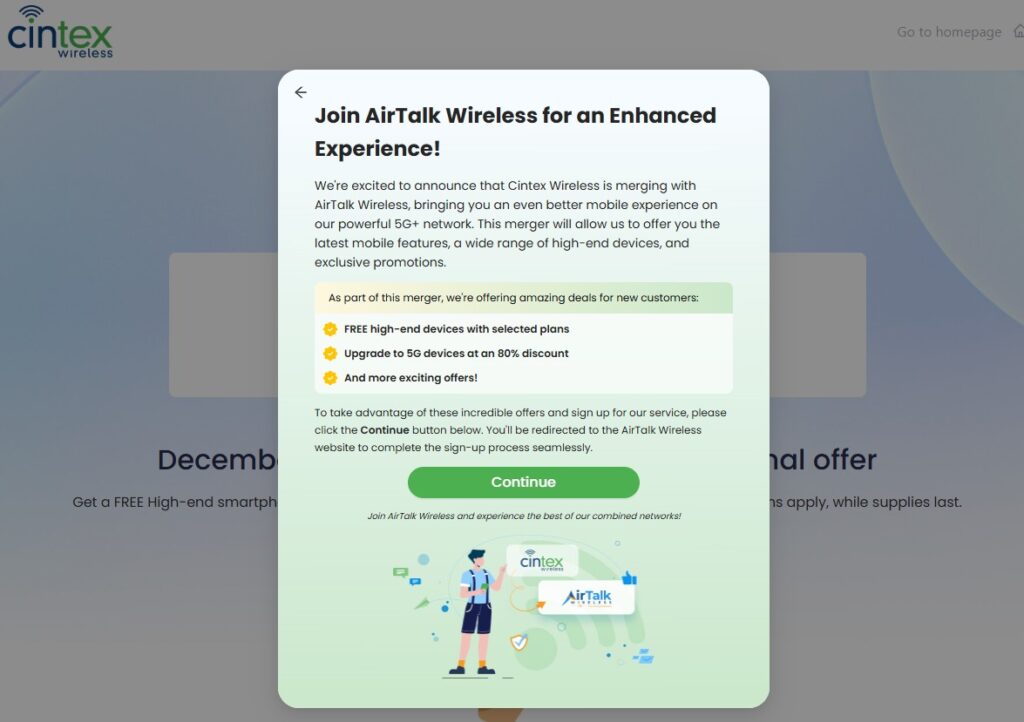
IMPORTANT: The government does not subsidize devices. Lifeline programs cover basic service costs only. Free or discounted devices, upgrade plans, or top-ups are exclusive benefits provided by Cintex and AirTalk Wireless as part of the promotional offers. Terms and conditions apply. Limited-time promotion—offers vary by state, stock availability, and eligibility.
>>> Read more: How Do I Know If My Phone Is Unlocked? iPhone and Samsung
5. FAQ
Q1. Can the Pixel 7 run two active eSIMs at the same time?
Pixel 7 devices can support two active eSIMs on supported software versions and compatible carriers, although one physical nano-SIM plus one eSIM remains the most common configuration.
Q2. Is eSIM more secure than a physical SIM card?
Generally, yes. An eSIM cannot be physically removed from the device, which makes it harder for someone to pop it out and use it in another phone. Account security still matters more than the SIM type itself.
Q3. What happens if I switch from my Pixel 7 to a new phone?
You will need to transfer or reactivate the eSIM on your Pixel 7 and activate a new one on your next device, usually through your carrier’s app or a fresh QR code. This takes a few extra steps compared to moving a physical SIM card.
Final Words
Google Pixel 7 eSIM support works well for most users, with activation taking only a few minutes through Settings. The main drawbacks, like extra steps when switching phones, are minor for most people.
If you qualify for government assistance, an approved Lifeline provider may offer a free phone with $0 monthly service on your Pixel 7 or any compatible device.