Thinking about switching to an eSIM, but don’t know if your iPhone is compatible with it? In fact, knowing which iPhones support eSIM is the first step before selecting a cell plan or activating digital services.
Although Apple has broadened eSIM functionality across most of its iPhone portfolio, there are still significant differences between models and regional versions. This tutorial will help you locate compatible iPhones, explain major exclusions, and explain how to activate your own device.
1. Which iPhones Support eSIM?
Apple’s eSIM-compatible lineup begins with the iPhone XR, XS, and XS Max, which were released in 2018. Most later iPhones also support eSIM, although the exact SIM configuration can vary depending on where the device was purchased.
Importantly, the iPhone 13 series was the first to support dual eSIMs, allowing customers to operate two phone lines without a physical SIM card.

With the iPhone 14, Apple made a significant step forward in the United States by removing the traditional SIM tray and making eSIM the only option for US versions.
The iPhone Air goes even further, becoming the first iPhone to be eSIM-only in all markets worldwide, not just the United States.
In addition, all iPhone SE models, beginning with the second-generation SE (2020), support eSIM and include a conventional nano-SIM tray in all regions, letting you use either form of SIM.
Look at the following table will let you know which iPhones support eSIM:
| iPhone Models | SIM Card Size |
| XR, XS, XS Max | Nano SIM & eSIM in supported regions |
| 11, 11 Pro, 11 Pro Max | Nano SIM & eSIM |
| SE 2nd gen (2020) | Nano SIM & eSIM in supported regions |
| 12, 12 Mini, 12 Pro, 12 Pro Max | Nano SIM & eSIM |
| 13, 13 Mini, 13 Pro, 13 Pro Max | Nano SIM & eSIM; also supports two active eSIMs |
| SE 3rd generation | eSIM with nano-SIM |
| 14, 14 Plus, 14 Pro, 14 Pro Max | US versions are eSIM-only; most other supported versions include eSIM and nano-SIM |
| 15, 15 Plus, 15 Pro, 15 Pro Max | US versions are eSIM-only; most other supported versions include eSIM and nano-SIM |
| iPhone 16 series | US versions are eSIM-only; most other supported versions include eSIM and nano-SIM |
| iPhone 17 series | eSIM-only in selected markets; eSIM with nano-SIM in many others |
| iPhone Air | eSIM-only worldwide |
Regional exceptions still apply, particularly in mainland China, Hong Kong, and Macao. Confirm the exact model number and country of purchase before choosing an eSIM plan.
2. Which iPhones Do Not Have an eSIM?
The eSIM was introduced in 2018 with the iPhone XR, XS, and XS Max.
This means anything older was developed before the era of integrated SIMs and is only compatible with physical SIM cards.
The models below do not support eSIM:
- iPhone X
- iPhone 8 and 8 Plus
- iPhone 7 and 7 Plus
- iPhone 6s and 6s Plus
- iPhone 6 and 6 Plus
- iPhone SE (1st generation)
- iPhone 5s, 5c, 5, and earlier
If you are using one of these older models, there is nothing “broken” with your setup.
You can still receive service through the type of physical SIM supported by your specific iPhone.
Most models from the iPhone 5 onward use a nano-SIM, while some earlier iPhones use a micro-SIM or an older SIM format.
Contact your carrier if you need the correct replacement card when changing devices or providers.
>>>Read more: How To Transfer eSIM From iPhone To Android Easily? Detailed Guide 2026
3. Why eSIM Support Can Still Vary
Even after identifying which iPhones support eSIM, your device may not be able to use the feature immediately.
Several factors beyond the iPhone model can affect whether eSIM is available and works properly.
- Carrier support: Not all mobile carriers offer eSIM service. Your provider must support eSIM activation for your iPhone model.
- Regional variant: The same iPhone model may have a different SIM configuration depending on where it was purchased. In mainland China, only the iPhone 17e and iPhone Air currently support local eSIM activation. The iPhone 17e can use either an eSIM or a physical nano-SIM, while the iPhone Air is eSIM-only.
- Phone lock status: If your iPhone is carrier-locked, you may only be able to activate an eSIM from that carrier until the device is unlocked.
- Mobile plan support: Even if your carrier supports eSIM, your current plan may not. Some older or prepaid plans require you to switch to an eSIM-compatible plan.
- Software version: Running the latest iOS version helps ensure compatibility with carrier updates, bug fixes, and the latest eSIM features. Keeping your iPhone updated can prevent activation and connectivity issues.
4. How to Activate eSIM on iPhone?
Once you’ve confirmed that your iPhone supports eSIM, activation is usually quick and straightforward.
Depending on your carrier, you can activate your eSIM through automatic carrier activation, a QR code, the carrier’s app, an activation link, or by manually entering the activation details provided by your carrier.
The exact steps may vary, but most users can complete the setup in just a few minutes.
>>> Read more: How To Activate eSIM On iOS And Android? 2026 Tutorial
5. iPhone Doesn’t Support eSIM? Here is the Solution
If your current iPhone doesn’t support eSIM, upgrading to a newer model is the most effective way to access digital SIM features.
For those with low income, the federal Lifeline program is worth considering.
It offers qualified low-income persons up to a $9.25 monthly discount (or up to $34.25 for those living on tribal territories) on qualifying phone service, broadband internet, or bundled service plans.
What’s more, it partners with Eligible Telecommunications Carriers such as Cintex Wireless, allowing qualified applicants to receive a free device with an eSIM from these carriers.
Note: Eligibility varies by state and program. Offers depend on availability and qualifications. Cintex Wireless operates under the federal Lifeline Program as an Eligible Telecommunications Carrier (ETC). Service is non-transferable and limited to one service per household.
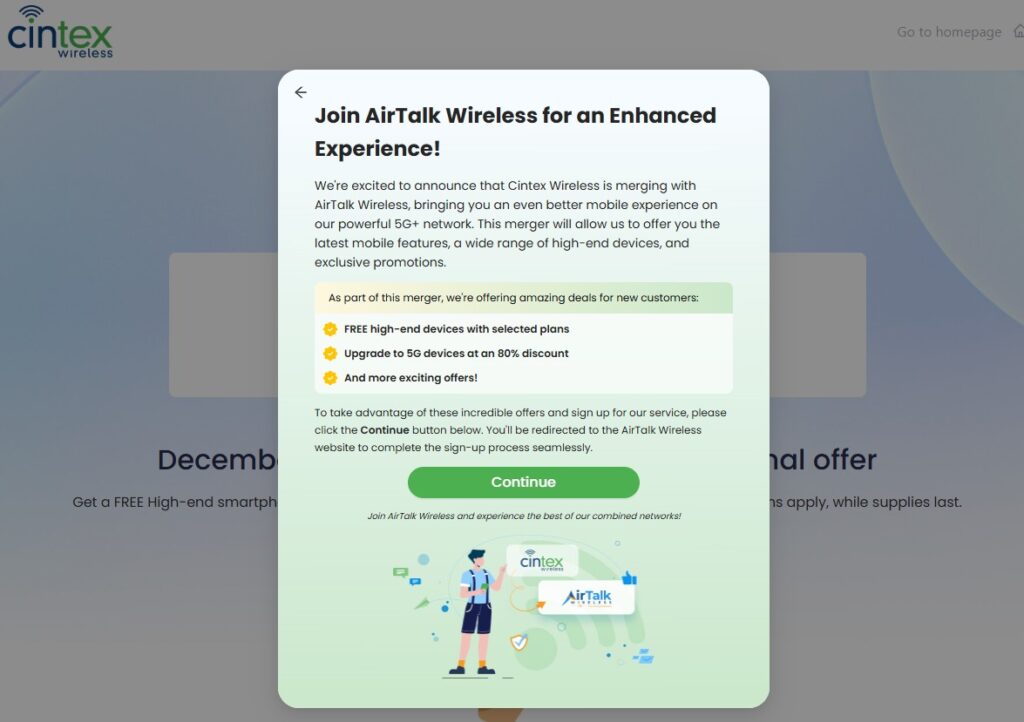
As Cintex Wireless merges with AirTalk Wireless, new applicants can apply through AirTalk Wireless to access wider device options and a much streamlined application process.
Depending on their eligibility, state, and available inventory, they may also qualify for an eSIM-compatible iPhone or Android smartphone.
Here is how to apply:
- Visit the AirTalk Wireless website and enter your ZIP code to confirm service availability in your area.
- Browse the available Lifeline plan and device, which may vary by state and current inventory.
- Complete the online Lifeline application with your personal information. Upload any required verification documents to confirm your identity and eligibility.
- Wait for approval, then activate your service once you receive your SIM card or eligible smartphone.
Conclusion
Choosing the right iPhone for eSIM is easier once you understand how model generation and purchase region affect compatibility. While most newer devices support digital SIM technology, the available setup may still differ between eSIM-only models and versions that also include a physical SIM tray.
Before selecting a plan, confirm which iPhones support eSIM in your region and check the exact model number of your device. That small step can help you avoid activation problems and choose a phone that fits the way you want to manage your mobile service.