A new SIM card cannot connect to the mobile network until the carrier activates it for your service line or account. In some cases, the carrier may also verify or register your phone’s IMEI during activation. Other providers require an app, website, QR code, or account verification.
This guide explains how to activate a SIM card, what to prepare before starting, and how physical and eSIM setups differ. You will also find practical fixes for common activation errors and options for lowering the cost of mobile service.
1. Before You Activate the SIM
A few checks before installation can prevent errors such as Invalid SIM, No Service, or SIM Not Supported.
Confirm phone and carrier compatibility
Many providers offer an online compatibility checker where you can enter the phone’s IMEI before buying or activating the SIM. Enter the phone’s IMEI before buying or activating the SIM.
You can usually find the number under Settings > About phone or by dialing *#06#.
Check the locked or unlocked status
An unlocked phone can generally accept SIM cards from compatible providers. In contrast, a carrier-locked phone may only work with the company that originally sold it.
A carrier lock may appear as SIM Not Supported, Network Locked, or a similar message. However, Invalid SIM can also have other causes, so confirm the phone’s lock status and carrier compatibility before assuming the device needs to be unlocked. Contact the original carrier when the phone needs to be unlocked, since a new SIM card cannot remove that restriction.
Prepare account and activation details
Keep the following information nearby:
- The SIM card number, also called the ICCID
- The phone’s IMEI
- Your carrier account login
- An activation code, if one came with the SIM
- Your billing address and payment details
- Your current account number and transfer PIN when keeping an old number
Connect to Wi-Fi if required
Many activation apps and websites need internet access before cellular service is available. A stable Wi-Fi connection is especially important for eSIM downloads, carrier app setup, and software updates.
Physical SIM vs eSIM
Both formats connect the phone to a mobile account, but their setup methods differ.
| Feature | Physical SIM | eSIM |
| Format | Removable plastic card | Digital profile built into the phone |
| Installation | Inserted into a SIM tray | Downloaded through settings, an app, or a QR code |
| Delivery | Store pickup or shipping may be required | Often available immediately |
| Device support | Works on phones with the correct tray | Requires a compatible phone and carrier |
| Switching phones | Move the card physically | Transfer or reactivate the digital profile |
| Common issue | Damaged card or tray | Failed download or unsupported device |
2. How to Activate a SIM Card?
The exact process varies by provider, but a physical SIM setup usually starts by inserting the card into the phone’s SIM tray. You may turn the phone off first if the device or carrier instructions recommend it.
The angled corner of the SIM should match the slot, and the card needs to sit flat before the tray is returned to the device.
Then, follow these steps:
- Turn the phone on and allow it time to detect the SIM. If the carrier name or signal bars do not appear, continue with the provider’s activation instructions.
- If the SIM does not activate automatically, open the provider’s website or app and follow the activation instructions.
- Enter any requested details, such as the SIM number, IMEI, account information, activation code, or selected plan.
- If you want to keep your existing phone number, provide your current account number and transfer PIN when required.
- Keep your old service active until the number transfer is complete.
- Restart your phone after activation is confirmed.
- Test calling, texting, and mobile data to make sure everything works properly.
- On Android, if calls and texts work but mobile data does not, check the cellular settings and follow your carrier’s troubleshooting instructions. Some providers may require you to confirm or update the APN settings.
>>>Read more: How To Activate iPhone Without SIM Card? 4 Safe Methods

3. How to Set Up and Activate an eSIM?
An eSIM is installed digitally rather than placed inside a SIM tray. The phone must support eSIM, and the wireless provider must allow digital activation for that model.
- On an iPhone, open: Settings > Cellular > Add eSIM or Set Up Cellular
- On a compatible Samsung phone, open: Settings > Connections > SIM manager > Add eSIM
The provider may automatically assign the plan, provide a QR code, offer a transfer from the old phone, or complete the setup through its mobile app.
Just remember to keep the device connected to a reliable internet connection while the eSIM profile downloads when required. W
i-Fi is commonly used, although some devices and carriers can complete activation through cellular service or carrier activation.
After installation, confirm that the new line is turned on and selected for the services included in your plan, such as calls, texts, or mobile data.
If the phone already has another SIM, the settings menu lets you choose which line handles each service.
4. Common Activation Issues & How to Fix
Even though you followed all the steps on how to activate a SIM card, sometimes it may not activate as expected.
The issue is often caused by a simple setup, compatibility, or network problem that can be fixed with a few quick checks.
No SIM
If your phone shows No SIM, the card may not be seated correctly.
Then, simply turn off the device, remove the SIM tray, and make sure the card fits the slot properly and lies flat before reinserting it.
You can also test the SIM in another compatible phone to determine whether the issue is with the card or the device.
SIM Not Supported or Network Locked
Messages such as SIM Not Supported or Network Locked usually indicate a carrier lock or compatibility problem.
In that case, check whether your phone is unlocked and use the carrier’s IMEI compatibility checker before attempting activation again.
Mobile Data Not Working
If calls and texts work but mobile data does not, check your cellular settings and confirm that the correct SIM line is selected for data.
Some Android devices may also require updated APN settings from the carrier.
eSIM Won’t Install
If an eSIM fails to install, make sure your phone has a stable Wi-Fi connection, then restart the device before trying again.
An expired or previously used QR code may need to be replaced by the provider.
Activation Stuck or Pending
If activation remains pending for an extended period, contact your carrier for assistance.
You can ask them to verify that your SIM number, IMEI, service line, and any number transfer request have been processed correctly.
5. SIM Card Not Working? Consider Other Options
If the current SIM remains unreadable or the plan costs more than expected, here is another way to stay connected.
Lifeline is a federal assistance program that helps eligible low-income households receive free or discounted wireless service through approved Eligible Telecommunications Carriers.
Qualification is generally based on household income or participation in an accepted assistance program.
Depending on the provider and current offer, eligible customers may receive monthly talk, unlimited text, mobile data, and a compatible smartphone.
However, Lifeline is limited to one benefit per eligible household, and the service cannot be transferred to another person.
Cintex Wireless is one participating ETC and is known for its straightforward enrollment process.
The provider is currently merging with AirTalk Wireless, allowing new applicants to complete enrollment through an updated system and review a broader selection of available devices, such as:
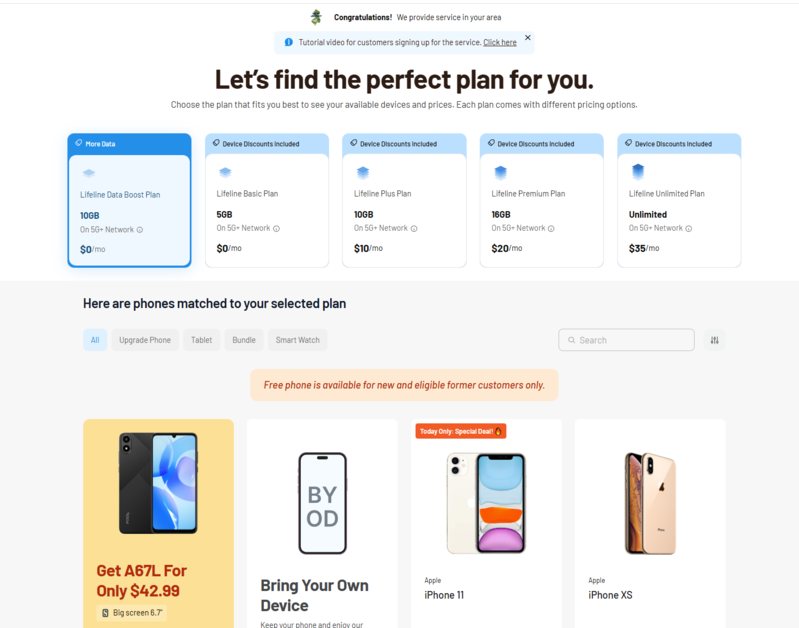
IMPORTANT: The government does not subsidize devices. Lifeline programs cover basic service costs only. Free or discounted devices, upgrade plans, or top-ups are exclusive benefits provided by Cintex and AirTalk Wireless as part of the promotional offers. Terms and conditions apply. Limited-time promotion—offers vary by state, stock availability, and eligibility.
Conclusion
A successful SIM setup depends less on the card itself and more on whether the phone, network, and account details match. Once those pieces are in place, how to activate a SIM card becomes a straightforward process for both physical SIM and eSIM.
For anyone searching how to activate a SIM card for free, some carriers waive activation fees for online setup, eSIM activation, or promotional offers. The cost of the mobile service plan itself is separate and depends on the provider and plan you choose.