Have you ever been concerned when you go for your phone, hoping to make a call or check a message, only to be met with the dreadful phrase: “SIM Locked.”
If you’re wondering how to unlock a locked SIM card, the solution depends on the cause of the restriction. In some cases, you’ll need a PIN or PUK code to regain access; in others, you may need assistance from your mobile carrier.
This guide explains the most effective ways to unlock a locked SIM card, and both iPhone and Android users will find step-by-step solutions for their devices.
1. Why Is Your SIM Card Locked?
Before attempting to unlock SIM card free, you should understand what type of lock you’re dealing with.
SIM locks generally fall into some categories, and each requires a different solution.
SIM PIN lock (security code protection)
SIM PIN locks are security features that prevent unauthorized usage of your SIM card.
When enabled, a SIM PIN is an optional security feature that may be required when restarting the phone or inserting the SIM into a new device.
You may see a prompt asking for a SIM PIN when this feature is enabled.
If you know the proper PIN, you may immediately unlock your SIM card.
SIM blocked state (requires PUK)
The PUK (Personal Unblocking Key) is a carrier-issued code used to unblock a SIM card after too many incorrect PIN attempts.
Most carriers allow a limited number of PUK attempts (often around 8–10) before the SIM is permanently disabled.
The PUK is unique to your SIM card, providing an extra layer of security.
If your PIN code is active and you enter it incorrectly 3 times, your SIM card will be blocked. You will be unable to use your phone, except for emergency calls.
To unblock the SIM card, you must first enter your PUK into your phone.
Carrier/network lock (device restriction)
Carrier lock, also known as network lock, is a SIM restriction imposed by mobile network operators on devices that prevents them from being used with SIM cards from other carriers.
This limitation often applies to sponsored phones or those obtained through low-cost carrier contracts.
Also, it is commonly used for devices purchased through financing or promotional offers.
It is performed by configuring the device to only accept SIM cards from the service to which it is locked.
2. How To Unlock A Locked SIM Card?
To unlock a locked SIM card, you typically need its PUK, which your mobile carrier provides.

Enter the Correct SIM PIN
If a SIM PIN protects your SIM card, the simplest way to unlock it is to enter the correct code when prompted.
This security feature helps prevent unauthorized access to your mobile service if the SIM card is lost or stolen.
Once the correct PIN is entered, the SIM card will unlock and connect to the network normally.
Unlock a SIM Card Using a PUK Code
If you’ve entered the wrong SIM PIN too many times, your SIM card may become locked and require a PUK code.
The PUK code is provided by your mobile carrier and can usually be found through your carrier account or customer support.
After entering the correct PUK code, you’ll be asked to create a new SIM PIN. That’s how to unlock a locked SIM card.
What Happens if the PUK Code is Entered Incorrectly Too Many Times?
Entering the incorrect PUK code repeatedly might permanently deactivate your SIM card.
Most carriers enable up to 10 PUK attempts before blocking the SIM and rendering it unusable.
Once this limit is reached, the SIM card cannot be reactivated, even with the correct PUK code.
Bonus Note: iPhone and Android Users
Here’s a useful tip to find a SIM PIN to unlock SIM card iPhone and Android. Whether you want to turn the SIM PIN feature on or off, or change your PIN, follow these steps:
- iPhone: Go to Settings > Cellular > SIM PIN. Next, choose the SIM you want to change > Turn SIM PIN On/Off. Then, enter your SIM PIN > Done.
- Android: Go to Settings > Security > Set up SIM card lock. Here, toggle Lock SIM card On or Off and enter your SIM PIN when prompted.
3. How to Prevent Your SIM Card from Getting Locked Again?
Sometimes knowing how to unlock a locked SIM card is not enough.
Taking a few preventive measures can help you avoid future lockouts and unnecessary interruptions to your mobile service.
- Create a memorable SIM PIN: Select a PIN that is easy to remember but difficult for others to guess.
- Store your PUK code securely: Keep it in a safe place, such as a password manager or a secure document.
- Enable alternative device security methods: Use features such as Face ID, Touch ID, fingerprint recognition, or a device passcode to protect your phone without relying solely on SIM-based security.
4. Where You Can Get a SIM Card?
In some situations, replacing your SIM card is the only practical solution.
This may be necessary if your SIM card has been permanently locked after too many incorrect PUK attempts, is physically damaged, is no longer detected by your phone, or has been deactivated by your carrier.
Fortunately, there are several ways to get a new SIM card and restore mobile service.
Buy from a Carrier
Most cell carriers provide replacement SIM cards through their stores, websites, or customer service departments.
In most cases, the new SIM may be activated using your existing phone number and service plan.
Use eSIM Activation
If your device supports eSIM technology, you may be able to activate a new cellular plan digitally without waiting for a physical SIM card.
An eSIM works in the same way as a traditional SIM card, but is activated digitally through a carrier profile instead of a physical chip.
When enabled, the eSIM connects your device to the carrier network associated with the installed mobile plan, which can support 4G LTE and 5G networks if the device, carrier, and plan are compatible.
Free SIM Card Program
Are you participating in programs such as Medicaid, SNAP, or SSI? Is your household’s annual income at or below 135% of the Federal Poverty Lines?
If the answer is yes to either question, you are eligible for a free SIM card and smartphone through carriers of the Lifeline program.
Lifeline is a federal assistance program that helps eligible low-income households access essential communication services. Also, Lifeline service is non-transferable and limited to one service per household.
Through participating carriers such as Cintex Wireless, eligible users may receive a free SIM card and phone along with monthly talk, text, and data benefits.
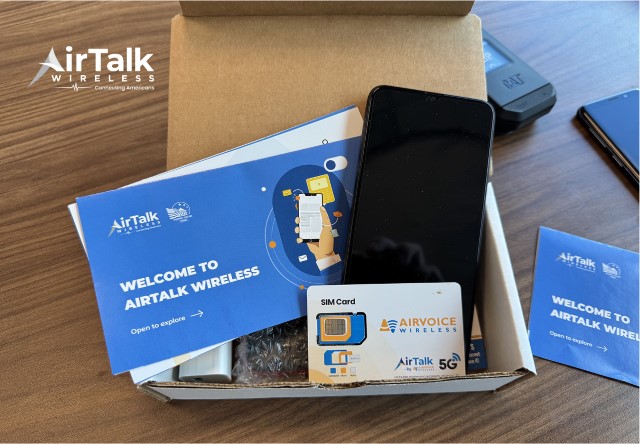
Notably, Cintex is merging with AirTalk Wireless to offer a more streamlined customer experience by giving qualified consumers access to a wider range of devices and services.
For example, you can get one of the following devices (may vary by state and inventory):
Notice: The government does not cover device costs, only basic service through Lifeline. Any free or discounted devices, upgrades, or top-ups are limited-time Cintex Wireless offers and may vary by state, eligibility, and availability. Terms and conditions apply.
FAQs
Can I unlock a SIM card without the PUK code?
You need the correct PUK code from your carrier to unlock it if your SIM card is PUK-locked. Without the PUK code, the SIM card cannot be reactivated.
Is SIM unlock free?
It depends on the type of lock. SIM PIN and PUK unlocking are usually free. Carrier unlocking may also be free if eligibility requirements are met.
How many times can I enter the wrong PUK code?’
Most carriers allow a maximum of ten incorrect PUK attempts. Following that, the SIM card may become permanently disabled and require replacement.
Does removing the SIM card remove the lock?
Removing the SIM card does not remove any SIM PIN, PUK, or carrier locks. The restriction will stay in effect until properly unlocked.
Is a SIM lock the same as a carrier lock?
A SIM lock might be a SIM PIN or PUK lock that secures the SIM card. It differs from a carrier lock, which limits the phone to a specific mobile network.
Conclusion
That’s how to unlock a locked SIM card. In most cases, the issue can be resolved with the correct information or assistance from your carrier. By understanding the available options, you can avoid unnecessary frustration and get your phone back up and running as soon as possible.