
Does every phone have a SIM card? No. Some phones use a removable physical SIM, others rely on eSIM, and certain models support both. You can also use many phone features over Wi-Fi without an active cellular plan.
The difference matters when you switch devices, change carriers, or move your number to a new phone. This guide explains the main SIM configurations, what still works without cellular service, and how to check which setup your phone uses.
1. Does Every Phone Have a SIM Card?
No, not all smartphones are equipped with a physical SIM card.
Most smartphones need a SIM or eSIM profile to connect to cellular service, but many newer devices no longer require a removable physical SIM card. Some phones and Wi-Fi-only devices can also be used without cellular service at all.
Below is a brief comparison between these 2 types of SIM card:
| Physical SIM card | eSIM | |
| Size & Form | Removable physical SIM, most commonly nano-SIM on newer phones. | Embedded inside the device, no card needed. |
| Installation & Activation | Requires manual insertion and SIM tray handling. | Activated digitally through methods such as a QR code, carrier app, device transfer, or manual carrier setup. |
| Device Compatibility | Works on devices that include a compatible physical SIM tray. | Only works on eSIM-compatible devices. |
| Durability | Can be damaged, worn out, or misplaced. | No removable card to lose, scratch, or wear through repeated handling. |
| Security | Can be physically removed, lost, or stolen. | Cannot be physically removed or misplaced, but the mobile account can still be targeted through account takeover or unauthorized SIM/eSIM changes. |
2. Can You Use Phones Without SIM Cards?
Now you know does every phone have a SIM card. In fact, your device is equipped with numerous features that do not require a SIM card, including:
- Make emergency calls: Many phones can call emergency services without a SIM card if they can connect to an available compatible cellular network. Availability may vary by device, network, and country.
- Connect to Wi-Fi: You can browse the web, check email, use apps, and access online services through Wi-Fi without a SIM card.
- Use GPS navigation: GPS itself does not require a SIM card. Navigation apps can work over Wi-Fi or with downloaded offline maps when no internet connection is available.
- Take photos and videos: The camera works normally without a SIM, allowing you to capture and store photos and videos on your device.
- Use social media: Apps such as Facebook, Instagram, and other social platforms can work over Wi-Fi without cellular service.
- Use messaging and calling apps: Apps such as WhatsApp, Messenger, and Skype can send messages or make internet-based calls over Wi-Fi, though some services may require an existing account or phone number verification.

3. How to Know If Your Phone Has a SIM Card?
There are several simple ways to check whether your phone uses a physical SIM, eSIM, or both. Below is a general tutorial:
Locate a SIM Tray
The easiest method is to check the sides, top, or bottom edge of your phone for a small removable tray with an eject hole.
If your device has one, it likely supports a physical SIM card.
>>> Read more: How Do I Know If I Have An eSIM? 2026 Guide For iPhone & Android
Check Phone Settings
Open your phone’s settings and look for sections related to SIMs, Cellular, Mobile Network, or Connections.
These menus may show whether a physical SIM or eSIM profile is currently installed and active.
Check Network Information
A carrier name or signal bars can confirm that cellular service is active, but they do not tell you whether the phone is using a physical SIM or eSIM.
Check the Cellular/SIM settings or device specifications for the exact SIM type.
Check Device Specifications
Search for your exact phone model on the manufacturer’s official website and review its specifications.
The SIM section should indicate whether the device supports a physical SIM, eSIM, dual SIM, or another configuration.
Confirm Carrier Activation Status
If you are still unsure, contact your mobile carrier or check your online account.
The provider can confirm whether a SIM or eSIM is assigned to your phone and whether the service is currently activated.
4. How to Activate a Phone Without a SIM Card?
In many cases, you can set up a phone without inserting a physical SIM by connecting to Wi-Fi and following the on-screen steps, although some models or carriers may still require cellular or eSIM activation during setup.
Depending on the phone and carrier, you may be able to skip SIM setup, activate an eSIM later, or use the device over Wi-Fi only.
However, the exact steps vary depending on whether you are using an iPhone or an Android device. Refer to our guide for more details!
5. How Low-Income Individuals Can Stay Connected with Affordable SIM Cards
For low-income individuals and families, the federal Lifeline program can make mobile service more affordable by providing a monthly discount on qualifying phone service or internet service through approved carriers, also known as Eligible Telecommunications Carriers.
Applicants may qualify based on household income or participation in programs such as Medicaid, SNAP, SSI, or Federal Public Housing Assistance.
Especially, Eligible Telecommunications Carriers such as Cintex Wireless may apply the Lifeline benefit to eligible mobile plans and offer a free SIM card, monthly talk, text, and data, or promotional smartphones.
The company is merging with AirTalk Wireless, so applicants should visit airtalkwireless.com for the latest plans and offers available in their area.
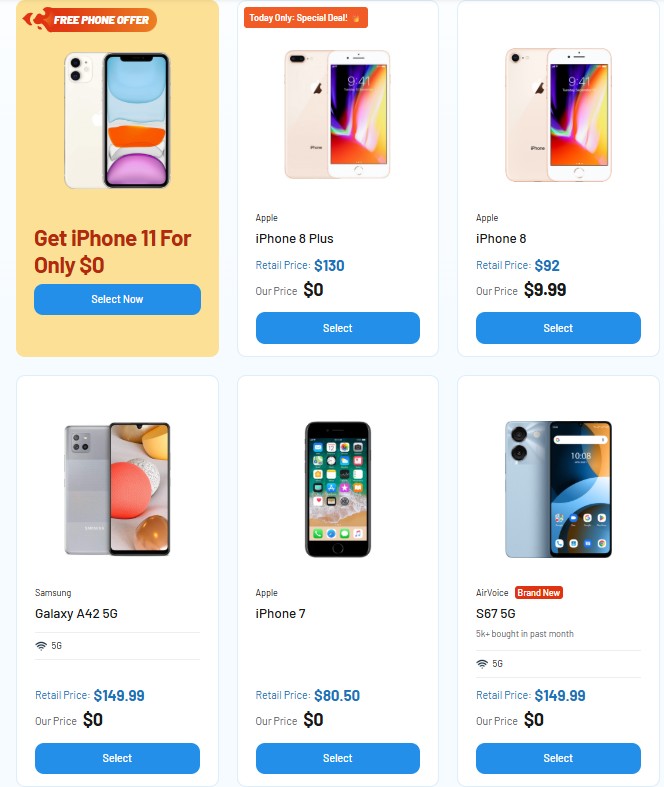
Below are some popular phone offers you can consider at AirTalk Wireless:
Note: Eligibility varies by state and program. Offers depend on availability and qualifications. Cintex and AirTalk Wireless operate under the federal Lifeline Program as an Eligible Telecommunications Carrier (ETC). Service is non-transferable and limited to one service per household.
Conclusion
Phones no longer follow one universal SIM setup. Depending on the model and region, a device may use a physical SIM, eSIM, both options, or no active cellular service at all when connected through Wi-Fi.
For does every phone have a SIM card, the simple answer is no. Before moving service or buying a new phone, check the exact model specifications and carrier support so you know whether you need a physical SIM, eSIM activation, or both.