How to unlock iPhone 5 for free is a common question for users who want to switch carriers or reuse an old device. You can unlock an iPhone 5 at no cost if you choose the right method.
Read on to see which method fits your situation and how to unlock an iPhone 5 without paying fees.
1. Can You Really Unlock an iPhone 5 for Free?
1.1 Most common ways
Yes, you can unlock an iPhone 5 for free in the U.S., but only in specific, legitimate situations.
Some users unlock an iPhone 5 through the original carrier. This option works when the phone is fully paid off and linked to a valid account. If the eligibility requirements are met, the unlock is typically processed at no cost.
There are also free, official methods to unlock an iPhone 5 if access is restricted. If the device is locked due to a forgotten passcode or Apple ID, you can use Apple’s Find My feature through iCloud to erase and unlock the phone after signing in with the correct Apple ID. This method removes the lock but also deletes existing data, so a backup is recommended beforehand.
What’s important to know is that free unlocks are conditional. They are not instant, not guaranteed for every device, and do not bypass unpaid balances, activation locks, or ownership verification.
1.2 Another possible option
Other users take a different route instead of unlocking an older iPhone 5.
By enrolling in the Lifeline program through an approved provider, eligible individuals may receive a free or discounted phone with a free monthly service plan. In many cases, this means upgrading to a newer smartphone rather than continuing to use an older device.
For many people, Lifeline is the most practical option (about 6.5 million households were enrolled, out of more than 33 million eligible households in the U.S).
When you qualify for Lifeline, you receive a monthly service subsidy that lowers your phone or internet cost:
- Up to $9.25 per month for standard households
- Up to $34.25 per month for Tribal residents
Approved Lifeline providers apply this support to service plans and device offers.
What You May get through a Lifeline provider
Depending on your location and provider, you may receive:
- A free government iPhone, a free 5G phone, or a low-cost upgrade
- Free monthly talk, text, and data
- A free SIM card or eSIM
- International calling on select plans
- No contracts and no monthly bills
- Extra features based on the provider and state
If you want to ensure the method of how to unlock iPhone 5s for any carrier for free without any unexpected issues, start with Lifeline. It combines free service with device access and works even when you do not know the phone’s original carrier.

2. Who Qualifies to Unlock an iPhone 5 for Free Through Lifeline?
You may unlock and use an iPhone 5 for free through Lifeline if you meet program-based or income-based eligibility. Approved Lifeline providers handle verification and service setup.
1. Program-Based Eligibility
You usually qualify faster if you or someone in your household receives benefits from one of these programs:
- SNAP / EBT
- SSI (Supplemental Security Income)
- Section 8 or Public Housing
- Veterans Pension or Survivors Benefit
- Tribal programs, including: FDPIR, BIA General Assistance, Tribal TANF
Note: Verification is often automatic for program-based applicants. Many users do not need to upload extra documents.
2. Income-Based Eligibility
You may also qualify based on household income.
- Total Household income at or less than 135% of the Federal Poverty Guidelines
- The limit depends on household size and state of residence
If income verification is required, providers may ask for recent pay stubs or tax documents. Approval times vary by provider and ZIP code.
3. How to Unlock iPhone 5 for Free (Step-by-Step)
Before you start the application, compare provider benefits by coverage, device availability, and approval speed. After that, apply through a trusted Lifeline provider.
3.1. Choose Trusted Lifeline Providers
Two providers that many U.S. users choose are Cintex Wireless and AirTalk Wireless. Together, they serve over 1.3 million users nationwide.
Merger note: Cintex Wireless is merging into AirTalk Wireless. Some Cintex applications may redirect to AirTalk’s site. After the merge, users often see broader coverage, better inventory access, and faster processing.
What AirTalk Wireless offers after the merge (availability varies by area):
- Free monthly service for talk and text
- 5G access up to 30 GB in supported locations
- International calling to 200+ countries
- Free SIM or eSIM
- Free iPhone and low-cost upgrades
- Free government Galaxy phones and discounted Samsung 5G
- Free shipping in 7-14 business days
- Fast approval with order tracking
- BYOP (Bring Your Own Phone) support
3.2. Start Application Process
After choosing your provider, you start the application process. Follow these steps below:
Step 1: Check eligibility beforehand
Confirm you qualify for Lifeline before applying.
Step 2: Visit AirTalk Wireless and enter your ZIP code
Your ZIP code shows local plans and device options.
Step 3: Select a free service plan
Choose the plan that fits your usage.
Step 4: Choose an iPhone 5 or a compatible device
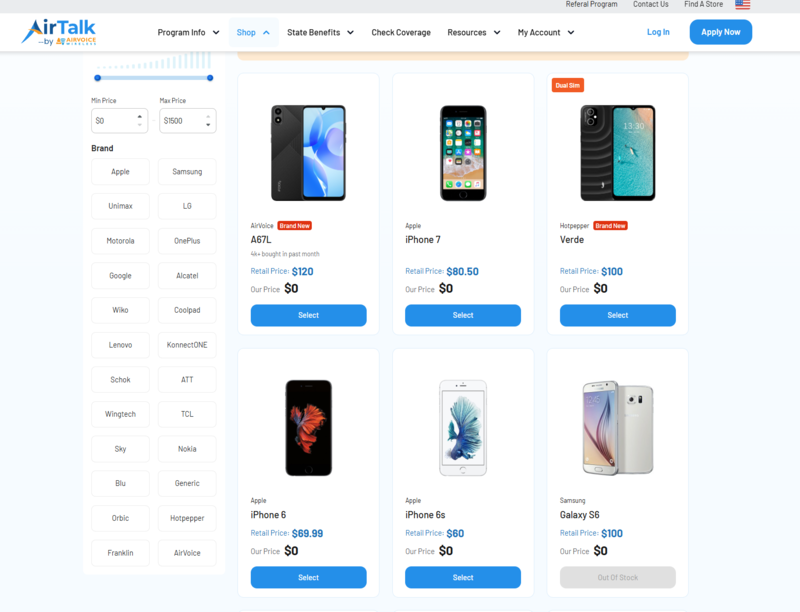
The iPhone 5 is $0 for Lifeline-eligible users when available. Because it is an older model, stock can run out. If unavailable, select another free or discounted phone instead. Prices and availability depend on your state and current promotions.
Step 5: Upload information and documents
Apart from essential personal information such as your name, address, and ID, you may also be asked to provide clear copies of proof of eligibility (income or program) if automatic verification does not succeed.
Step 6: Submit your application
Review details and send your request.
Step 7: Activate service
Activate your SIM/eSIM or start service on supported networks once approved.
>>> Read more: Top 10+ Best Free 5G Government Phones iPhone Users Can Get
4. FAQs
Q1. Can I unlock an iPhone 5s for any carrier for free?
Yes, but only in certain cases. A free unlock is usually possible if the iPhone 5s is fully paid off, not reported lost or stolen, and tied to a valid account. When those conditions are met, the unlock can be done through official channels at no cost.
If unlocking isn’t an option, eligible users may instead qualify for a free phone through a Lifeline provider, where the device is offered as part of the service benefit. Both options depend on eligibility and are not guaranteed.
Q2. What is the easiest free method to unlock an iPhone 5s?
A carrier unlock works if the phone is paid off and linked to the original carrier. Or use the Find My iPhone feature to remotely erase your iPhone and remove the lock. If you do not know the carrier or bought the phone second-hand, getting a free device from the Lifeline provider is often easier.
Q3. Does the government unlock iPhones directly?
No. The government does not unlock phones. Approved Lifeline providers supply compatible SIM cards and free service, which allows the iPhone 5s to work on supported networks.
Q4. Do I need the original carrier account to unlock for free?
Yes, in most cases you do. A free unlock typically requires the iPhone to be linked to the original carrier account and fully paid off. Without account access or ownership verification, a free official unlock is usually not available.
Q5. Is the iPhone 5s still supported on all networks?
Support depends on the network and local coverage. Some carriers may limit compatibility due to older hardware.
Final Words
How to unlock iPhone 5 for free? You can unlock one if you follow approved options. Carrier unlock works when you know the original network. Lifeline works better for many users who want free service and a compatible SIM. Both methods avoid risky tools and paid unlock sites.
Check your eligibility, compare options, and choose the method that helps you unlock an iPhone 5 for free with less effort.