Moving to a new phone should not mean losing the number and mobile plan you already use. In many cases, you can simply transfer SIM card to new phone, turn the device on, and continue using your existing service.
The move is easiest when both phones use the same SIM format and the new device works with your carrier. A few checks before opening the SIM tray can prevent common problems such as an unsupported card, a missing signal, or a failed activation.
1. Can You Move Your Old SIM Card to a New Phone?
Yes, you can move a physical SIM card from one compatible phone to another.
Your carrier associates the SIM with your mobile line and account, so your phone number and plan usually remain the same when the card is moved to a compatible phone. However, some carriers may require you to activate the new device or update the device information on your account.
However, moving the SIM does not automatically copy everything stored on the old phone.
Photos, apps, messages, passwords, and settings should be transferred separately via a backup, a cloud account, a cable, or the phone manufacturer’s setup tool.
A small number of contacts may be stored directly on an older SIM, but they may need to be imported manually after the move.
Most modern phones store contacts on the device or sync them through a Google, Apple, Samsung, or other cloud account, so back up or sync your contacts before removing the SIM.
For this reason, it is better to back up the old device before removing the card.
2. Things to Consider Before Switching SIM Card
Before moving the SIM, make sure the new phone can actually use it. A few quick checks can prevent problems after the card is inserted.
Carrier Compatibility
The new phone must support your carrier’s network and required frequency bands.
Check the device IMEI on the provider’s website, especially when the phone was purchased overseas or from another carrier.
Unlocked Device
A locked phone may reject a SIM from a different network.
Therefore, confirm the lock status before switching, as unlocking the device does not occur automatically in all cases.
Size of SIM Slot
Most newer phones use nano-SIM, while older models may require micro-SIM. Some recent devices use eSIM and may not have a physical tray at all.
If the card size does not match, request a replacement rather than cutting it yourself.
>>>Read more: SIM Card Inserted But No Service iPhone? 9 Easy Troubleshooting Tips
3. How To Transfer SIM Card To New Phone Easily?
How do I transfer my old SIM to my new phone? The process depends on whether your mobile line uses a removable card or an eSIM profile.
Transfer Physical SIM to a New Phone
Moving a physical card normally takes only a few minutes. Here is how:
Turn Off Both Phones
Powering off both phones before moving the SIM is a useful precaution and can help the new device recognize the card cleanly when it starts.
Back up the old phone first if you still need to move photos, contacts, messages, or apps. The SIM transfer itself will not carry most of that data.
Eject the SIM Tray
Locate the small hole beside the SIM tray and insert the ejector tool straight into it. Apply gentle pressure until the tray opens.
Be careful not to insert the tool into a microphone opening. If the tray does not move easily, check the phone manual rather than forcing it.
Swap SIM Cards
How to transfer SIM card to new phone? Simply remove the SIM from the old tray and place it into the matching outline on the new one. The angled corner helps show the correct orientation.
Make sure the card lies flat. If it lifts from the tray or does not match the slot, stop and confirm that the new phone uses the same SIM size.
Power Up the New Phone
Reinsert the tray gently, then switch on the new device. Wait for the carrier name and signal bars to appear.
You may be asked to enter the SIM PIN, restart the phone, install carrier settings, or complete activation through the provider’s app or website. Make a test call, send a message, and turn off Wi-Fi briefly to confirm that mobile data works.
Google’s Android setup guidance also states that a physical SIM can be removed from an old iPhone and inserted into a compatible new Android device.
Transfer eSIM to a New Phone
How to transfer a SIM from one phone to another phone?
An eSIM cannot be physically removed from one phone and inserted into another. Instead, the cellular plan must be transferred through the phones’ setup tools or activated again with help from the carrier.
On supported iPhones, eSIM Quick Transfer may appear when moving service from another iPhone.
Some compatible iPhones also support transferring an eSIM from an Android device.
Selected Android phones, including supported Pixel models, may offer a transfer option during setup or under the SIM settings.
Keep both phones nearby, unlocked, and connected to Wi-Fi while following the onscreen prompts. Availability depends on the devices, software versions, and carrier. Contact the carrier if no transfer option appears or activation fails.
Once the plan activates on the new phone, the previous SIM or eSIM may be deactivated and should no longer be used.
4. What Happens If You Transfer SIM Card to a New Phone?
When the SIM is accepted, the new phone connects to the mobile account associated with that card.
Your existing number typically stays with the SIM, so callers can continue reaching you without needing to learn a new one.
The following services generally move with the line:
- Your existing phone number
- Your active talk, text, and data plan
- Carrier services enabled for that line
- A limited number of contacts, if they were specifically saved on the physical SIM
Your carrier account login, billing information, apps, photos, messages, and other personal data do not transfer through the SIM card.
Voicemail behavior depends on the provider. Existing messages may remain available, but the new phone could ask you to set up the voicemail interface again.
Some security and messaging services may also need attention after the move. Banking apps, authenticator tools, iMessage, RCS, and other account-based services can ask you to verify the new device.
Your number usually does not change simply because you inserted the SIM into another phone.
Apple similarly advises transferring the existing SIM or eSIM when setting up a replacement iPhone, while contacting the carrier if the new device requires a different format.
5. Your Phone Doesn’t Work After SIM Moving? Here is How to Solve It
If the new phone does not connect after the SIM transfer, start with the basics.
- Restart the device, toggle Airplane Mode, and check that the SIM is lying flat in the tray.
- Confirm that the line is enabled, the phone is unlocked, and the device works with your carrier’s network.
- Try the SIM in the old phone again. If it still works there, the issue may involve the new device’s settings, compatibility, or SIM reader. If it fails in both phones, the card may need to be replaced.
- A damaged tray or card reader can also stop the phone from detecting the SIM.
If none of the aforementioned methods work, consider upgrading your device.
For households with limited income, Lifeline, a government assistance program, may help make that change more affordable.
The program provides a monthly discount on qualifying wireless service to eligible applicants. Qualification is generally based on household income or participation in programs such as SNAP, SSI, or Medicaid.
Lifeline benefits are delivered through approved Eligible Telecommunications Carriers, or ETCs. Providers such as Cintex Wireless may include talk, text, data, and an eSIM-compatible phone through their own promotions.
Notably, Cintex Wireless is currently merging with AirTalk Wireless. New applicants may apply through AirTalk and review a broader selection of devices through an updated enrollment process.
However, available phones can change, and some premium models may be discounted rather than free.
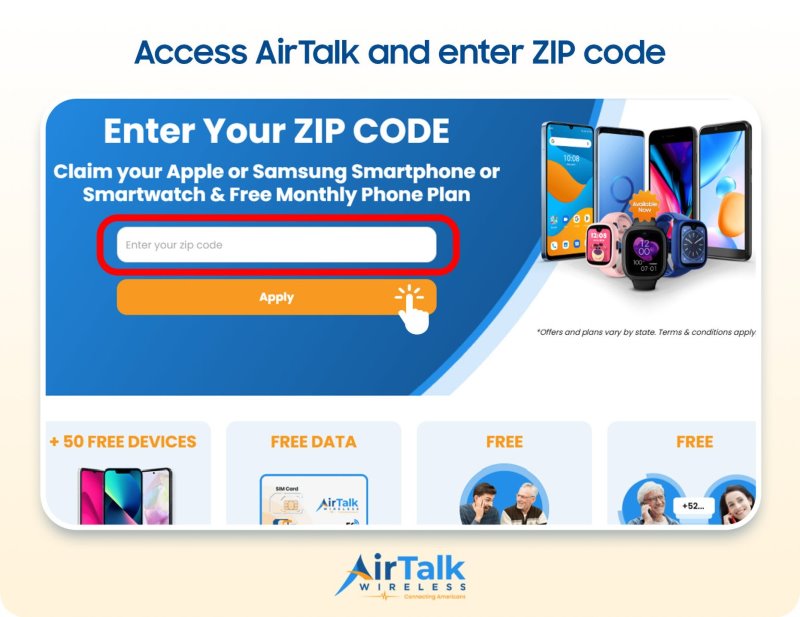
Note: Eligibility varies by state and program. Offers depend on availability and qualifications. Cintex and AirTalk Wireless operate under the federal Lifeline Program as Eligible Telecommunications Carriers (ETCs). Service is non-transferable and limited to one service per household.
Conclusion
Moving to a new phone should feel like an upgrade, not a risk to the number and service you rely on every day. In most cases, the process is straightforward once you confirm the SIM size, carrier compatibility, and lock status of the new device.
Knowing how to transfer SIM card to new phone can help you avoid unnecessary activation problems and make the change with more confidence. After moving the card, test your calls, messages, and mobile data, and remember that photos, apps, contacts, and other personal information may still need to be transferred separately.