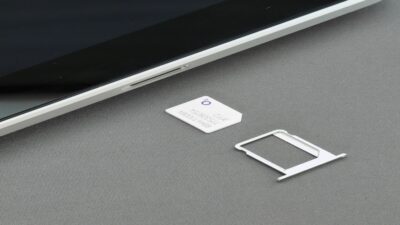
Do I need a new SIM card for a new phone? Usually, no. If your current SIM is active, compatible with the new device, and still supported by your carrier, you can often move it over and keep the same service.
The catch is that phones have changed. Some newer models use eSIM only, while others may need a newer SIM or fresh carrier activation. Before ordering another card, check what your new phone actually supports and work from there.
1. Do I Need a New SIM Card for a New Phone?
For many upgrades, your existing physical SIM can make the move with you.
You can usually keep it if:
- The new phone accepts the same physical SIM type
- The SIM is active and working normally
- The phone supports your carrier’s network
- Your carrier does not require a new SIM or eSIM activation
A replacement becomes more likely when the new phone is eSIM-only, the card is damaged, or the carrier says the SIM is too old for its current network setup.
That last point is not just theoretical. Google says some older SIM cards are unsupported on Pixel 8 and later, while U.S. Pixel 10, Pixel 10 Pro, and Pixel 10 Pro XL models are eSIM-only. Apple likewise notes that physical SIM support varies by iPhone model and region.
So before blaming the little piece of plastic, make sure the new phone still has a place for it.
2. What Happens If I Put My Old SIM Card in My New Phone?
What happens if I put my old SIM card in my new phone? If everything is compatible, the new device may recognize your carrier line and connect with little extra work.
Your phone number normally stays the same because the number belongs to your carrier line, not permanently to that particular card.
Still, a few things can happen during the handoff.
The phone connects normally
This is the ideal case. Insert the SIM, complete the phone setup, and your line begins working on the new device.
The carrier asks for activation
Some carriers tie service to the device as well as the SIM, so moving the card may require an activation step or account update before calls and data work properly.
A carrier-settings update appears
On iPhone, a new SIM may prompt a carrier-settings update. Apple says these updates can improve network connectivity and add support for features such as 5G or Wi-Fi Calling.
The SIM is rejected
If the SIM is too old, the phone is incompatible, or the device does not accept physical SIMs at all, you may need a replacement card or eSIM instead.
>>> Read more: How To Transfer SIM Card To New Phone Effortlessly? 2026 Guide
3. How to Tell If Your Phone Needs a New SIM Card
How to tell if your phone needs a new SIM card? Look for a clear compatibility or hardware reason rather than replacing a working card just because you bought a new phone.
A new SIM may make sense if:
Your new phone is eSIM-only
Some current phones no longer accept removable cards. In that case, the carrier line needs to move to an eSIM instead.
The old SIM is no longer supported
Carriers occasionally replace older SIM generations as their network technology changes. If your carrier or phone specifically reports that the SIM is unsupported, replacement is the right move.
The card is damaged
Cracks, worn contacts, or repeated SIM detection errors can point to a failing physical card.
The SIM does not fit
Most phones that still accept physical cards use nano-SIMs, but do not cut an older SIM to force it into the tray. Ask the carrier for the correct replacement.
Service works poorly after the upgrade
Do not immediately assume the SIM is at fault. Check activation, coverage, carrier compatibility, network settings, and software updates first. If those are fine, the carrier can confirm whether the SIM needs replacing.
4. Moving to an eSIM? Here’s What Changes
If the new phone does not need a physical card, your mobile line can often make the jump digitally.
Apple supports several eSIM setup methods, including carrier activation, QR codes, and eSIM Quick Transfer between supported iPhones and carriers. When the plan activates on the new iPhone, the previous SIM is deactivated.
Google also supports transferring a physical SIM or existing eSIM to an eSIM on compatible new phones, although the exact process varies by carrier.
Before switching, check:
- Whether the new phone supports eSIM
- Whether your carrier supports eSIM on that model
- Whether direct SIM transfer is available
The phone number usually comes along with the carrier line, so moving from physical SIM to eSIM does not inherently mean getting a new number.
>>> Read more: SIM Cards Near Me: Where to Buy One Today
5. Changing Service for Your New SIM? Compare the Cost First
Setting up a new phone is also a natural time to look at what you’re paying for service. If monthly wireless costs are stretching the budget, there may be another option worth knowing about.
The federal Lifeline program helps eligible households reduce the cost of qualifying phone service or internet service. Eligibility is generally based on household income or participation in qualifying assistance programs, such as Medicaid.
Lifeline itself is not a wireless carrier. The benefit is provided through an Eligible Telecommunications Carrier (ETC) that handles enrollment and delivers the supported service.
Cintex Wireless is an ETC that helps eligible customers apply for Lifeline-supported service through a straightforward process:
- Enter your ZIP code and check availability
- Choose an available plan and device, either BYOD or a new device option
- Complete the Lifeline eligibility application and provide documentation if requested
- Wait for approval and follow the activation instructions
Available plans can include essentials such as unlimited talk and text, nationwide coverage, Wi-Fi Calling, international calling to supported destinations, and a SIM kit or eSIM.
If your new phone is compatible, BYOD may let you keep the device you already have. If you need a phone instead, provider device offers may be available separately depending on eligibility, location, and inventory.
Cintex is merging into AirTalk Wireless as the brands streamline service under AirTalk.
That means changing phones does not have to be just a hardware upgrade. It can also be a chance to make sure the service attached to that phone still fits what you need and what you want to spend.
IMPORTANT: The government does not subsidize devices. Lifeline programs cover basic service costs only. Free or discounted devices, upgrade plans, or top-ups are exclusive benefits provided by Cintex and AirTalk Wireless as part of the promotional offers. Terms and conditions apply. Limited-time promotion—offers vary by state, stock availability, and eligibility.
6. FAQs
Do I need a new SIM card with a new phone?
Not usually. If your existing SIM is active, supported by your new phone, and compatible with your carrier, you can often keep using it. An eSIM-only phone or outdated SIM may require a transfer or replacement.
Can I keep the same phone number with my old SIM?
Usually, yes. Your number belongs to your carrier line/account, so moving a compatible SIM to another phone normally keeps the same number. Converting that line to eSIM can also keep the number.
Can I move my SIM card to any unlocked phone?
Not every unlocked phone. It must also support your carrier’s network, accept your SIM type, and meet any carrier activation requirements.
Is it better to switch to eSIM instead?
Neither option is automatically better. eSIM removes the physical card and can make digital transfers convenient, while a physical SIM is easy to move between compatible phones. The right choice depends on your phone and carrier.
Conclusion
The answer to do I need a new SIM card for a new phone is usually no, but “it fits” is only half the story. The old SIM still has to match the phone, carrier, and network setup, while an eSIM-only device takes the physical card out of the equation entirely.
A new phone does not automatically call for a new SIM. What matters is whether the connection behind that SIM is ready to make the move with it.