Are you looking for free government phones iPhone open now? If you are, then you will be glad to know that you can apply today through the approved providers who participate in the Lifeline assistance program.
Continue reading to see how Lifeline works, and apply quickly.
1. What Does “Free Government Phones iPhone Open Now” Mean?
“Free government phones iPhone open now” is a current Lifeline offer that eligible users can apply for at the provider’s website right away. It means applications are available now, and you can check real-time iPhone deals from participating providers.
These phones are not sent directly by the government. Licensed wireless companies work with the Lifeline program to provide free or discounted iPhones and service plans.
In many cases, “open now” also refers to locations or providers that are currently accepting applications, either online or at retail stores. Some phones may also be unlocked, which allows use on supported networks.
1.1. Lifeline Program Overview
The Lifeline program is a federal assistance program managed by the FCC. It helps low-income households by making phone service or internet service more affordable by offering subsidies.
The subsidies specifically include:
- $9.25 monthly subsidy for standard households
- Up to $34.25 per month for Tribal areas
Providers like AirTalk Wireless and Cintex Wireless partner with Lifeline, then apply that subisies to their service to offer:
- $0 monthly service plans
- free or discounted smartphones, including iPhones
- mobile data, talk, and text
Note: Phone availability depends on provider inventory and promotion timing.
1.2. Providers Currently Accepting Applications
If you search for free government phones iPhone open now, you are likely looking for providers that are currently accepting applications.
You can apply in two ways:
1. Online application (most common)
- Visit a provider website
- Enter your ZIP code
- View available iPhones and plans
- Submit your application in minutes
2. In-store application (for local support)
Some providers also have retail stores or enrollment locations where you can apply in person.
For example: You can visit a store, submit documents, and receive support from staff
An in-store application may help if you need assistance with documents or eligibility.
To find active providers:
- Search for Lifeline providers in your area
- Check store locations or online availability
- Compare phone options and service plans before applying
Choosing a provider that is currently accepting applications helps you access available iPhone offers without delay.
2. Trusted Providers Offering Free Government Phones iPhone Open Now
You can find free government phones iPhone open now, through several Lifeline providers that are currently accepting applications. Before choosing, you should review available providers, device options, and service plans to find the best offer in your area.
2.1. AirTalk Wireless and Cintex Wireless
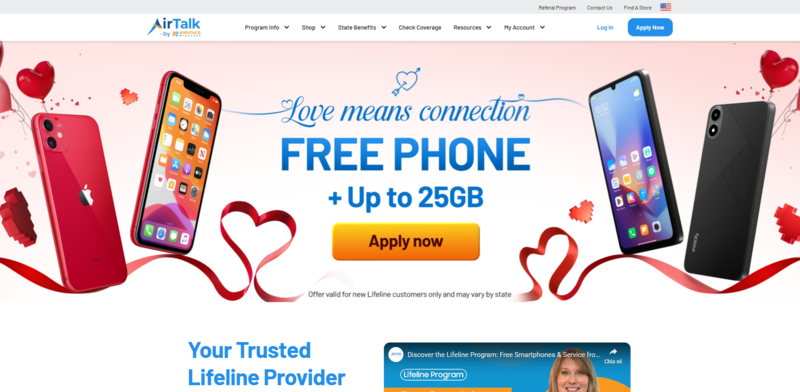
Many applicants search for free government phones iPhone open now and choose trusted Lifeline providers with strong service and device options. Two widely used providers are AirTalk Wireless and Cintex Wireless, which serve over 1.3+ million users nationwide.
These providers offer online and in-person support for applications. Some locations, such as the AirTalk Wireless store in Fountain Valley, California, allow you to visit for application help, document support, and plan consultation.
However, devices are not handed out at the store. After approval, the provider will ship the phone directly to your home address.
Key reasons many users choose these providers:
- Simple online enrollment process
- Wide range of smartphone options
- Support for both new applicants and device activation
- Nationwide coverage across supported networks
- Assistance available during application and setup
UPDATE: Recent updates show that Cintex Wireless is merging with AirTalk Wireless, which may expand device inventory and improve enrollment speed.
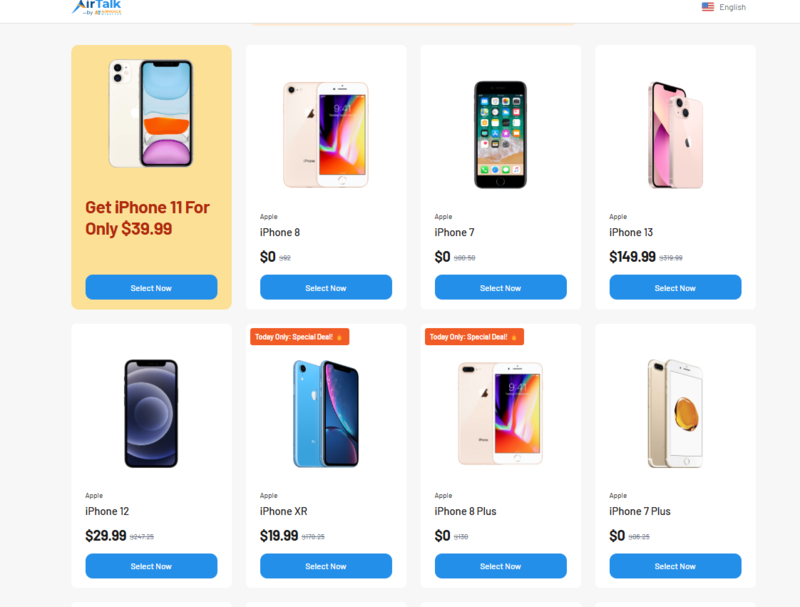
2.2. List of & Discounted iPhone You May Claim Open Now
Available phones depend on inventory, ZIP code, and promotion timing. Below are common examples of devices you may refer to at a provider’s offline store or online application during enrollment.
| Device Model | Type | Price (Estimated) |
| iPhone 7 | Free | $0 |
| iPhone 8 | Free | $0 |
| iPhone XR | Free | $0 |
| iPhone XS | Free / Discounted | $0 – $49 |
| iPhone 11 | Discounted/Limited Promotion | $0 – $199 |
Note: Newer models may appear during limited-time promotions. Availability and price can change quickly, so you should check current offers when applying.
2.3. $0 Monthly Service Plan
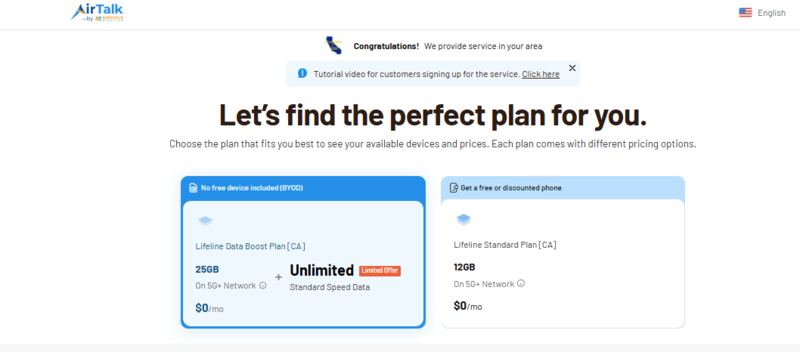
Most Lifeline providers offer $0 monthly service plans along with phone options. Plan features may vary by location and provider.
Below are AirTalk Wireless’s benefits, including:
- Unlimited voice calls and text messaging
- Monthly mobile data for internet access
- International calling support to 200+ countries and territories
- Access to a wide range of smartphones, including iPhones
- Free or discounted iPhone offers during enrollment
- Simple online application process
- Nationwide network coverage
- Customer support for the application and activation
- Device delivery within 7-14 business days after approval
Responsive customer support also helps users resolve issues during enrollment and service activation.
Plan details may vary depending on your ZIP code, provider, and current promotions.
>>> Read more: Which Are the Best Free Gov Phone Companies in the US?
3. How to Apply for Free Government Phones iPhone Open Now
You can apply for free government phones iPhone open now, either online or at a provider store. The application steps are similar, but the main difference is the level of support you receive during the process.
3.1. Apply at a Store (In-Person Support)
If you visit a free government phone location such as an AirTalk Wireless store, staff can assist you with the application.
The process usually includes:
- Checking your eligibility on-site
- Helping you prepare and submit documents
- Guiding you through plan and phone options
- Answering questions about service and activation
You will complete the same application steps as online. However, staff support can help reduce errors and speed up the process.
Note: Even when you apply at a store, AirTalk Wireless will ship the phone to your home address after approval. Devices are not handed out at the store.
3.2. Apply Online (Most Common Users Choose)
If you cannot visit a store, you can apply free government iPhone online through AirTalk Wireless’ website.
The steps include:
- Enter your ZIP code to view available plans and phones
- Choose a free or discounted iPhone option
- Fill in your personal information, and upload documents if required
- Wait for approval, and once approved, your device will be shipped to your address
Many users choose online applications because they are faster and allow easy comparison between providers.
If you are unsure about the process, store staff can also guide you on how to apply online and help you understand each step before you submit your application.
4. FAQs
1. Apply online vs. offline? Which should I choose?
You can apply for a Lifeline plan online or in person. Each option fits a different need.
Online application:
- Faster process
- Easy to compare phones and plans
- Apply anytime from home
- Track application status
Offline (store) application:
- Staff help with documents and forms
- Direct support if you are not familiar with online steps
- Guidance on plans and device options
If you want speed and convenience, you should apply online. If you need help, you can visit a support store and then complete the application.
2. How to apply free tablet deals?
Most Lifeline providers offer discounted tablets, not completely free devices. You can apply for tablet deals during the enrollment process.
Steps to get tablet offers:
- Enter your ZIP code on a provider website
- Choose a Lifeline plan
- Check available tablet options during enrollment
- Select a discounted tablet if offered
Tablet availability depends on provider inventory and promotion timing. Some providers include tablet bundles with mobile data plans.
>>> Read more: Apply for Phones With Tablet Deals: Claim Extra Benefits Now!
3. How to compare each of the Lifeline providers?
You should compare Lifeline providers before applying. Different providers offer different phones, plans, and service quality.
Key factors to compare:
- Available phone models (free vs discounted iPhones)
- Monthly data allowance
- Plan cost ($0 or upgraded plans)
- Approval speed
- Shipping time
- Customer support availability
- Network coverage in your area
You should also check the provider’s reputation and user feedback. Comparing these factors helps you choose a provider that fits your needs and increases your chance of receiving a better device and plan.
Final Words
Free government phones iPhone open now depend on provider inventory, location, and promotion timing. Lifeline providers update phone offers regularly, so available iPhones may change during the day.
If you qualify, compare providers and apply online to view current iPhone deals and secure your device while offers are still open.