The iPhone 16 SIM card slot has become a common topic among buyers. While some iPhone 16 models still support physical SIM cards, others rely entirely on digital activation.
Understanding which versions include a SIM tray can help you avoid compatibility issues when switching carriers, traveling internationally, or transferring an existing mobile plan. This guide explains where the iPhone 16 SIM card slot is located, which models support physical SIM cards, and how eSIM works on Apple’s latest devices.
1. Does an iPhone 16 SIM Card Slot Exist?
The answer depends on where the phone was purchased.
iPhone 16 Models Sold in the United States
Apple no longer includes a physical SIM tray on iPhone 16 models sold in the United States.
These devices activate cellular service using eSIM technology, allowing users to download and manage carrier plans digitally.
U.S. buyers cannot insert a nano SIM card into their devices because there is no physical slot.
iPhone 16 Models Sold Outside the United States
Many international versions of the iPhone 16 still support nano SIM cards. Depending on the region, users may have access to the following:
- One physical nano SIM and one eSIM
- Multiple stored eSIM profiles
- Dual SIM functionality
As a result, customers purchasing an iPhone 16 outside the United States may still receive a device equipped with a SIM tray.
2. Where Is the SIM Card Slot on iPhone 16?
Many buyers search for the iPhone 16 SIM card slot location before purchasing the device. So here are the details:
- International models typically place the SIM tray on the left side of the phone.
- U.S. models do not include a physical SIM tray at all.
If you cannot locate a tray on the side of your device, your iPhone 16 may be a U.S. eSIM-only model.
3. How to Check Whether Your iPhone 16 Has a SIM Card Slot?
If you are unsure which version you own, several methods can help.
Inspect the Device
Look along the sides of the phone for a small removable tray with an eject pin hole. If no tray is visible, the device may only support eSIM.
Check the Model Number
Model numbers can help identify the region for which the phone was manufactured. You can find this information under the following: Settings > General > About.
Comparing the model number with Apple’s regional specifications can confirm whether the device supports physical SIM cards.
Verify Cellular Settings
Simply navigate Settings > Cellular. If the menu prominently displays options for adding eSIM plans, your device may rely entirely on digital activation.
>>> Read more: What Is A SIM Lock iPhone? 4 Easy Methods To Check Phone Status
4. How to Set Up an iPhone 16 eSIM?
Activating an eSIM on iPhone 16 is usually straightforward. Follow these steps:
- Open Settings.
- Tap Cellular or Mobile Data.
- Select Add eSIM.
- Follow your carrier’s instructions.
- Scan a QR code or transfer an existing plan.
- Finish the activation process.
Many carriers now allow customers to complete activation online without visiting a retail store.
5. Can I Use a Physical SIM Card in an iPhone 16?
Whether you can put a traditional SIM card in an iPhone 16 SIM card slot depends entirely on your specific model.
- U.S. versions cannot use physical SIM cards because they do not include a SIM tray.
- International versions may still accept nano SIM cards.
If you frequently move SIM cards between devices, travel internationally, or prefer physical cards, an international model may better suit your needs.
However, many users now prefer eSIMs because they allow them to activate service, switch carriers, and manage multiple plans digitally.
6. Get a Free SIM Card Through the Lifeline Program and Cintex Wireless
For households trying to reduce monthly phone expenses, the federal Lifeline program may provide valuable assistance.
Overview of Lifeline Program
The program was created to help eligible consumers maintain access to wireless communication services through participating providers.
Individuals may become eligible based on household income or enrollment in certain public assistance programs, including Medicaid, SNAP, SSI, and other qualifying benefits.
The program does not provide the support directly, but through working with Eligible Telecommunication Carriers to handle the process.
Importantly, Cintex Wireless is an ETC that has long participated in the Lifeline program, offering various benefits to its applicants.
The company is currently transitioning its services through AirTalk Wireless, which allows eligible customers to continue receiving supported wireless services while benefiting from a larger device selection and expanded customer support.
Note: Eligibility varies by state and program. Offers depend on availability and qualifications. Cintex and AirTalk Wireless operate under the federal Lifeline Program as an Eligible Telecommunications Carrier (ETC). Service is non-transferable and limited to one service per household.
Depending on your location, qualification status, and current promotions, approved applicants may receive benefits such as the following:
- Monthly wireless service at little or no cost
- A complimentary SIM card for activation
- Talk, text, and mobile data benefits
- Access to select smartphones (may vary)
- Standard calling features such as voicemail and caller identification
DISCLAIMER: The government does not cover device costs, only basic service through Lifeline. Any free or discounted devices, upgrades, or top-ups are limited-time Cintex Wireless and AirTalk Wireless offers and may vary by state, eligibility, and availability. Terms and conditions apply.
How to Apply for Lifeline Benefits
Because available devices and promotions may change throughout the year, applying early may improve your chances of accessing current offers.
Luckily, applying for Lifeline-supported service is generally done online and requires only a few steps.
- Visit AirTalk’s website and enter your ZIP code to confirm service availability in your area.
- Review the available plans and eligible devices offered in your state. Available options may differ depending on inventory and local program support.
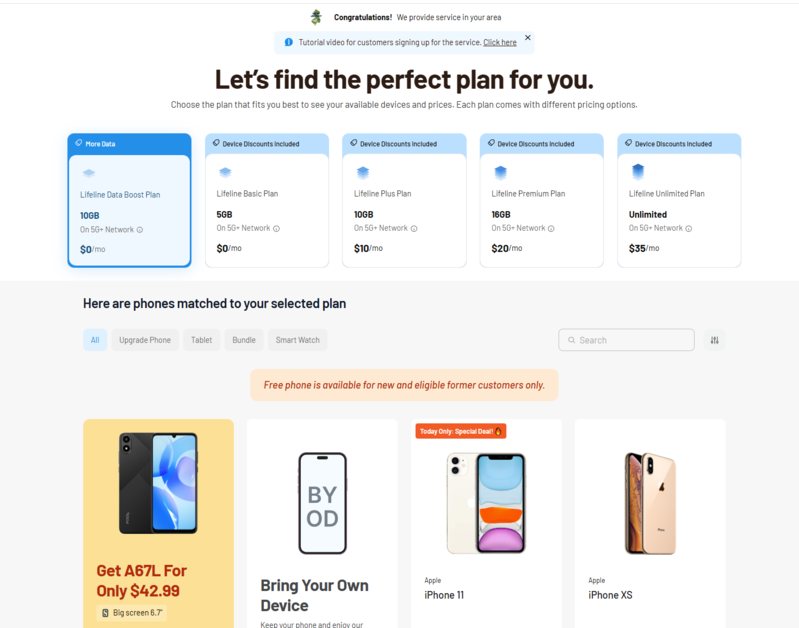
- Complete the online application and carefully verify all personal information before submission.
- Once approved, your selected device or SIM card will be prepared for shipment, and tracking information is typically provided after processing.
Conclusion
The availability of an iPhone 16 SIM card slot depends on the country where the device was sold. U.S. models rely entirely on eSIM, while many international versions continue to offer a physical nano SIM tray. Understanding these regional differences can help you choose the right iPhone 16 model and avoid activation issues later.