
A SIM card is a small piece of hardware that connects your phone to a mobile network and identify your subscription. If you’ve ever wondered what is stored on a SIM card, the answer goes beyond basic carrier information.
But what exactly information and how much data can the SIM card hold? In this post, we will look at what information SIM cards may and cannot store.
1. What is Stored on a SIM Card?
A SIM card mainly stores subscriber and network-related information used to identify your mobile line and authenticate it to the carrier.
Some physical SIM cards can also store a limited number of contacts and, in certain cases, SMS messages, although modern phones usually keep this personal data on the device or in cloud accounts.
Below is some additional information stored on your SIM card:
- Carrier information: Network identifiers and subscription-related data used to help the SIM authenticate and access the carrier’s mobile service.
- ICCID: A unique serial number used to identify the SIM card itself.
- IMSI: A unique subscriber identity that allows the mobile network to recognize your subscription.
- Network information: A SIM may store certain network-selection or temporary registration information used during mobile-network access. This is not the same as storing your GPS location or location history.
- Subscription information: Data that helps link the SIM to your mobile service and account.
- Authentication key: A secure key used to authenticate your SIM to the carrier’s network.
- PIN-related security data: The SIM supports PIN protection, while the carrier provides a PUK code that can be used to unblock the SIM after too many incorrect PIN attempts.
- Phone number: A SIM may contain information associated with your mobile number, although the number is primarily managed by the carrier’s network.
- Contacts: Some SIM cards can store a limited number of contact names and phone numbers.
- SMS messages: SIM cards may store a limited number of traditional SMS messages, although modern phones generally store messages on the device or in cloud services.

2. What is not Stored on a SIM Card?
Now you know what is stored on a SIM card.
It is also important to understand what a SIM normally does not store, including apps and personal media such as photos, videos, or music.
These are saved to your mobile or an external storage card, such as a Micro SD card, if it is suitable.
Moreover, call logs and browsing history, as well as emails and social media accounts, are generally stored on your phone’s cloud storage or internal memory, not on the SIM.
>>>Read more: How To Transfer SIM Card To New Phone Effortlessly? 2026 Guide
3. How Much Data is Stored on a SIM Card?
Although SIM cards have become physically smaller over time, their internal capabilities have also evolved as mobile networks moved from GSM to newer USIM and 4G/5G technologies.
SIM cards use relatively small amounts of secure storage compared with a phone’s normal internal memory. The exact capacity varies by SIM generation, manufacturer, and implementation, so there is no single storage range that applies to every physical SIM or eSIM.
That storage is used mainly for subscriber identifiers, authentication and security data, network information, and any optional SIM-stored contacts or messages.
Some physical SIM cards can store a limited phonebook, but the number of entries varies and modern smartphones generally store contacts in the device or cloud instead.
In practice, the SIM’s main role is to identify and authenticate your mobile subscription so the device can access the carrier’s supported services. Any contacts or SMS stored on a physical SIM are secondary, limited features rather than the SIM’s primary purpose.
>>>Read more: Tablet With SIM Card: How It Keeps You Connected (2026)
4. Will I Lose My Data if I Change My SIM Card?
If your SIM contains contacts or other limited SIM-stored information, removing the card may make that information temporarily unavailable on the phone until the SIM is reinserted or the data is imported elsewhere.
Removing a SIM does not erase the data stored on the card. Reinserting it into a compatible phone may make its SIM-stored contacts or other supported information available again.
But please note that contacts saved directly on the old SIM may not appear after you switch, so it is best to back them up first.
- Import contacts from the SIM: Move SIM-stored contacts to your phone before removing the card.
- Sync with Google or iCloud: Save contacts to your Google or iCloud account so they can be restored on another device.
- Export contacts as needed: Create a contact backup file for an additional copy.
- Back up other phone content separately: Photos, messages, apps, and documents are usually stored on the device or in the cloud, so back them up separately before making major changes.
5. Worrying about Losing Your SIM Card? Here is Your Alternative
If you often worry about losing, damaging, or misplacing a physical SIM card, consider switching to an eSIM.
Because an eSIM is built into a compatible phone, there is no removable card to carry, clean, lose, or physically damage, although the digital profile may still need to be transferred or reactivated when you change devices.
Especially, eligible low-income consumers may also be able to use eSIM service through carriers of the federal Lifeline program.
Lifeline is a federal initiative that helps those with limited income stay connected by offering discounts on phone service or internet service.
Eligibility based on income or participation in other qualifying programs.
And the Lifeline benefits are delivered through approved Eligible Telecommunications Carriers, or ETCs.
Cintex Wireless is a Lifeline-participating provider that may offer more than just discounted monthly service.
Depending on your location, eligibility, and current availability, qualifying users may have access to an eSIM-compatible smartphone, monthly data, and unlimited talk and text.
Moreover, it is merging with AirTalk Wireless to offer a streamlined application process as follows:
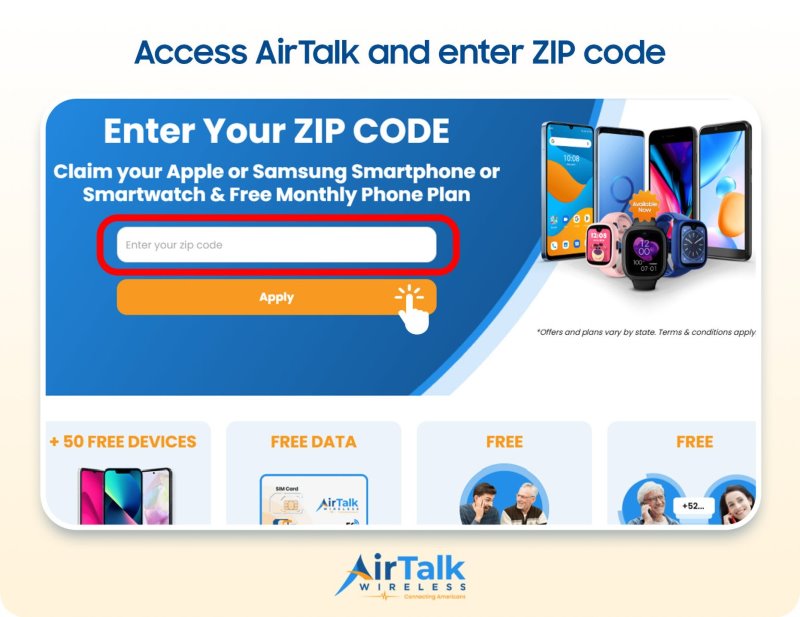
- Enter your ZIP code: Visit the carrier website and enter your ZIP code to check whether Lifeline service is available in your area.
- Choose your plan and device: Review the Lifeline plans and available phones offered in your state. You can also choose the Bring Your Own Device option to use your existing device.
- Provide your information: Complete the application and upload proof of identity or eligibility if additional documentation is requested.
- Submit your application: Your application will be reviewed. If approved, your service can be activated, and any selected physical device or SIM will be processed for delivery.
Note: Eligibility varies by state and program. Offers depend on availability and qualifications. Cintex and AirTalk Wireless operate under the federal Lifeline Program as Eligible Telecommunications Carriers (ETCs). Service is non-transferable and limited to one service per household.
Conclusion
Understanding what is stored on a SIM card can help you manage your mobile data more safely when switching phones, replacing a SIM, or moving to an eSIM.
A SIM mainly stores subscriber- and network-related information, such as identifiers, authentication data, security codes, and sometimes limited contact information or SMS messages.
Meanwhile, most personal content, including photos, apps, and files, is stored on your phone or in the cloud rather than on the SIM card.