Why does a call go straight to voicemail without ringing? It’s frustrating when you call about an important appointment and hear voicemail before the phone even seems to ring. You might wonder whether the person is unavailable or has deliberately blocked your number.
But immediate voicemail doesn’t always mean your call was rejected. The cause may involve network availability or how the receiving phone handles incoming calls. Here’s how to narrow down what’s happening before jumping to conclusions.
1. Why Does A Call Go Straight To Voicemail Without Ringing?
A call may reach voicemail immediately because the recipient’s phone is unavailable or certain settings affect incoming calls.
Here are seven possible causes:
- Phone unavailable: The device may be switched off, in Airplane Mode, or outside cellular coverage.
- Call forwarding: Incoming calls may be redirected to voicemail or another number.
- Call screening: Unknown-caller screening or spam protection may send certain callers directly to voicemail.
- Number blocking: A blocked number may reach voicemail, depending on the phone and carrier.
- Busy line: If the recipient is already on another call, Call Waiting and carrier settings affect how the next call is handled.
- Dual SIM configuration: On some iPhones, calls to one line may reach voicemail while the other line is in use.
- Carrier problems: Network outages, routing errors, or service restrictions may prevent normal call delivery.

2. Is It Happening To One Contact Or To Your Own Incoming Calls?
Before investigating “why does a call go straight to voicemail without ringing,” establish the pattern.
| Pattern | Where to start |
| One person receives your calls differently | Their availability, settings, or routing |
| Several people cannot reach you | Your connection, settings, and carrier |
| Only unsaved callers are affected | Unknown-caller screening |
| Calls fail in one location | Coverage or Wi-Fi Calling |
For example, a clinic’s unsaved number may be silenced while family calls ring normally. That points toward screening rather than a broken speaker.
>>> Read more: Why Does My Call Go Straight to Voicemail? 7 Reasons to Know
3. Which Phone Settings Can Prevent Incoming Calls From Ringing?
If you’re wondering why does a call go straight to voicemail without ringing, follow these steps to check settings on your iPhone or Android device.
iPhone settings worth checking
Step 1. Review Focus settings
Open Settings > Focus and check whether Do Not Disturb or another Focus mode is silencing incoming calls.
Step 2. Check unknown caller screening
Go to Settings > Apps > Phone and review Screen Unknown Callers. Where available, Silence sends unknown calls to voicemail, while Ask Reason for Calling screens them first.
Step 3. Review blocked contacts and spam controls
Check blocked numbers and spam filtering settings that may prevent certain calls from ringing.
Step 4: Check Call Forwarding
Open Settings > Apps > Phone > Call Forwarding, if available.
Check whether your incoming calls are being redirected to another number. If your carrier supports conditional forwarding when your line is busy or unavailable, contact them to review those settings.
Step 5. Check unknown caller filtering
Review the Unknown Callers filter, which organizes call history rather than directly silencing calls.
Using Dual SIM? Incoming calls to your second line may go directly to voicemail while you’re talking on the other line if Wi-Fi Calling or the necessary data connection isn’t available. Check both lines’ settings before assuming the calls are being blocked.
Android settings that may affect call delivery
Step 1. Check Do Not Disturb
Open Settings > Modes or Do Not Disturb and review whether incoming calls are being silenced.
Step 2. Review blocked numbers
Open your Phone app and check blocked numbers. Phone by Google automatically declines calls from blocked contacts.
Step 3. Check spam filtering
Review your phone’s settings for features that may automatically screen or decline calls.
Step 4. Verify unknown number blocking
In Phone by Google, the Unknown blocking option applies to private or unidentified numbers, not every unsaved contact.
Note: Android menus vary by manufacturer and software version. These settings can help identify why incoming calls reach voicemail without ringing.

4. Does Immediate Voicemail Mean You Have Been Blocked?
No. A call going straight to voicemail doesn’t necessarily mean someone blocked your number. Poor network coverage, call forwarding, or unknown-caller screening can produce similar results.
If your calls consistently reach voicemail while other people can contact the recipient normally, blocking is one possibility. However, this pattern isn’t reliable proof. The recipient may have settings that silence your number or prioritize certain contacts, and your phone won’t necessarily tell you which explanation applies.
Instead of repeatedly calling or using another number to get through, consider leaving a brief voicemail or sending a message through an established contact channel. If the person wants to respond, they can do so when available. This avoids unnecessary assumptions while respecting their communication preferences.
5. How To Troubleshoot Your Own Phone Step By Step
If people say their calls keep going straight to your voicemail, first check whether your phone receives calls without ringing or not at all.
Follow these steps one at a time, testing after each change.
Step 1. Identify which calls are affected
Compare calls from saved contacts and unknown numbers to determine whether the problem affects specific callers or everyone.
Step 2. Check network connectivity
Verify your signal strength, turn off Airplane Mode, and confirm your SIM or eSIM is active and connected.
Step 3. Review call silencing settings
Check Focus, Do Not Disturb, call screening, and blocked numbers to ensure incoming calls are not being filtered or silenced.
Step 4. Verify call forwarding
Review call forwarding settings. If necessary, contact your carrier to check whether conditional forwarding is redirecting calls to voicemail.
Step 5. Restart and update your phone
Restart your device and install available software or carrier updates to address potential connectivity issues.
Step 6. Test incoming calls again
Ask one saved contact and one unsaved number to call you.
Check whether the calls appear on your screen, ring normally, or go directly to voicemail.
If the calls appear without sound, check Silent Mode and your sound settings. If they never reach your phone, review screening, forwarding, and carrier service.
Step 7. Contact your carrier
If the problem continues, ask your carrier to check network outages, account restrictions, voicemail configuration, and call routing.
Note: Change one setting at a time and retest after each adjustment. This makes it easier to identify the actual cause.
>>> Read more: How To Call Voicemail: 3 Ways (Even Without Your Phone)
6. Don’t Let Important Calls Become Another Monthly Worry
Missed calls can mean delayed appointment updates, work discussions, or family conversations. After checking why calls reach voicemail, reviewing your monthly phone costs can help you keep reliable service within your household budget.
The Federal Lifeline Program helps eligible households reduce monthly phone service or internet service costs. You may qualify through Medicaid, SNAP, SSI, Federal Public Housing Assistance, or household income at or below 135% of the Federal Poverty Guidelines. Each household is limited to one Lifeline benefit.
Lifeline funds the discount, while an approved Eligible Telecommunications Carrier (ETC) provides service and applies the savings to an eligible plan. You can apply for eligibility directly, but you still need to enroll with a participating carrier to receive supported service.
Cintex Wireless is one of those ETCs that is worth exploring since it also offers a promotional device along with a Lifeline-discounted service plan.
The carrier is known for its simple enrollment process and is merging into AirTalk Wireless, another ETC that has been serving for years. Through this merger, eligible applicants can explore a broader device lineup and complete enrollment through a more streamlined sign-up process. Getting started generally involves:
- Check local availability: Visit AirTalk Wireless’s website and enter your ZIP code to view available offers.
- Compare your options: Review coverage where you use your phone, plan allowances, devices, and any applicable charges.
- Complete your application: Provide the required information and upload proof of eligibility if requested.
- Submit and wait for results: After approval, follow the carrier’s instructions to finish setup.
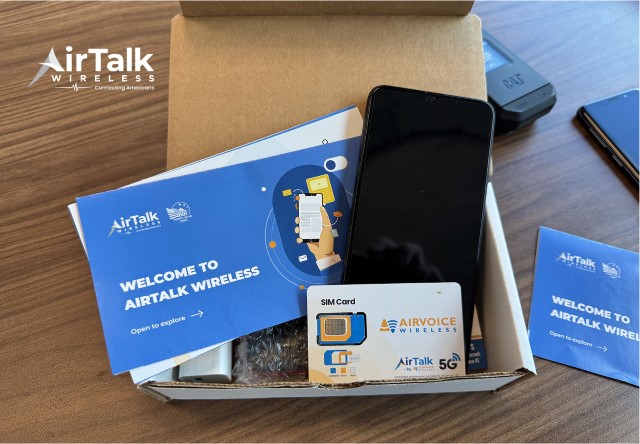
Choose an offer that fits your everyday communication needs. If calls still go straight to voicemail, continue working with your carrier to identify the cause; changing plans alone may not resolve the issue.
IMPORTANT: The government does not subsidize devices. Lifeline programs cover basic service costs only. Free or discounted devices, upgrade plans, or top-ups are exclusive benefits provided by AirTalk Wireless and Cintex Wireless as part of the promotional offers. Terms and conditions apply. Limited-time promotion—offers vary by state, stock availability, and eligibility.
7. FAQs
Can a phone on Silent mode still receive calls normally?
Yes. Silent Mode generally mutes the ringtone without preventing incoming calls. You can still answer them, although Focus, call screening, or other settings may affect how they arrive.
Can Airplane Mode send calls straight to voicemail?
Yes. Airplane Mode disconnects cellular service, so incoming calls may go to voicemail. However, Wi-Fi Calling can still work if Wi-Fi is enabled and your carrier supports it.
Can a full voicemail inbox change what the caller hears?
Yes. A full voicemail inbox may trigger a mailbox-full announcement or prevent callers from leaving messages. However, it doesn’t usually explain why the phone never rang.
When should I contact the carrier instead of the phone manufacturer?
Contact your carrier if multiple callers consistently reach voicemail despite normal connectivity and calling settings. Your carrier can investigate service restrictions, voicemail configuration, and call-routing problems.
Conclusion
The next time you wonder, “why does a call go straight to voicemail without ringing?”, remember that immediate voicemail doesn’t automatically mean someone has blocked your number or their phone is broken.
The most useful clue is whether the problem affects one caller or everyone trying to reach the same phone. Once you identify that pattern, it’s easier to check the right settings or ask your carrier for help. That can bring you closer to receiving important calls without unnecessary guesswork.