Moving a mobile line to another phone often takes only a few minutes, but the SIM card must fit the device and work with its network. Before you open either tray, you should check the phone’s lock status, SIM size, and carrier compatibility.
This guide explains how to switch SIM cards on iPhone and Samsung phones, what information is retained on the card, and what to do when the new device does not connect.
1. Can I Do SIM Swap by Myself?
Yes, you can usually switch a physical SIM card at home without a technician’s help.
You only need the correct ejector tool, two compatible phones, and a few minutes to carefully move the card.
However, note that the process depends on the type of change you are making.
The line can start working as soon as the new device boots up if you transfer an active physical SIM card from another compatible phone.
When you receive a replacement SIM, your carrier may need to activate it before it can connect.
2. Things to Consider before Switching SIM Cards
A SIM card may fit into the tray but still fail to provide service. These checks can help you avoid that situation.
Network Compatibility
The new phone must support the carrier’s network technology and frequency bands.
Before transferring the card, you should check the phone’s compatibility with the carrier, using its IMEI checker when one is available, especially if the handset was imported or purchased from another provider.
Carrier-Locked
A locked phone may accept only SIM cards from the carrier or network it is currently locked to.
The device may show SIM Not Supported, Invalid SIM, or a similar message when you insert a card from another network.
SIM Card Size
Most recent phones use nano-SIM cards, while some older models use micro-SIM. Examine the tray or the device specs before removing the card from the old phone.
You should not cut a larger card by hand. Apple warns that a modified SIM can damage the tray or device.
Physical SIM Tray or eSIM Support
Some phones support a removable card, while others use eSIM or offer both options. A phone without a physical tray requires a digital transfer instead of a card swap.
Backup Important Device Data
A SIM card does not normally contain your photos, apps, messages, passwords, or full contact library. You should back up the old phone before switching so that you can move those files separately.
An iCloud, Google, Samsung, or computer backup can protect information that will not travel with the SIM card.
3. How To Switch SIM Cards Between Phones?
Before removing or inserting a physical SIM, you may turn off both phones as a precaution. After the card is moved, powering the new phone on can help it detect the SIM and reconnect to the carrier.
Switch SIM Cards for iPhone Models with a SIM tray
Here is how to switch SIM cards iPhone models that include a physical SIM tray:
- Turn off both the old and new iPhones.
- You should locate the small SIM tray on the side of each device.
- Insert the SIM ejector tool straight into the tray hole.
- Remove the card from the old iPhone.
- You should place the SIM in the new tray with the angled corner aligned correctly.
- Push the tray back into the new iPhone in the same orientation.
- Turn on the new phone and wait for it to detect the SIM and connect to the carrier network.
After the iPhone starts, you should make a call, send a message, and test mobile data. The phone may also ask you to install a carrier settings update or enter the SIM PIN.
Switch SIM Cards for Samsung Phone
Wonder how to switch SIM cards Samsung? The process also begins by turning off both devices.
- Locate the SIM tray on the side, top, or bottom edge of each phone, then insert the ejector tool into the correct opening.
- Pull the tray out gently and remove the SIM card from the old device.
- Place the card into the matching slot on the new Samsung phone, making sure the angled corner lines up and the SIM lies flat.
- Reinsert the tray without forcing it, then power on the device and wait for the network signal to appear.
Some Galaxy models use a hybrid tray that shares space with a microSD card, while others support two physical SIMs. Thus, check the markings on the tray carefully before placing the card.
After the phone starts, test a call, text message, and mobile data connection.
If service does not appear, restart the device, check that the SIM line is enabled, and confirm that the phone is unlocked and compatible with the carrier.
>>>Read more: How To Transfer SIM Card To New Phone Effortlessly? 2026 Guide
4. Moving an eSIM Require a Digital Transfer
An eSIM cannot be removed with an ejector tool because its profile is stored digitally inside the phone.
You may be able to transfer the line during the new phone’s setup process or through its cellular settings. The carrier may also provide a QR code, app-based activation, or a newly assigned eSIM profile.
You should keep both phones connected to Wi-Fi during the transfer.
You should contact the carrier when the automatic transfer option does not appear, the devices or carrier do not support direct transfer, or the old phone is no longer available.
5. Will I Lose Anything on My Phone if I Switch SIM Cards?
You will not normally lose the personal files stored on either phone simply by switching the SIM.
The card mainly connects your mobile number and service account to the carrier’s network.
Information That Usually Follows the SIM
- Your existing mobile number usually remains attached to the line.
- Your talk, text, and data plan usually remain active.
- Contacts stored directly on an older SIM may be available for import on the new phone.
- Your existing mobile line and plan generally remain associated with the same carrier account.
Information That Does Not Automatically Transfer
- Your photos and videos remain on the old phone or cloud account.
- Your apps and app data do not move with the SIM.
- Your message history usually requires a device backup or transfer tool.
- Your passwords and settings remain tied to the phone or online account.
- Your authenticator apps may require separate migration.
- Contacts stored in iCloud, Google, or Samsung accounts can usually return after you sign in and enable syncing. Contacts stored only in the phone’s local memory may need to be transferred separately.
When the SIM Does Not Work in the New Phone
Now you know how to switch SIM cards. In case your new SIM does not work, simply restart, then turn Airplane Mode on and off.
If the signal does not return, remove the card and confirm it sits correctly in the tray.
You should also:
- Check whether the new phone is carrier-locked.
- Confirm that the model works with the network.
- Install available software and carrier settings updates.
- Make sure the mobile line is enabled in the phone settings.
- Ask the carrier whether it needs to register the new IMEI.
- Test the SIM in the original phone again.
6. Experience SIM Card Issues? Get a New Free SIM Card
If your current phone requires a physical SIM or no longer works well for you, consider upgrading your device.
Luckily, Lifeline may help reduce the cost of switching to another device and service plan.
It is a federal assistance program that provides a monthly discount on qualifying wireless service for eligible low-income households. Qualification generally depends on household income or participation in an approved assistance program.
The program itself does not provide free phones. However, participating Eligible Telecommunications Carriers may offer a compatible smartphone through their own promotions.
Lifeline is limited to one benefit per eligible household, and the service cannot be transferred to another person.
One notable Lifeline provider is Cintex Wireless, which is merging with AirTalk Wireless. New applicants can now complete the enrollment process through AirTalk.
Depending on eligibility, location, and available inventory, benefits may include:
- Unlimited monthly talk and text
- A generous monthly mobile data allowance
- A compatible smartphone or tablet
- Nationwide network coverage
- No annual service contract
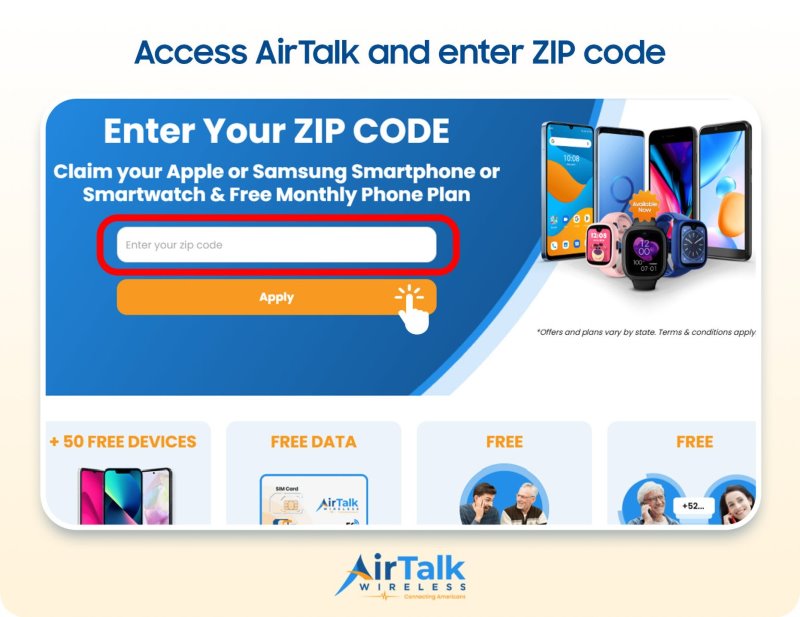
IMPORTANT: The government does not subsidize devices. Lifeline programs cover basic service costs only. Free or discounted devices, upgrade plans, or top-ups are exclusive benefits provided by Cintex and AirTalk Wireless as part of the promotional offers. Terms and conditions apply. Limited-time promotion—offers vary by state, stock availability, and eligibility.
Conclusion
Learning how to switch SIM cards starts with three checks: the new phone must be compatible with the carrier, support the correct SIM type, and be unlocked if you are moving the line from a different carrier.
A physical swap usually takes only a few minutes, while an eSIM requires a digital transfer. Your number and service may carry over, but your files and apps still require a separate backup or device transfer process.