If you’re asking, “does my phone have an eSIM?”, there are several quick ways to find out. From checking your phone’s settings and EID number to verifying your model and carrier support, a few simple checks can confirm whether your device is eSIM-compatible.
This blog post will walk you through 5 easy methods to determine if your phone supports eSIM and what to do if it doesn’t.
1. Does My Phone Have an eSIM?
An eSIM (or embedded SIM) is a digital version of a traditional SIM card that is integrated into your phone’s hardware. Rather than inserting a physical card, you download your carrier profile and activate it using software.
Although most eSIM-compatible phones and tablets can easily install an eSIM, there is one exception that may be holding you back.
If your phone is locked to one carrier, you may not be able to activate an eSIM from a different carrier until the device is unlocked. This can happen with some carrier-financed or locked devices, depending on the carrier’s unlock policy.
2. Quick Ways to Check if Your Phone Has eSIM
If you are wondering “Does my phone have an eSIM?” there are several methods to verify.
Check Settings
Checking your device’s settings will let you know whether your phone supports eSIM. Here is how:
- Open your phone’s Settings app.
- Navigate to Cellular/Mobile Data on an iPhone or Connections > SIM Manager (or Network & Internet > SIMs) on an Android device.
- Check whether you see an option such as Add eSIM, Add Cellular Plan, or Add Mobile Plan. If available, your device supports eSIM.
Check for an EID Number
Dialing *#06# can show device identifiers. If an EID appears, your phone likely has eSIM hardware. You can also check the EID in device settings on many phones.
However, it’s worth noting that this check isn’t always definitive. Some regional models, carrier-locked devices, or software variants may show eSIM-related identifiers but still have limited activation support with certain carriers.
Search Your Exact Phone Model
Another reliable way to perform an eSIM compatibility check is to search for your exact phone model.
Find your device model number in your phone’s settings, then look it up on the manufacturer’s official website.
The product specifications will indicate whether your specific model supports eSIM, which is especially important since compatibility can vary between regional versions of the same phone.
Confirm With Your Carrier
Does my phone have an eSIM? You can directly contact your carrier.
Provide your phone model or IMEI number, and they can confirm whether both your device and your current mobile plan support eSIM activation on their network.
3. How to Check eSIM Support by Phone Type
Support for eSIM varies by phone manufacturer and model. If you notice an “EID” number, your phone probably supports eSIM.
The instructions below show how to check eSIM compatibility on popular smartphones.
Please note that these methods may or may not apply to your device. The best approach is to validate eSIM functionality through your device manufacturer, vendor, or primary carrier.
- On iPhone: Open Settings > General > About and scroll to find Available SIM, Digital SIM, or EID. If an EID or Digital SIM information is displayed, your iPhone is eSIM-compatible.
- On Samsung Galaxy: Go to Settings > Connections > SIM Manager. If you see an Add eSIM option, your Samsung device likely supports eSIM.
- On Google Pixel: Open Settings > Network & Internet > SIMs, then tap the + icon. If you see Download a SIM instead?, your Pixel supports eSIM.
- On other Android phones: Dial *#06#. If an EID appears alongside your device identifiers, your phone supports eSIM.
4. What to Do After You Confirm eSIM Support?
Once confirmed does my phone have an eSIM, you may activate your cell plan to stay connected.
Depending on your carrier, you may need to scan a QR code, use the carrier’s app, follow an activation link, or manually enter the eSIM data. The specific procedure varies per device and provider, but it often takes only a few minutes.
>>>Read more: How To Activate eSIM On iOS And Android? 2026 Tutorial.
5. What to Do if Your Phone Isn’t eSIM Compatible?
There are situations when your phone is incompatible with eSIM. So what do you do?
The best solution relies on your existing device and your readiness to upgrade.
Use a Physical SIM Card
If your phone has a SIM card slot, you can continue using a traditional nano SIM from your carrier.
Physical SIM cards still provide reliable access to calls, text messages, and mobile data, making them an excellent option if you don’t need the additional flexibility that eSIM offers.
Use Portable Hotspot
A portable WiFi hotspot is another convenient solution, especially if you frequently travel or need internet access on multiple devices.
It creates a secure mobile internet connection for your phone, tablet, or laptop without requiring your device to support eSIM technology.
>>>Read more: Pay As You Go eSIM: Flexible Service Without Contracts
Upgrade Your Phone
If you’d like to enjoy features such as digital activation, easier carrier switching, and Dual SIM functionality, upgrading to an eSIM-compatible smartphone is the best long-term solution.
Luckily, eligible low-income households can explore the Lifeline program. This is a federal program that supports eligible households to access wireless services like phone service or internet service without breaking their financial plan.
The program provides a monthly discount through participating Eligible Telecommunication Carriers (ETCs) such as Cintex Wireless, which is merging its services with AirTalk Wireless, to deliver the support.
To qualify, you either have to meet one of the following requirements:
- meeting the household income limit
- participate in qualifying programs like SNAP, Medicaid, SSI, etc.
Depending on your state, eligibility, and available inventory, you may qualify for free or discounted wireless service and an eSIM-compatible smartphone from these carriers as well.
Follow these steps to claim your benefits:
- Visit the AirTalk Wireless website and enter your ZIP code to check service availability.
- Choose a Lifeline plan and an available device based on your location and current inventory.
- Complete the online application with your personal information. Upload any required documents to verify your identity and Lifeline eligibility.
- Wait for your application to be reviewed and approved through the Lifeline verification process. Receive and activate your SIM card or device once your application has been approved.
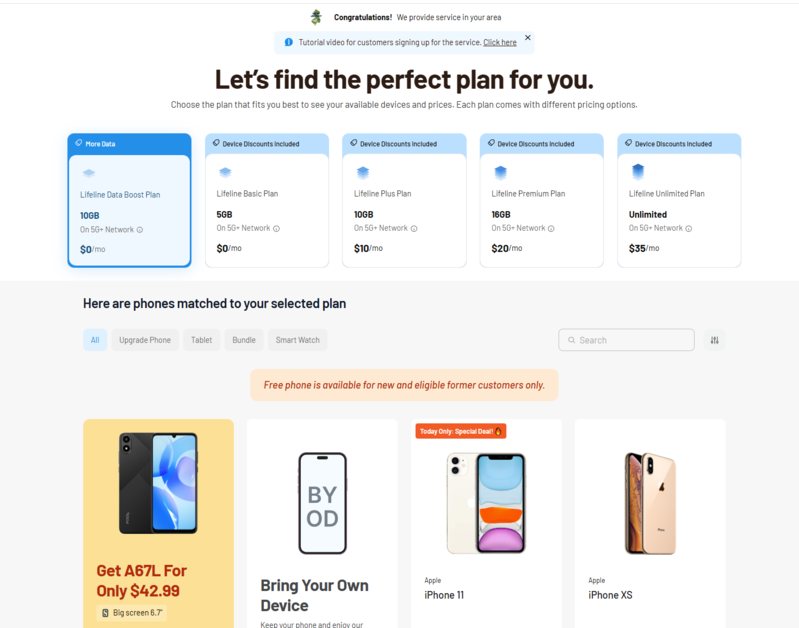
Note: Eligibility varies by state and program. Offers depend on availability and qualifications. Cintex Wireless and AirTalk Wireless operate under the federal Lifeline Program as an Eligible Telecommunications Carrier (ETC). Service is non-transferable and limited to one service per household.
Conclusion
To conclude, by reviewing your device settings, model, EID number, carrier support, and manufacturer specifications, you can quickly confirm “Does my phone have an eSIM?”. If your current device doesn’t support eSIM, you can continue using a physical SIM card or consider upgrading to a compatible smartphone to take advantage of digital SIM technology.