More laptops now come with built-in cellular connectivity, making it possible to stay online without relying on public WiFi or a mobile hotspot. If you’re considering an eSIM laptop, it’s important to understand how this technology works, which laptops support it, and how to activate a compatible mobile plan.
This blog post covers everything you need to know to get connected with an eSIM-enabled laptop. Let’s check it out!
1. Can You Get an eSIM on a Laptop?
An eSIM-enabled laptop is a laptop with cellular hardware and an embedded SIM, or eSIM, that can store a mobile data profile without using a removable SIM card.
It enables you to download cellular data plans directly to your device, allowing you to stay connected when traveling or in areas lacking WiFi.
In fact, you can use an eSIM laptop only if your gadget is compatible with it.
However, not all laptops include eSIM support or built-in LTE/5G cellular hardware. Thus, the first step is to determine whether your model is suitable.
Most eSIM-ready laptops are newer models intended for remote workers, business travelers, and others who want consistent connectivity while on the road.
If your laptop supports eSIM, you must also have a valid data plan from a laptop-compatible carrier. A phone eSIM plan may not always work on a laptop, and many laptop eSIM plans are data-only.
Moreover, some eSIM plans are intended for phones, tablets, watches, or specific device types, so confirm that the carrier supports your laptop model before buying a plan.
2. Why Use an eSIM Laptop?
As more of us stream on the go, staying connected without relying on unreliable public WiFi has become essential.
Whether you are a remote worker or someone who wants to have dependable internet wherever they go, eSIM provides you with freedom and flexibility without the hassle by offering the following benefits:
- Stay connected from anywhere with mobile coverage.
- No need for SIM cards or USB dongles.
- Scan a QR code to go online quickly.
- Travel light without carrying unnecessary items.
- Effortlessly switch networks or plans as needed.

3. How to Check If Your Laptop Supports eSIM?
As previously stated, many new laptops now have eSIM capabilities, which provide seamless connectivity without physical SIM cards.
To determine whether your laptop has built-in eSIM functionality, here is how:
- Check your system settings: On Windows, go to Settings > Network & Internet > Cellular. If your PC supports eSIM, you may see options such as Manage eSIM profiles or a way to add an eSIM profile. On a Chromebook, open Settings > Network and look for mobile data, SIM, or eSIM options. Google says Chromebooks can use an eSIM or SIM profile for mobile data when supported by the device and carrier.
- Review your BIOS settings: Restart your laptop and enter the BIOS or UEFI menu during startup. Not every laptop shows eSIM status in BIOS/UEFI, so manufacturer specifications and Windows/ChromeOS settings are usually more reliable.
- Verify your laptop’s specifications: Visit your laptop manufacturer’s official website and search for your exact model number. The product specifications will indicate whether the device includes a built-in eSIM or cellular connectivity.
>>>Read more: eSIM vs iSIM: 6 Key Differences You Should Understand
4. How to Install & Activate eSIM on Laptop?
Having an eSIM on your laptop lets you stay connected without worrying about finding a nearby WiFi connection.
To install and activate an eSIM laptop, follow the procedures below (the exact process may vary by your device):
Installation Steps
- On Windows, open Settings > Network & Internet > Cellular.
- Select your cellular settings, then open Manage eSIM Profiles.
- Choose Add a New Profile to begin the setup process.
- Select the option to enter an activation code from your mobile operator.
- Follow the carrier’s instructions, which may involve scanning a QR code, entering an activation code, selecting an available profile, or using the carrier’s website or app.
- Follow the on-screen instructions to install the eSIM profile.
- Once the profile has been downloaded successfully, select Close to finish the setup.
Activation Steps
- Open the Settings app on your laptop.
- Go to Network & Internet > Cellular > Manage eSIM profiles.
- Choose the eSIM profile you want to activate.
- Confirm your selection by clicking Yes, and the selected eSIM profile will become active.
>>>Read more: eSIM Compatibility Check On iPhone, Samsung & More [1-Minute Check]
5. Which Laptops Are eSIM Compatible?
One of the easier ways to verify if your laptop supports eSIM is to check the eSIM-compatible laptop list. If you can locate your laptop there, you can obtain and use an eSIM card.
Note: Current MacBook models do not include built-in cellular or eSIM support. Apple’s current MacBook Air and MacBook Pro technical specifications list Wi-Fi and Bluetooth wireless networking, not cellular connectivity. Mac users can use an iPhone or iPad Personal Hotspot instead.
The examples below should be treated as model families or known cellular-capable lines, not a guarantee that every configuration supports eSIM. Always check the exact SKU, WWAN/cellular option, region, and carrier support before buying.
| Brands | eSIM-compatible laptops |
| Acer | – Swift Series: Swift 3, Swift 7 – TravelMate Series: TravelMate P2, – TravelMate Spin P4, TravelMate P6 – Chromebook Spin Series: Spin 511, Spin 513 |
| Asus | – Mini Transformer T103HAF – NovaGo TP370QL – VivoBook Flip 14 TP401NA |
| Dell | – Latitude Series: Latitude 7210, 7310, 7410, 7440, 9410, 9440, 9510, 5410, 5411, 5511 – XPS Series: Several premium models support eSIM functionality. |
| HP | – HP EliteBook Series: EliteBook G5, 840 Aero G8 – HP Spectre Series: Spectre Folio 13 – HP ZBook Series: ZBook G5 – HP Elite Dragonfly Series: Elite Dragonfly 2, Elite Folio 2-in-1 Notebook PC |
| Lenovo | – ThinkPad Series: X1 Titanium Yoga, X1 Carbon (Gen 9 and 10), X12 Detachable, X1 Nano – Yoga Series: Yoga C630, Yoga 520, Yoga 720 (2-in-1 models) – Lenovo Flex 5G: An outstanding model with excellent eSIM support. |
| Microsoft | – Surface Pro Series: Surface Pro 9 with 5G, Surface Pro 8 LTE, Surface Pro X, Surface Pro 8, Surface Pro 7+, Surface Pro LTE Advanced – Surface Go Series: Surface Go 2, Surface Go 3 with LTE |
| Panasonic | Toughbook Series: Toughbook G2, Toughbook 55, Toughbook 40 |
| Samsung | Galaxy Book Series: Galaxy Book 2 |
For Acer, Asus, HP, Lenovo, Dell, and Samsung, eSIM support often depends on whether the laptop was purchased with an LTE/5G WWAN module. A Wi-Fi-only version of the same model name will not support eSIM.
6. If Laptop eSIM Isn’t an Option, Connectivity Still Matters
Don’t worry if your laptop doesn’t support eSIM or built-in cellular connectivity; you can still stay connected by using an eSIM-compatible smartphone as a mobile hotspot.
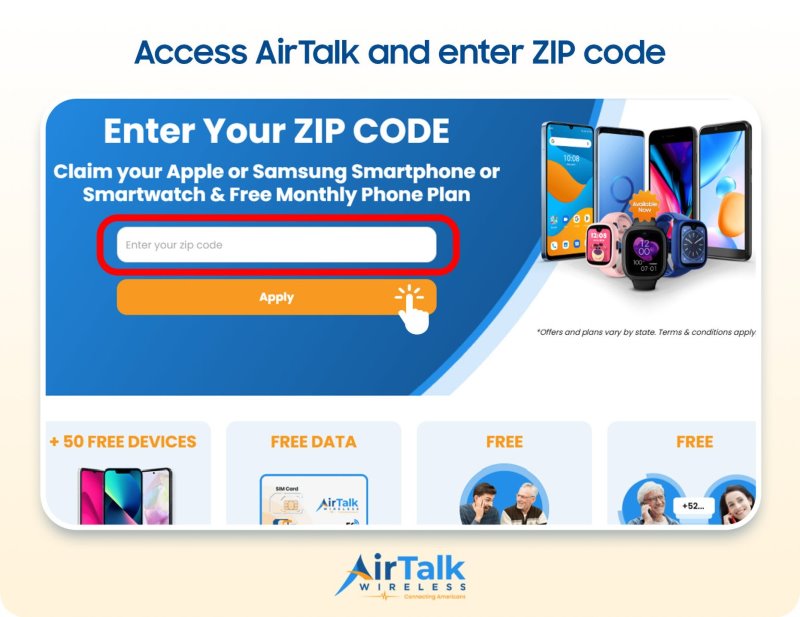
For eligible low-income households, the Lifeline program provides access to free or discounted wireless service through participating Eligible Telecommunication Carriers (ETCs) like Cintex Wireless.
Particularly, the Lifeline program will provide a monthly discount, which will then be intergreated to the ETC service plans. This means that the service plan eligible households can get as low as $0.
You may be eligible if your household income falls within the program’s limits or if you participate in qualifying government assistance programs such as SNAP, Medicaid, SSI, Federal Public Housing Assistance, or certain other federal programs.
Eligible applicants may qualify for an eSIM-compatible smartphone, along with free monthly talk, text, and data, depending on their state, eligibility, and available inventory.
As Cintex Wireless continues merging into AirTalk Wireless, this means that when applying to either carrier, consumers are accessible to a broader range of device options and mỏe strealined application process.
This can be a practical way to maintain reliable internet access for your laptop while you’re away from WiFi.
Keep in mind that Lifeline benefits are exclusively meant for the approved beneficiary. The service cannot be transferred to another individual and is often restricted to one benefit per qualifying family.
IMPORTANT: The government does not subsidize devices. Lifeline programs cover basic service costs only. Free or discounted devices, upgrade plans, or top-ups are exclusive benefits provided by Cintex and AirTalk Wireless as part of our promotional offers. Terms and conditions apply. Limited-time promotion—offers vary by state, stock availability, and eligibility.
FAQs
Is My Laptop Supporting eSIM or Just WiFi?
You can easily check by opening your laptop’s network settings, reviewing the manufacturer’s specifications, or verifying an eSIM-compatible laptop list.
If your laptop only lists Wi-Fi and does not show Cellular, Mobile Data, WWAN, SIM, or eSIM options, it likely does not have built-in cellular support.
Can I Add eSIM to a Laptop Without Built-In Cellular?
Usually, no. A laptop needs built-in cellular hardware and eSIM support to use an eSIM profile directly. If the laptop does not have LTE/5G hardware, you can use a phone hotspot, portable hotspot, USB cellular modem, or tethering instead.
Do MacBooks Support eSIM?
Current MacBook models do not support built-in cellular or eSIM. Use Personal Hotspot from an iPhone or iPad, a portable Wi-Fi device, or a USB/mobile modem instead.
Can I Use the Same eSIM on My Phone and Laptop?
Usually no. An eSIM profile is typically installed and active on one device at a time. Some carriers offer shared data plans or companion-device plans, but those usually require separate profiles or device-specific activation.
Conclusion
An eSIM laptop offers a convenient way to stay connected without relying on public WiFi or a physical SIM card.
Before purchasing an eSIM plan, make sure your laptop supports both eSIM and cellular connectivity. If it doesn’t, you can still enjoy mobile internet by using an eSIM-compatible smartphone as a hotspot or upgrading to a compatible device that better suits your connectivity needs.