Not all smartphones support eSIM, and compatibility varies based on device model, regional version, carrier, and software. That is why, before acquiring an eSIM plan, you should perform an eSIM compatibility check.
In this article, you will discover how to check whether your phone supports eSIM, how to activate eSIM, and what choices you have if your current device isn’t compatible.
1. How to Do an eSIM Compatibility Check?
There are several simple ways to determine whether your smartphone is eSIM compatible. However, the processes may vary depending on your phone’s brand.
On iPhone
Generally, all iPhones starting with the XR support eSIM. If you own an XR or newer model, it will work with eSIMs.
The only exception is that most iPhones sold in mainland China, Macau, and Hong Kong are not compatible with eSIM.
Is my iPhone eSIM compatible? You asked. Just follow the procedures below:
- Go to Settings > Cellular or Settings > Mobile Data, depending on your region.
- Look for Add eSIM or Add Cellular Plan. If the option appears, your iPhone likely supports eSIM, but carrier support and lock status still matter.
- You can also go to Settings > General > About and look for an EID. If an EID appears, the iPhone has eSIM hardware.
On Samsung
Most recent Android phones feature eSIM technology. However, because Android devices come from many manufacturers, eSIM settings and support can differ from one phone to another.
You can perform an eSIM compatibility check in your Android device by contacting the manufacturer, reseller, or network provider. Also, you can check the device’s settings to see if it supports eSIM.
Alternatively, you can look for an EID, which is a device identifier associated with eSIM capability.
Here’s how to check for an eSIM on Samsung:
- Dial *#06# and press Call. If your device is eSIM-compatible, you may access your EID number.
- You can also go to Settings > Connections > SIM manager and look for Add eSIM
On Google Pixel
Some SIM-compatible Google Pixel phones are available. To check if it is compatible with eSIM technology, perform these steps:
- Go to Settings > Network & internet > SIMs > Add SIM > Set up an eSIM.
- If the eSIM setup option appears, your Pixel may support eSIM, but carrier support and device lock status still matter.
On Motorola, Oppo, Huawei, Xiaomi & Others
Doing an eSIM compatibility check for these brands depends significantly on model variation and region.
- Motorola’s Edge series and select Moto G-line smartphones are expected to continue supporting eSIM in select regions.
- Huawei’s recent flagship lines (P and Mate series) may offer eSIM in select regions, although conventional SIMs remain popular.
- Xiaomi’s eSIM support remains limited, typically to certain regional variants (e.g., Europe, Asia) of flagship models.
- Some recent Oppo luxury models may offer eSIM support, especially in regions where eSIM adoption is growing.
To ensure the phone you’re planning to buy is eSIM-compatible, check the manufacturer’s official specifications, look for an EID, and use your carrier’s compatibility checker before buying or activating an eSIM.

2. Why Your Phone May Fail an eSIM Compatibility Check?
Even if your phone appears in the eSIM-compatible phone list, several factors can prevent it from passing an eSIM compatibility check.
Below are the most common reasons:
- The phone is carrier-locked: A carrier-locked device may only work with the original mobile network and may not allow eSIM activation from other providers until it has been officially unlocked.
- The model is from a region that doesn’t support eSIM: Some regional variants, such as certain models sold in mainland China, have different hardware configurations and may not include eSIM functionality.
- The device doesn’t display an EID: The EID is a device identifier associated with eSIM capability. If your phone doesn’t show an EID in its settings, it likely doesn’t support eSIM.
- Your carrier doesn’t support eSIM for that device: Even if your phone is eSIM-compatible, your mobile carrier may not offer eSIM service for your specific model or plan.
- The phone software is outdated: Older operating system versions may not fully support eSIM features. Updating your device to the latest software can often resolve compatibility issues.
- The device is WiFi only: Some tablets and other Wi-Fi-only devices don’t include cellular hardware, so they can’t use an eSIM for mobile network access.
3. How to Activate an eSIM?
Once you’ve confirmed that your device is eSIM-compatible, the next step is to activate it.
Most carriers let you activate an eSIM using a QR code, carrier activation, a mobile app, or manual setup with activation details.
While the process is generally straightforward, the exact steps vary between iPhone and Android devices.
>>>Read more: How To Activate eSIM On iOS And Android? 2026 Tutorial.
4. Can I Use Multiple eSIMs at the Same Time?
Fortunately, you can use two eSIMs at the same time if your device supports it, such as the iPhone 13 and newer models.
This allows you to use two active lines on your phone without a physical SIM card and to effortlessly switch between them in your settings.
On Android, the number of stored and active eSIM profiles depends on the exact device. Some phones may store multiple eSIM profiles, but active-line support varies by manufacturer and model.
5. What to Do If Your Phone Doesn’t Support eSIM?
Don’t worry if your device does not pass an eSIM compatibility check. There are still various options.
Depending on your requirements and budget, you can either continue using a physical SIM card or switch to an eSIM-compatible device.
Use a Physical SIM Card
If your phone does not support eSIM, you can still stay connected by using a regular SIM card.
Most carriers still provide classic nano SIM cards, which allow you to make calls, send text messages, and use mobile broadband without requiring eSIM capability.
Using a physical SIM card brings the following benefits:
- Easier device swapping between compatible unlocked phones.
- Broad support across many older and budget phones.
- Simple replacement if your carrier provides a new SIM card.
- Useful for phones or regions where eSIM is not supported.
Upgrade to an eSIM-Compatible Device
If you’d like to take advantage of the flexibility and convenience of eSIM, upgrading to a compatible smartphone is the best long-term option.
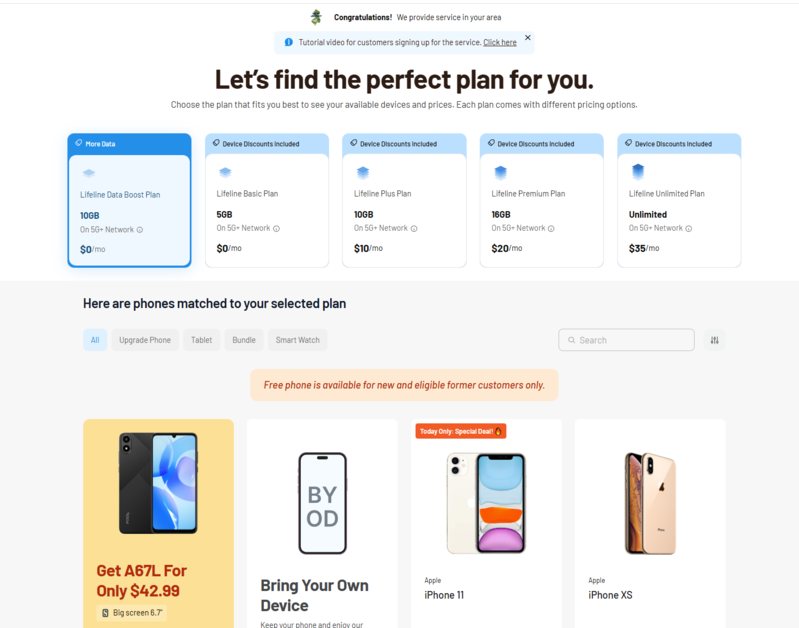
Luckily, eligible low-income households can benefit from the Lifeline program. It is a government assistance initiative that helps low-income participants have stable connectivity by offering a monthly discount on wireless service.
The program works through approved Eligible Telecommunications Carriers (ETCs), like Cintex Wireless, to deliver service to eligible households. These carriers help customers complete the application process, verify eligibility, and provide service plans where the Lifeline discount is already applied to reduce the monthly cost.
In many cases, these carriers may also offer a free device to help eligible customers use the service. However, device availability depends on the customer’s eligibility, location, carrier terms, and current inventory.
Households that participate in programs such as Medicaid, SNAP, SSI, or other qualifying assistance programs may be eligible for discounted or free wireless service and an eSIM-compatible smartphone.
Income-based qualification is also available in many states.
Importantly, as Cintex Wireless continues merging with AirTalk Wireless, new applicants can apply through AirTalk to access more benefits, such as:
- Various phone and tablet offers from popular brands
- Generous monthly data allowance
- Free talk and text
- Free international calling to various regions
- No contract required, no credit check, no activation fee, etc.
Note: Eligibility varies by state and program. Offers depend on availability and qualifications. Cintex Wireless and AirTalk Wireless operate under the federal Lifeline Program as an Eligible Telecommunications Carrier (ETC). Service is non-transferable and limited to one service per household.
Conclusion
An eSIM compatibility check is a simple but important step before buying or activating an eSIM plan.
By confirming your phone model, regional version, carrier support, lock status, software, and EID, you can avoid activation problems and choose the right setup with more confidence.
If your current phone does not support eSIM, you can still use a physical SIM or explore compatible device options that better fit your needs and budget.