
Your iPhone 13 may occasionally display a pop-up notification stating “SIM Failure.” There might be various factors that cause a “SIM Failure” notification. This issue can be addressed as soon as possible. If your SIM card is not working, your iPhone will be unable to make or receive calls, and your cellular data connection may fail.
But do not worry! This post explains how to resolve the SIM failure iPhone 13. If you follow all of the instructions correctly, the SIM failure message should go away.
1. Why Does My iPhone 13 Keep Saying SIM Card Failure?
Before exploring how to fix SIM in iPhone 13, it is crucial to know the underlying causes and what is responsible for this troublesome issue.
Common Cause for SIM Failure iPhone 13
Apple iPhones occasionally have issues when the SIM card is not recognized in the SIM tray.
This issue is known as SIM Card Failure, and the following are some possible causes.
- Loose or misaligned SIM tray: An improperly seated SIM card can disrupt the connection and cause SIM detection errors.
- Faulty or worn-out SIM card: Physical wear, scratches, or age-related damage may prevent the SIM card from being read consistently.
- Temporary system glitches: Software communication errors within iOS can sometimes stop the device from recognizing an active SIM or eSIM.
- Problematic iOS updates: Bugs introduced during a software update may interfere with carrier settings, modem functions, or SIM recognition.
- Inactive or improperly provisioned mobile plan: Issues with your carrier account, eSIM activation, or service provisioning can prevent your iPhone from connecting to the cellular network.
Identify What’s Causing the SIM Failure
Understanding “Why does my iPhone 13 keep saying SIM card failure?” is not enough. It is important to pinpoint the source of the problem.
A few simple tests below can help determine whether the issue lies with the SIM card, your iPhone 13, or your carrier service.
- Check whether the SIM works in another phone: Insert the SIM card into a compatible device to see if it can connect to the network. If it fails there as well, the SIM card may be defective or inactive.
- Try another SIM in your iPhone 13: Using a known working SIM card can help rule out problems with your current SIM. If the replacement SIM also fails, your iPhone may be the source of the issue.
- Check for carrier or activation issues: Confirm that your mobile plan is active and that no service outages or activation problems are affecting your line.
- Look for physical damage to the SIM tray: Examine it for bends, cracks, or debris that could interfere with the SIM card’s connection to your iPhone.
2. How to Fix SIM Failure iPhone 13 Error?
Several people use a factory reset to fix SIM failure on iPhone 13, but it takes time and raises the chance of data loss, which is unpleasant.
Instead, try these easy solutions for fixing SIM failure on iPhone without losing data.
Check for SIM Malfunctions
Even if your phone is functioning correctly, a faulty SIM card might cause recurrent issues.
For this reason, if you see no SIM available on iPhone 13 message, try the physical SIM in another compatible phone or contact your carrier to validate the eSIM profile.
Restart iPhone
A simple restart can often resolve a SIM failure iPhone 13 error caused by temporary software glitches or communication issues between iOS and your carrier network.
Moreover, restarting the device refreshes system processes and forces your iPhone to reconnect to the cellular network.
- Press and hold the Side button and either Volume button.
- When the power-off slider appears, drag it to turn off the device.
- Wait about 30 seconds for the iPhone to shut down completely.
- Press and hold the Side button again until the Apple logo appears.
- After the phone restarts, check whether the SIM failure message is gone.
Check Carrier Settings
If the service provider releases a new update, your device may no longer support the previous version. However, updating your carrier settings quickly resolves the SIM failure issue in this situation.
- Open your device’s Settings > General > About.
- If an update option is available, you will see it here.
- Click the “Update” button.
Upgrade iOS System
Your iPhone’s operating system may be outdated, which might cause SIM failure iPhone 13. To resolve this annoyance, you must update to the latest iOS version.
- Go to Settings > General > Software Update.
- You will find the available iOS system updates here. To install the update, click “Download and Install”.
Reinsert SIM Card
Reinstalling the SIM card can help restore a stable connection and resolve the SIM failure iPhone 13 error.
Simply turn off your iPhone, remove the SIM tray, and check the SIM card for dirt or damage. If needed, gently wipe the card with a soft, dry cloth.
Then, place it back in the tray correctly, reinsert the tray, and restart your device to see if the issue is resolved.
Unlock SIM Card
If your iPhone is asking for a SIM PIN or PUK code, contact your carrier for assistance. This is a SIM security issue rather than a typical SIM Failure error.
To avoid this, check whether your SIM card is protected by a PIN or if your device is carrier-locked. If necessary, contact your carrier to obtain a PUK code or request an official unlock.
>>>Read more: What Does No SIM Restrictions Mean? Easy Way to Check 2026
Contact Carrier
If the SIM failure iPhone 13 error persists, contact your mobile carrier for assistance.
They can verify whether your line is active, check for network issues, confirm that your SIM or eSIM is properly provisioned, and replace a faulty SIM card if necessary.
In many cases, carrier-side issues can be resolved without any repairs to your device.
Contact Apple Support
In most cases, using the 7 tips listed above will resolve your SIM failure iPhone 13. However, if you continue to encounter the same problem, you should avoid interfering.
Try reaching out to Apple support and describing your issue. They may offer you the best solution and guide you to it.
3. Still Experience SIM Failure iPhone 13? Try a Different SIM Card
Still dealing with a SIM failure iPhone 13 error after troubleshooting? Then, trying a different SIM card can help determine whether the issue is caused by the SIM itself.
If you need a replacement SIM or are considering switching providers, the Lifeline program may be a helpful option.
It is a federal assistance program that supports eligible low-income households, with qualifications typically based on income or participation in programs such as SNAP, Medicaid, SSI, etc.
Through Eligible Telecommunications Carriers like Cintex Wireless, eligible users may qualify for a free SIM card and discounted or free smartphones.
Note that eligibility may vary by state and program. Offer depends on availability and qualifications. The Lifeline service is non-transferable and limited to one service per household.
Importantly, Cintex Wireless is merging with AirTalk. This merger offers participants more phone choices, such as a discounted or free iPhone 13, subject to state availability and inventory.
As AirTalk is continuing service for Cintex Wireless customers, eligible users can apply for Lifeline with 4 easy steps as follows:
- Go to AirTalk’s official website and enter your ZIP code to check service availability.
- Review the plan and device offers available (may vary). Select one that best suits your requirements.
- Complete the online application and submit any required verification documents.
- Wait for approval. If successful, you will receive your device in 7-14 working days.
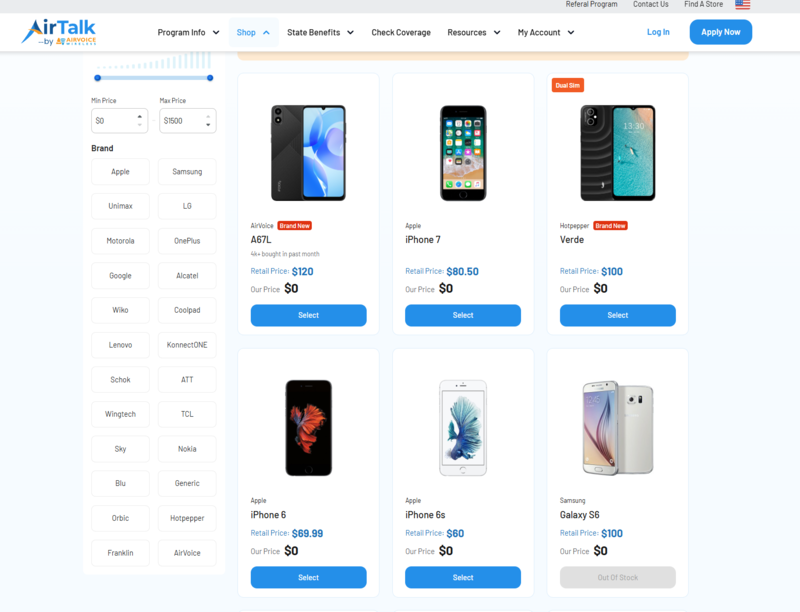
Note: The government does not cover device costs, only basic service through Lifeline. Any free or discounted devices, upgrades, or top-ups are limited-time Cintex Wireless and AirTalk Wireless offers and may vary by state, eligibility, and availability. Terms and conditions apply.
Conclusion
SIM Failure iPhone 13 is a common problem, yet it usually occurs for no apparent reason. Whatever the situation, following the procedures outlined above should assist. If not, you may need to take the iPhone to an authorized service center.